Chapter 3 Preparations
Chapter 3 Preparations 3-9
2 Drop frame mode for time code reader (for 525
mode only)
“.”: Drop frame mode
“:”: Non-drop-frame mode
3 Drop frame mode for time code generator (for
525 mode only)
“.”: Drop frame mode (factory preset)
“:”: Non-drop-frame mode
4 VITC field
“ ” (blank): Fields 1 and 3
“*”: Fields 2 and 4
5 Device selection
Indication of the device selected on the control panel.
This is displayed in one of the following three formats
depending on the unit’s status.
•[device name indication]: SELF mode
(RECORDER button and PLAYER button both unlit)
or 9-pin remote control mode (9P indicator lit)
•P [device name indication]: Player mode (PLAYER
button lit)
•R [device name indication]: Recorder mode
(RECORDER button lit)
The device name indications used for this display are
as follows.
EXT: EXT
TP: TAPE
MST: DISK MASTER
PGM: DISK PROGRAM
D.P: DISK PLAYER PORT (hard disk playback
being carried out through 9-pin remote control)
D.R: DISK RECORDER PORT (hard disk recording
being carried out through 9-pin remote control)
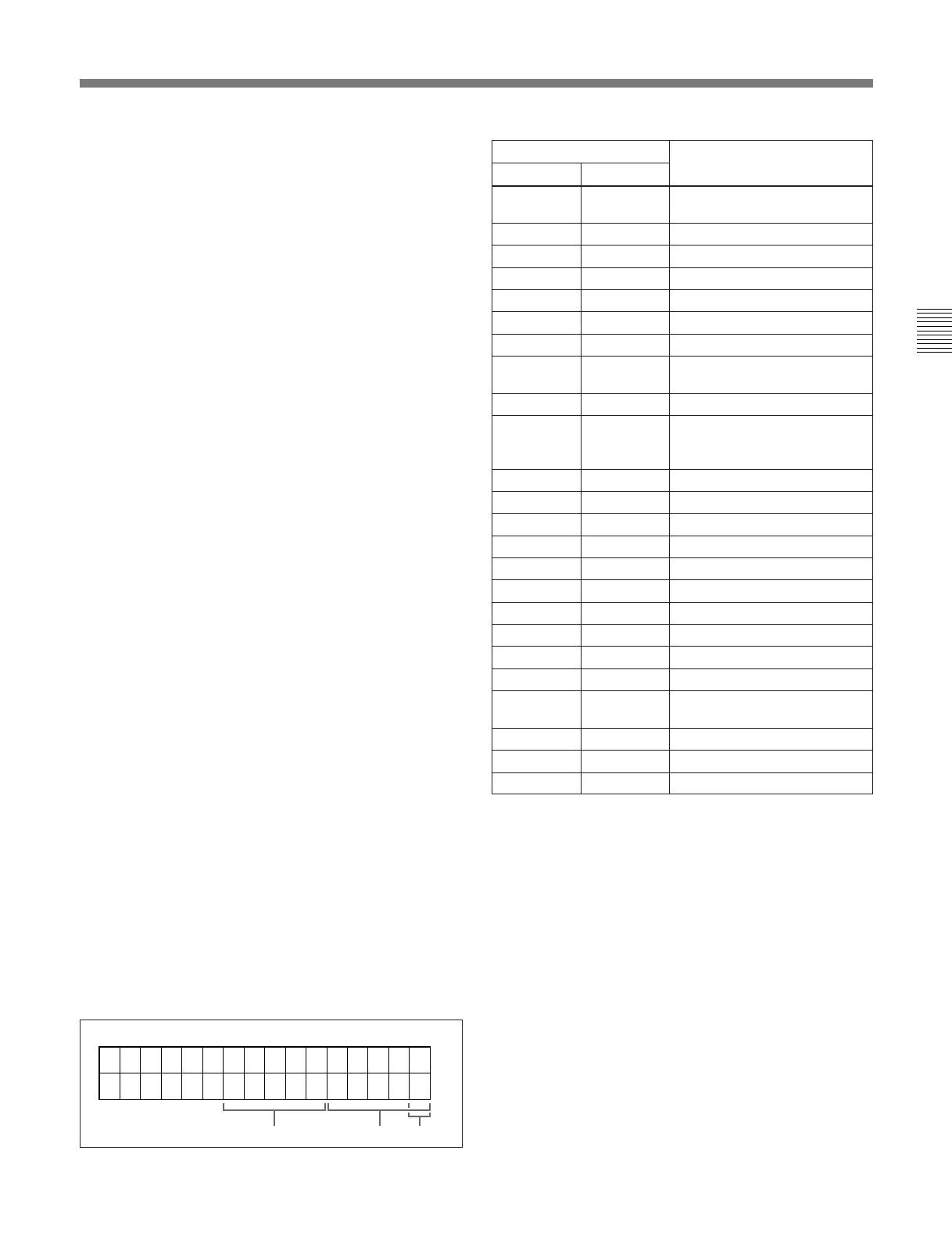
6 Operation mode
The field is divided into three blocks, A, B and C.
•Block A displays the operation mode.
•Block B displays the servo lock status or tape speed.
•Block C displays a p mark to indicate an edit section
during automatic editing.
A
BC
Display
Block A Block B
Operation mode
TAPE
UNTHD
Cassette is not loaded.
STDBY OFF Standby off mode
T.RELEASE Tape tension released
STOP Stop mode
F.FWD Fast forward mode
REW Rewind mode
PREROLL Preroll mode
PLAY Playback mode (servo
unlocked)
PLAY Playback mode (servo locked)LOCK
PLAY Deviation
from normal
speed (%)
Capstan override mode
REC Record mode (servo unocked)
REC LOCK Record mode (servo locked)
EDIT Edit mode (servo unlocked)
EDIT LOCK Edit mode (servo locked)
JOG STILL A still picture in jog mode
JOG FWD Jog mode in forward direction
JOG REV Jog mode in reverse direction
SHTL (Speed) Shuttle mode
VAR (Speed) Variable mode
FEED (Speed) Feed play mode
SPD (Speed) Initial speed setting for feed
play
PREVIEW Preview mode
AUTO EDIT Automatic editing mode
REVIEW Review mode



 To Next Page