Chapter 3 Preparations
3-8 Chapter 3 Preparations
3-4 Superimposed Character Information
3-4 Superimposed Character Information
When the CHARACTER switch on the subsidiary
control panel is set to ON, the video signal output from
the COMPOSITE VIDEO OUTPUT 3 (SUPER)
connector contains superimposed character
information, including time code, menu settings, and
alarm messages.
Adjusting the character display
You can adjust the position, size and type of the
superimposed characters using the basic menu.
For details of the basic menu, see Section 7-2, “Basic
Menu” (page 7-1).
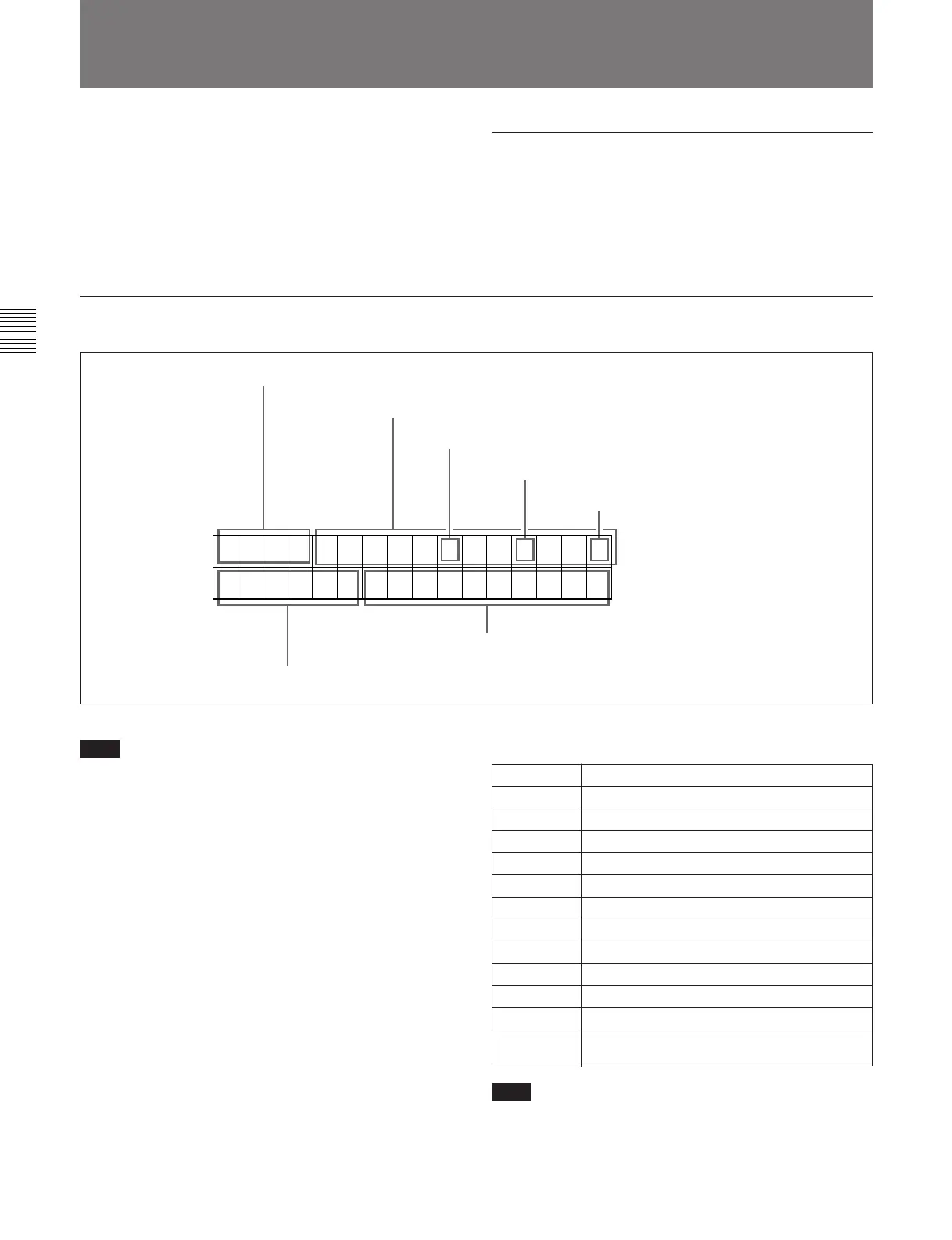
Information displayed
TCR . 23 : 59 . 40 . 18 *
[TP ] SHTL STILL
1 Types of time data
Time data
2 Drop frame mode of time code reader (for 525
mode only)
3 Drop frame mode of time code
generator (for 525 mode only)
4 VITC field
5 Device selection
6 Operation mode
Note
The display shown above corresponds to the factory
default settings of the unit.
Changing the setting of basic menu item 005 allows
different time data to be displayed in the bottom line of
the display.
For details of basic menu item 005, see Section 7-2-1,
“Items in the Basic Menu” (page 7-1).
1 Types of time data
Note
If the time data or user’s bits cannot be read correctly,
they will be displayed with an asterisk. For example,
“T*R”, “U*R”, “T*R.” or “U*R.”.
Display Meaning
CTL CTL counter data
TCR LTC reader time code
UBR LTC reader user’s bits
TCR. VITC reader time code
UBR. VITC reader user’s bits
TCG Time code generator time code
UBG Time code generator user’s bits
IN IN point
OUT OUT point
AI Audio IN point
AO Audio OUT point
DUR Duration between any two of the four edit
points (IN, OUT, audio IN, audio OUT)



 To Next Page