122
GB
Print cartridge
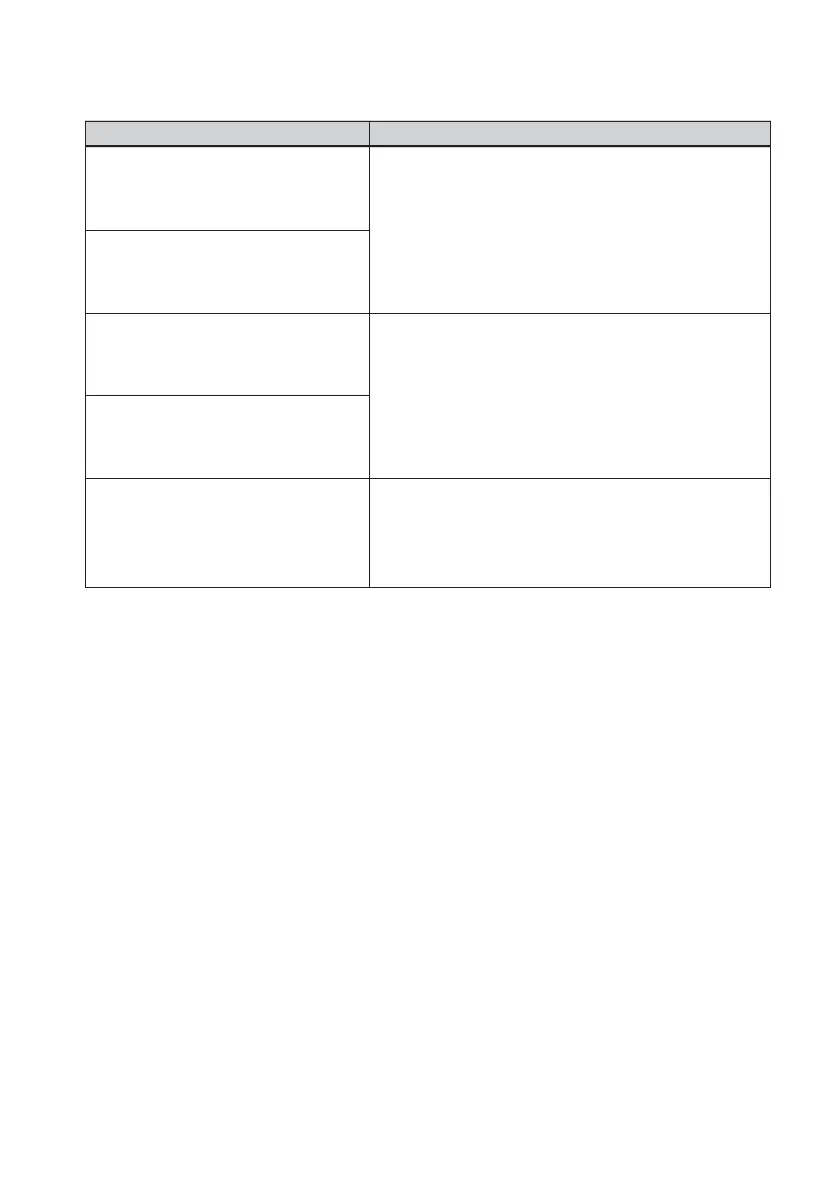
Error messages
No print cartridge inside.
Set the print cartridge. Press [PRINT]
again.
No print cartridge inside.
Set the print cartridge for ### size.
Press [PRINT] again.
Print cartridge finished.
Set a new print cartridge. Press
[PRINT] again.
Print cartridge finished.
Set the new print cartridge for ###
size. Press [PRINT] again.
Wrong print cartridge.
Set the print cartridge for ### size.
Press [PRINT] again.
Meaning/Solutions
c The print cartridge is not inserted in the printer. Set
the print cartridge into the printer. (.page 13)
If “for ### size” (###: Postcard, 3.5 x 5 inch, or
Small) appears, set a print cartridge of the specified
size. If “cleaning” is displayed, set the cleaning
cartridge. (.page 124)
c Replace it with a new print cartridge.
If “for ### size” (###: Postcard, 3.5 x 5 inch, or
Small) appears, set a print cartridge of the specified
size. (.page 13)
c The print size you specified in the Creative Print
menu does not match the print cartridge actually
loaded in the printer. Set a print cartridge and print
paper of the displayed size. (.pages 13, 15)



 To Next Page