139
GB
Additional information
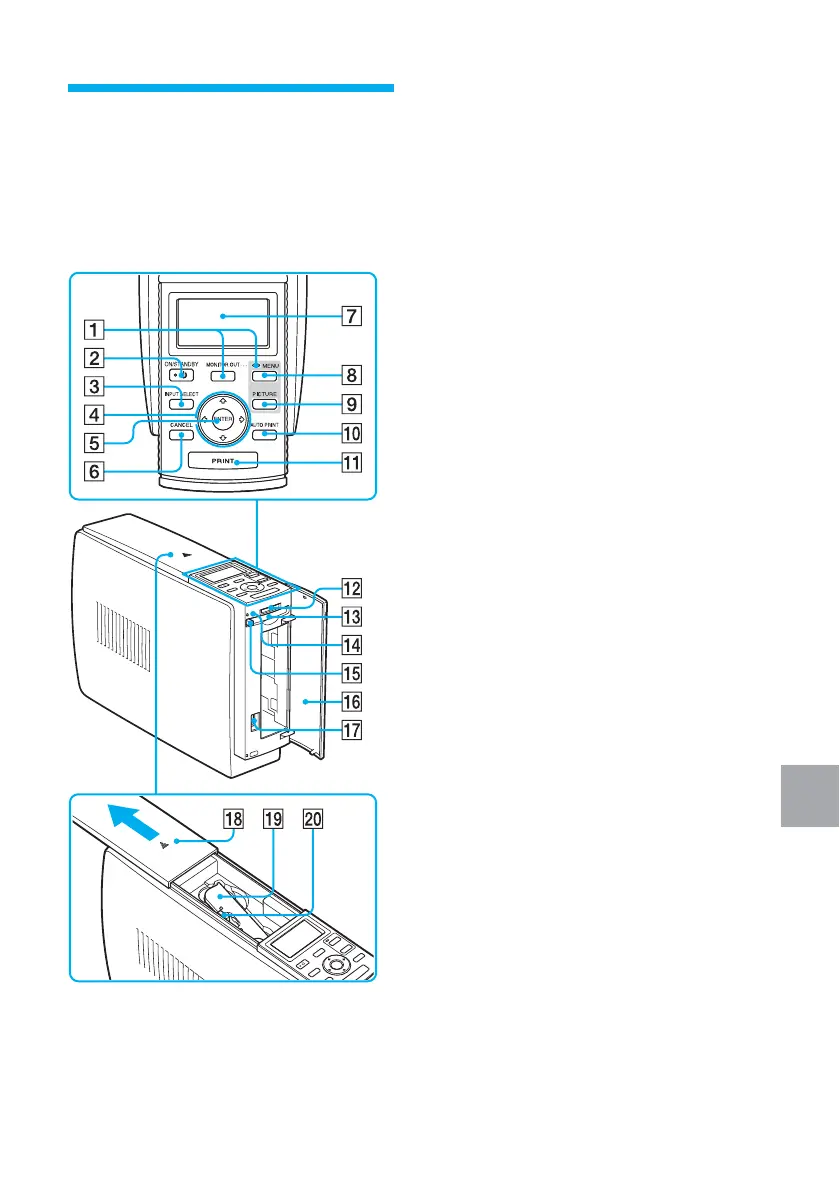
1 MONITOR OUT button (pages 20,
72)
2 ON/STANDBY button (pages
20, 74, 82, 89)
3 INPUT SELECT button (pages 21,
74)
4 Arrow (B/b/V/v) button
5 ENTER button
6 CANCEL button (page 25)
7 LCD display (page 72)
8 MENU button (pages 31, 43, 60)
9 PICTURE button (page 23)
0 AUTO PRINT button (pages 27, 78)
Each time you press the button, INDEX,
DPOF, ALL, and normal printing modes
switch.
qa PRINT button (pages 22, 75)
qs “MEMORY STICK” insertion slot
(pages 19, 73)
qd CompactFlash card insertion slot
(pages 20, 73)
qf Access indicator (pages 21, 74)
Lights or blinks when the printer accesses
the data of the memory card.
qg CompactFlash card eject button
(pages 20, 73)
qh Paper tray compartment cover
(page 15)
qj PictBridge connector (page 82)
Connect the PictBridge-compliant digital
camera.
qk Cartridge compartment cover
(page 13)
ql Print cartridge (pages 12, 13)
(Not supplied)
w; Print cartridge eject lever (page 13)
Identifying the parts
For details, see the pages indicated in
the parentheses.
Printer



 To Next Page