65
GB
Printing using a TV monitor (MONITOR OUT mode)
Viewing a slideshow
You can perform a slideshow of the
images saved in a “Memory Stick” or
CompactFlash card. You can also
manually print an image being
displayed.
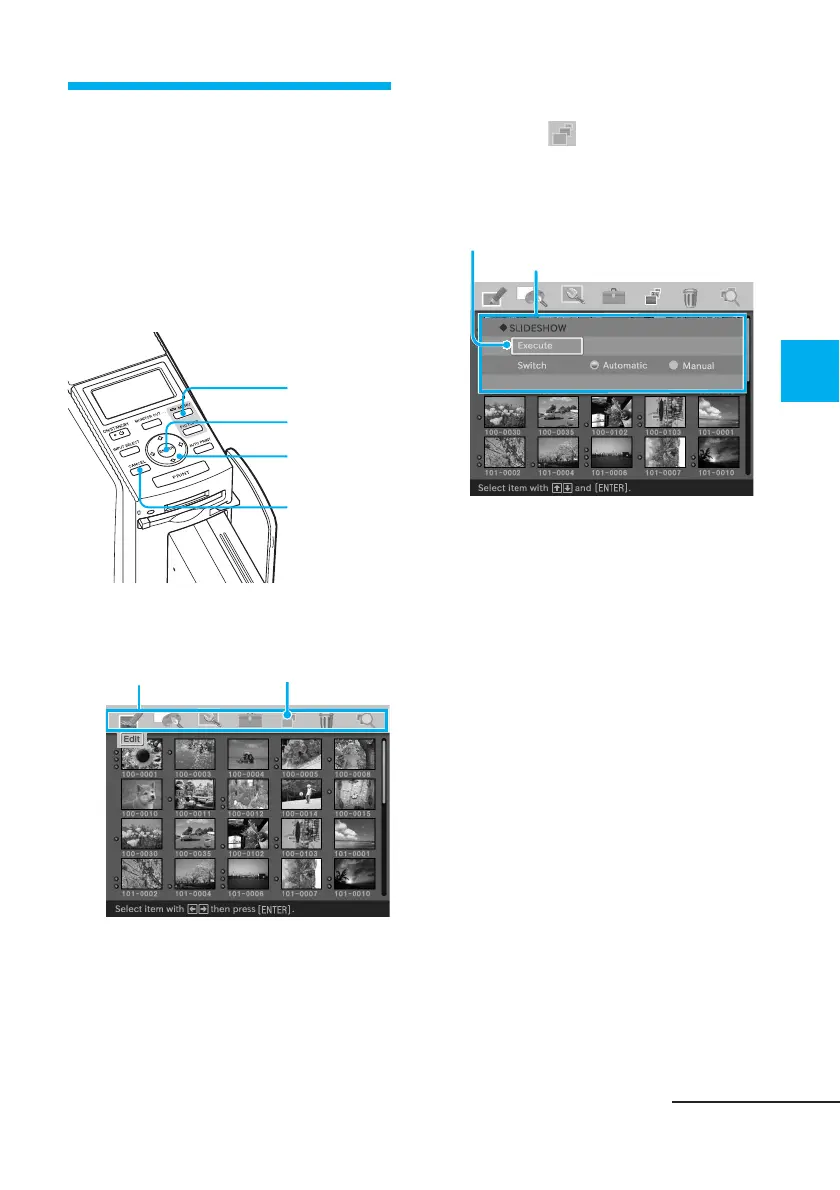
Buttons to be used in this section
MENU
ENTER
Arrow (B/b/
V/v) button
CANCEL
1
Press MENU.
The menu bar is displayed.
Menu bar SLIDESHOW menu icon
To exit the menu mode
Press MENU. The previous
window is displayed.
2
Press the arrow (B/b) button
to select (SLIDESHOW) and
then press ENTER.
The SLIDESHOW menu is
displayed.
Cursor
SLIDESHOW menu
3
Press the arrow (V/v) button
to select “Switch,” press the
arrow (B/b) button to select
“Automatic” to switch images
automatically, or “Manual” to
switch them manually, and
then press ENTER.
4
Press the arrow (B/b/V/v)
button to select “Execute,”
then press ENTER.
• When “Automatic” is selected:
The images in the “Memory
Stick” or CompactFlash card are
displayed automatically one after
another.
Continued



 To Next Page