EasyManua.ls Logo

Sony EVO-720P - Page 223

Sony EVO-720P
287 pages
Print Icon
To Next Page IconTo Next Page
To Previous Page IconTo Previous Page
Loading...
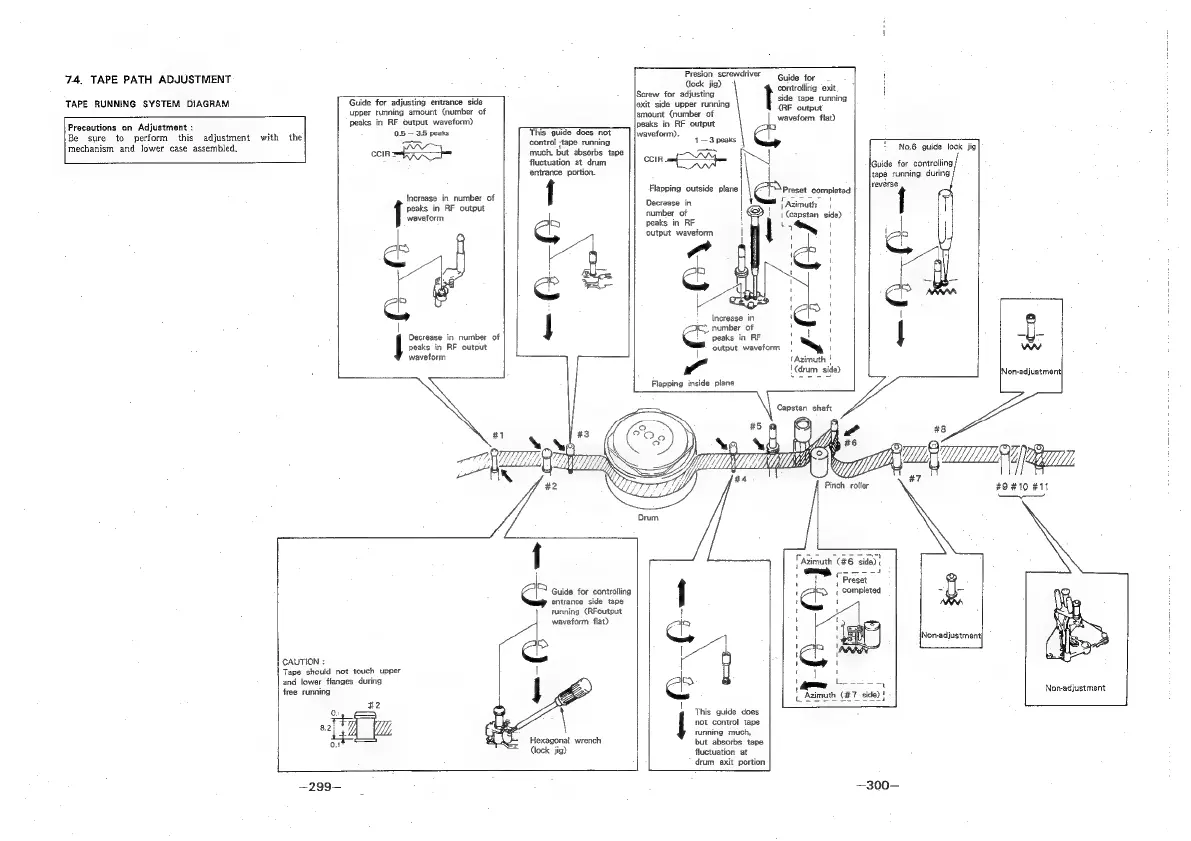
74,
TAPE
PATH
ADJUSTMENT
Guide
for
adjusting
entrance
side
upper
running
amount
(number
of
peaks
in
RF
output
waveform)
0.5
3.5
peaks
cone
TAPE
RUNNING
SYSTEM
DIAGRAM
Precautions
on
Adjustment
:
Be
sure
to
perform
this
adjustment
with
the
mechanism
and
lower
case
assembled,
Increase
in
number
of
peaks
in
RF
output
waveform
|.
4
an
|
j
Decrease
in
number
of
peaks
in
RF
output
waveform
This
guide
does
not
control
;tape
running
much,
but
absorbs
tape
fluctuation
at
drum
entrance
portion.
Presion
screwdriver
dock
jig)
Screw
for
adjusting
t
exit
side
upper
running
amount
(number
of
peaks
in
RF
output
waveform).
1
—3
peaks
ple
COIR
mf
Flapping
outside
plane
IN
Decrease
in
number
of
peaks
in
RF
output
waveform
|
|
|
Increase
in
Flapping
inside
plane
CAUTION
:
Tape
should
not
touch
upper
and
lower
flanges
during
free
running
entrance
side
tape
running
(RFoutput
waveform
flat)
Hexagonal
wrench
(lock
jig)
juide
for
controlling
running
much,
but
absorbs
tape
fluctuation
at
drum
exit
portion
This
guide
does
|
not
control
tape
—299—
G
number
of
peaks
in
RF
output
waveform
Guide
for
controllirig
exit
side
tape
running
(RF
output
waveform
flat)
[Azimuth
|
|
capstan
side)
Sass
|
Preset
|
completed
roc
—300—
No.6
guide
lock
jig
Guide
for
controlling
tapé
running
during
reverse
bs
Preset
completed
|
Non-adjustment|
INon-adjustment|
#O#10
#11
{Se
Non-adjustment

Table of Contents

Related product manuals