EasyManua.ls Logo

Sony EVO-720P - Audio System Adjustment

Sony EVO-720P
287 pages
Print Icon
To Next Page IconTo Next Page
To Previous Page IconTo Previous Page
Loading...
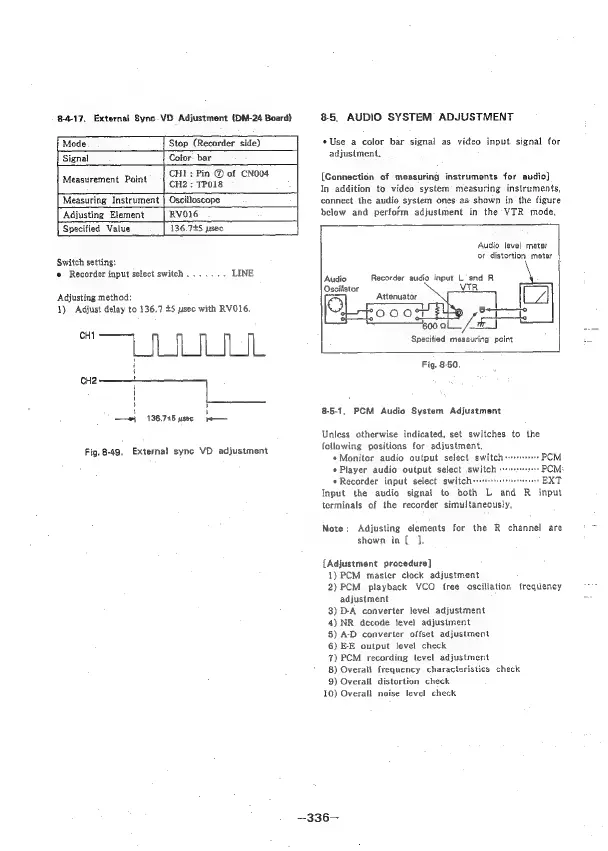
8-4-17.
External
Sync-VD
Adjustment
(DM-24
Board)
Mode
|
Stop
(Recorder
side)
Signal
Cofor:
bar
.
CHL:
Pin
®
of
CNO04
Measurement
Point
CH2
:
TPOIS
Measuring
Instrument
|
Oscilloscope
Adjusting
Element
RVO16
Specified
Value
136.725
usec
Switch
setting:
e
Recorder
input
select
switch
.......
LINE
Adjusting
method:
1)
Adjust
delay
to
136.7
£5
ysec
with
RVO16.
“IIL
f j
wi
136.745
usec
Fig.
8-49,
External
sync
VD
adjustment
8-5,
AUDIO
SYSTEM
ADJUSTMENT
«Use
a
color
bar
signal
as
video
input
signal
for
adjusiment.
[Connection
of
measuring
instruments
for
audio}
In
addition
to
video
system’
measuring
instruments,
connect
the
audio
system
ones
as
shown
in
the
figure
below
and
perform
adjustment
in
the
VTR
mode.
Audio
level
meter
or
distortion
meter
Audio
Recorder
audio
input
L
and
R
VTR
Attenuator
/
wel
rp
ROOOn
a
BEET
600
ale
en}
Specified
measuring
point
Be
Fig.
8-50.
8-5-1,
PCM
Audio
System
Adjustment
Unless
otherwise
indicated,
set
switches
to
the
following
positions
for
adjustment.
*Moniter
audio
output
select
switchs:
PCM
*
Player
audio
output
select
switch
PCM
*
Recorder
input
select
switch
EXT
Input
the
audio
signal
to
both
L
and
R=
input
terminals
of
the
recorder
simultaneously,
Note:
Adjusting
elements
for
the
R
channel
are
shown
in
[
J.
{Adjustment
procedure]
1)
PCM
master
clock
adjustment
2)
PCM
playback
VCO
free
oscillation
frequency
adjustment
3)
D-A
converter
level
adjustment
4)NR
decode
tevel
adjustment
5)
AD
converter
offset
adjustment
6)
E-E
output
level
check
7)
PCM
recording
level
adjustment
8)
Overall
frequency
characteristics
check
9)
Overall
distortion
check
10)
Overall
noise
level
check
—336—

Table of Contents

Related product manuals