EasyManua.ls Logo

Sony EVO-720P - Page 257

Sony EVO-720P
287 pages
Print Icon
To Next Page IconTo Next Page
To Previous Page IconTo Previous Page
Loading...
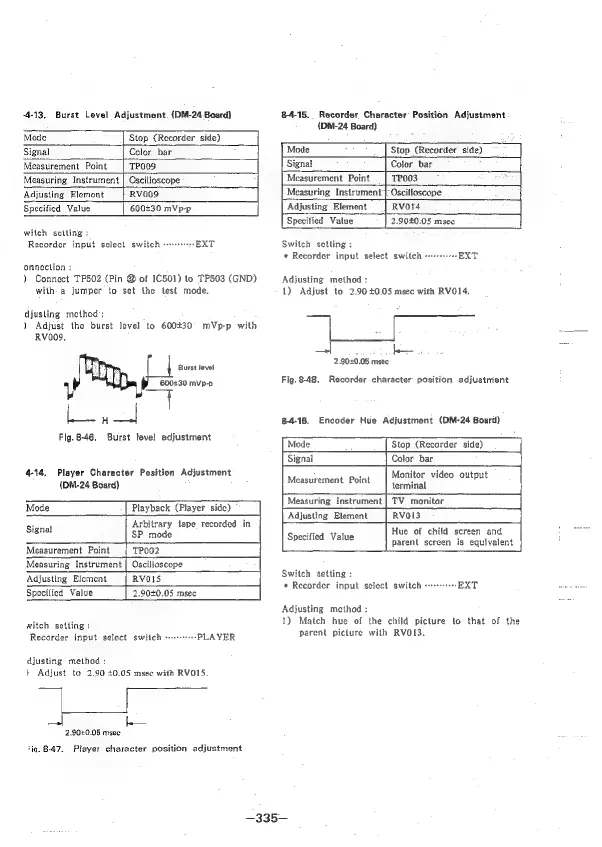
-4-13,
Burst
Level
Adjustment.
(DM-24
Board}
Mode
Stop
(Recorder
side)
Signal
Color
bar
Measurement
Point
TPOOS
Measuring
Instrument
|
Oscilloscope
Adjusting
Element
RVO009
Specified
Value
600230
mVp-p
witch
sctting
Recorder
input
select
switch
EXT
onnection
:
)
Connect
TP502
(Pin
@
of
IC501)
to
TP503
(GND)
with
a
jumper
to
set
the
test
mode.
djusling
method;
)
Adjust
the
burst
level
to
600430
mVp-p
with
RV009,
Burst
level
600:30
mVp-p
Fig.
8-46,
Burst
level
adjustment
4-14,
Player
Character
Position
Adjustment
(DM-24
Board)
Mode
Playback
(Player
side)
Arbitrary
tape
recorded
in
SP
mode
Signal
Measurement
Point
TPOO2
Measuring
Instrument
|
Oscilloscope
Adjusting
Element
RVOIS
Specified
Value
2,9040.05
msec
witch
setling
:
Recorder
input
select
switch
w+
»PLAYER
djusting
method
:
|
Adjust
to
2.90
40.05
msec
with
RVO15.
|
be.
2,900.05
msec
*iq.
8-47.
Player
character
position
adjustment
84-15.
Recorder
Character
Position
Adjustment
{(DM-24
Board)
Mode
Stop
(Recorder
side)
Signat
Color
‘bar
:
TPO03
Measurement
Point
|
Measuring
Instrument’
Oscilloscope
Adjusting
Element
|
Rvord
ee
Value
2.9040.05
msec’
Switch
setling
:
«
Recorder
input
select
switch
-+++++-+-EXT
Adjusting
method
:
1)
Adjust
to
2.90
40.05
msec
with
RVO14.
2
900.05
msec
Fig.
8-48.
Recorder
character
position
adjustment
84-16.
Encoder
Hue
Adjustment
(DM-24
Board)
Stop
(Recorder
side)
Color
bar
Monitor
video
output
terminal
TV
monitor
RVO13
Hue
of
child
screen
and
parent
screen
is
equivalent
Measurement
Point
Measuring
Instrument
Adjusting
Element
Specified
Value
Switch
setting
:
«
Recorder
input
select
switch
-+
EXT
Adjusting
method
:
1)
Match
hue
of
the
child
picture
to
that
of
the
parent
picture
with
RVO13.
—335—

Table of Contents

Related product manuals