EasyManua.ls Logo

Sony EVO-720P - Exit Side Adjustment

Sony EVO-720P
287 pages
Print Icon
To Next Page IconTo Next Page
To Previous Page IconTo Previous Page
Loading...
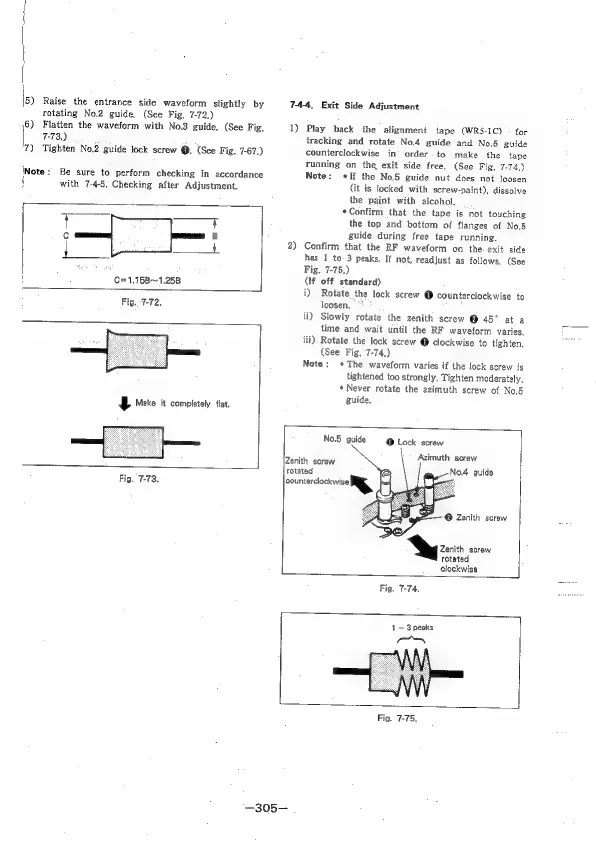
5)
Raise
the
entrance
side
waveform
slightly
by
rotating
No.2
guide,
(See
Fig,
7-72.)
6)
Flatten
the
waveform
with
No.3
guide.
(See
Fig.
7-73,)
7)
Tighten
No.2
guide
lock
screw
@.
(See
Fig.
7-67.)
Be
sure
to
perform
checking
in
accordance
with
7-4-5,
Checking
after
Adjustment.
f
c
B
fe
eg
:
C=1.15B~1.258
Fig.
7-72.
SE
Make
it
completely
flat.
Fig.
7-73.
74-4,
Exit
Side
Adjustment
1)
Play
back
the
alignment
tape
(WRS-IC)
-
for
tracking
and
rotate
No.4
guide
and
No.5
guide
counterclockwise
in
order.
to
make
the
tape
running
on
the,
exit
side
free.
(See
Fig,
7-74,)
Note:
If
the
No.6
guide
nut
does
not
loosen
(it
is
locked
with
screw-paint),
dissolve
the
paint
with
alcohol,
*Confitm
that
the
tape
is
not
touching
the
top
and
bottom
of
flanges
of
No.5
guide
during
free
tape
running,
2)
Confirm
that
the
RF
waveform
on
the.
exit
side
has
1
to
3
peaks.
If
not,
readjust
as
follows.
(See
Fig.
7-75.)
(tf
off
standard)
i)
Rotate
the
lock
screw
@
counterclockwise
to
loosen,
fi)
Slowiy
rotate
the
zenith
screw
@
45°
at
a
time
and
wait
until
the
RF
waveform
varies,
iii).
Rotate
the
lock
screw
@
clockwise
to
tighten.
(See
Fig.
7-74.)
Note:
The
waveform
varies
if
the
lock
screw
is
tightened
too
strongly.
Tighten
moderately,
*
Never
rotate
the
azimuth
screw
of
No.6
guide,
No.5
guide
@
Lock
screw
Azimuth
screw
No.4
guide
Zenith
screw
rotated
counterclockwise!
%
@
Zenith
screw
»
©
Zenith
screw
rotated
clockwise
Fig.
7-74.
1
—3
peaks
“—_
Fig.
7-75.
—305—

Table of Contents

Related product manuals