EasyManua.ls Logo

Sony EVO-720P - Reel FG Adjustment (MD-18 P Board)

Sony EVO-720P
287 pages
Print Icon
To Next Page IconTo Next Page
To Previous Page IconTo Previous Page
Loading...
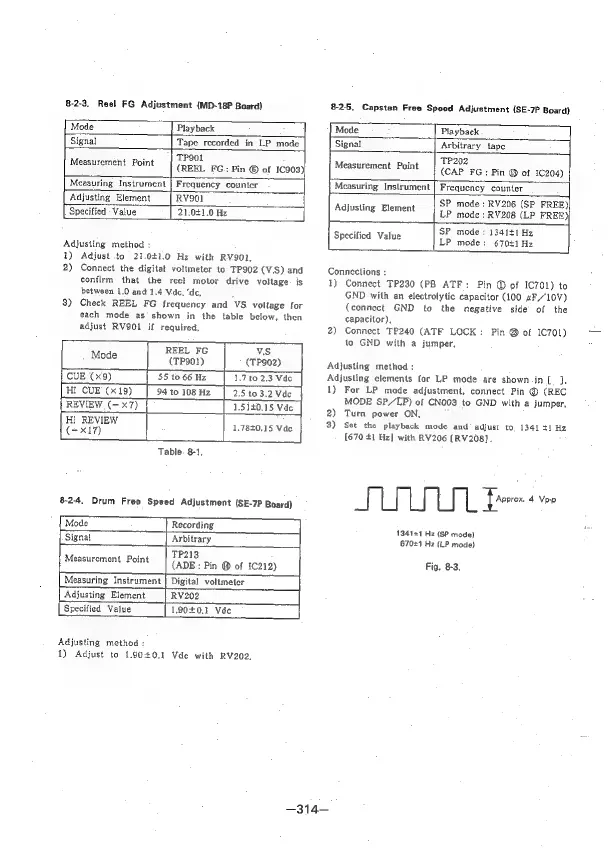
8-2-3.
Reel
FG
Adjustment
(MD-18P
Board)
8-25.
Capstan
Free
Speed
Adjustment
(SE-7P
Board)
Mode
~
|
Playback
Mode
Playback
Signal
Tape
recorded
in
LP
mode
Signal
Arbitrary
tape
TP9OL
Measurement
Point
|
(pent
FG.;
Pin
©
of
1C903)
TP202
Measurement
Point
(CAP
FG
:
Pin
@
of
1C204)
Measuring
Instrument
|
Frequency
counter
Measuring
Instrument
|
Frequency
counter
Adjusting
Element
RVS01
Specified
Value
21,0£1.0
Hz
SP
mode:
RV206
(SP
FREE)|
Adjusting
Element
/
7p
mode:
RV208
(LP
FREB)
Adjusting
method
:
1)
Adjust
to
21.0£1.0
Hz
with
RV902,
2)
Connect
the
digital
voltmeter
to
TP902
(V.S)
and
confirm
that
the
reel
motor
drive
voltage.
is
between
1.0
and
1.4
Vde.
‘de,
3)
Check
REEL
FG
frequency
and
VS
voltage
for
each
mode
as
shown
in
the
table
below,
then
adjust
RV901
if
required,
REEL
FG
VS
tot
|
to
CUE
(x9)
1.7
to
2.3
Vde
Hi
CUE
(x19)
2.5
to
3.2
Vde
REVIEW
(-x7)
[sd
.5
140.15
Vado
HI
REVIEW
(=x17)
1.7840.15
Vde
Table.
8-1,
82.4.
Drum
Free
Speed
Adjustment
(SE-7P
Board)
[Signal
Arbitrary
A
TP213
Measurement
Point
(ADE
:
Pin
@
of
1¢212)
Measuring
Instrument
|
Digital
voltmeter
Adjusting
Element
Specified
Value
RV202
1.90401
Vdc
Mode
Recording
-
Adjusting
method
:
1)
Adjust
to
1.90+0.1
Vde
with
RV202.
SP
mode
:
134141
Hz
Specified
Value
LP
mode:
670+1
Ha
Connections
:
1)
Connect
TP230
(PB
ATF:
Pin
@
of
IC701)
to
GND
with
an
electrolytic
capacitor
(100
“F/“10V)
(connect
GND
to
the
negative
side
of
the
capacitor),
2)
Connect
TP240
(ATF
LOCK:
Pin
@
of
1C701)
to
GND
with
a
jumper,
Adjusting
method
:
Adjusting
elements
for
LP
mode
are
shown.in
(J,
1)
For
LP
mode
adjustment,
connect
Pin
®
(REC
MODE
SP/LP)
of
CNO03
to
GND
with
a
jumper,
2)
Turn
power
ON,
3)
Set the
playback
mode
and
adjust
to,
1341
+1
Hz
[670
41
Hz]
with
RV206
[RV208].
|
|
Pro
4
Vp-p
134141
Hz
(SP
mode)
67021
Hz
(LP
mode)
Fig,
8-3.
—314—

Table of Contents

Related product manuals