EasyManua.ls Logo

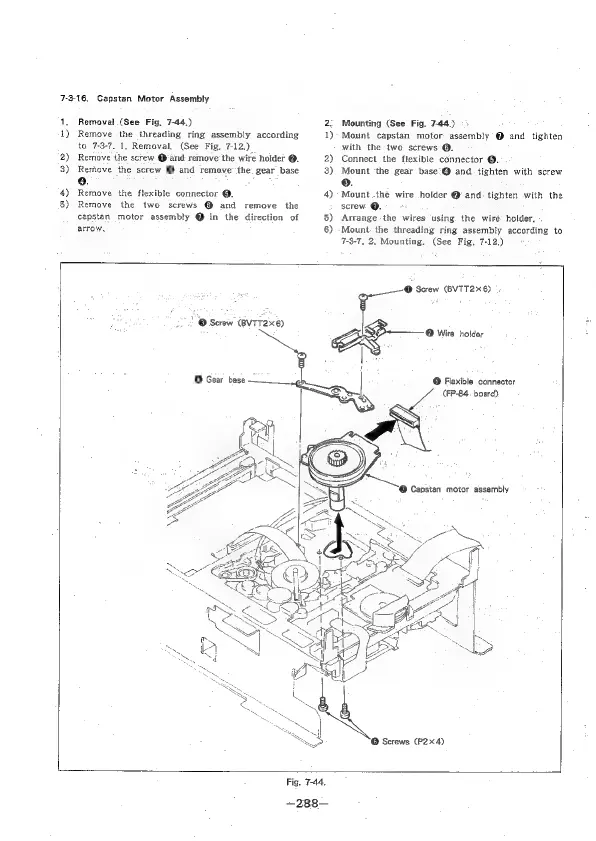
Sony EVO-720P - Capstan Motor Assembly

Sony EVO-720P
287 pages
Print Icon
To Next Page IconTo Next Page
To Previous Page IconTo Previous Page
Loading...
7-3-16.
Capstan
Motor
Assembly
1,
4)
2)
3)
4)
5)
Removal
(See
Fig,
7-44.)
Remove
the
threading
ring
assembly
according
to
7-3-7.
1,
Removal.
(See
Fig.
7-12.)
Remove
the
screw
Qand
remove
the
wire
holder
@.
Remove
the
screw
@
and
remove’
the.
gear
base
0.
Remove
the
flexible
connector
@.
Remove
the
two
screws
@
and
remove
the
capstan
motor
assembly
@
in
the
direction
of
arrow,
2
1)
2)
3)
4)
5)
8)
Mounting
(See
Fig.
7-44.)
>
Mount
capstan
motor.
assembly
@
and
tighten
with
the
two
screws
@.
Connect
the
flexible
connector
@.
Mount
‘the
gear
base°@
and
tighten
with
screw
8.
Mount.the
wire
holder
@
and.
tighten
with
the
screw
@.
Arrange
the
wires
‘using
the
wiré’
holder.
Mount
the
threading
ring
assembly
according
to
7-3-7,
2,
Mounting,
(See
Fig.
7-12.)
'@
Screw
(BvTT2x6)
>
©
Cex
“th
°
Screw
(BVTT26)
|.
eg
Wire
holder
@
Fiexible
connector
(FP-84.
board):

Table of Contents

Related product manuals