EasyManua.ls Logo

Sony EVO-720P - Mechanical, Adjustments; 7-1, Mechanical Check, Adjustment and; Operation Without Tape Inserted

Sony EVO-720P
287 pages
Print Icon
To Next Page IconTo Next Page
To Previous Page IconTo Previous Page
Loading...
720
SECTION
7
MECHANICAL
ADJUSTMENTS
7-1,
MECHANICAL
CHECK,
ADJUSTMENT
AND
PREPARATIONS
FOR
REPLACEMENT
Note:
Regarding
the
removal
procedures
of
the
cabinet
and
boards,
see
Section
2.
DISASSEMBLY,
7-1-1,
Cassette
Compartment
Assembly
and
Operation
without
Tape
Inserted
Note:
The
set
will
not
operate
if
there
is
a
strong
2)
3)
4)
8)
6)
light
source
near
it,
Loading
(See
Fig.
7-1.)
Remove
the
upper/lower
covers
and
front
pane!
according
to
Section
2.
DISASSEMBLY
2-1,
2-2.
Remove
the
cassette
compartment
assembly
@
according
to
Section
2,
DISASSEMBLY
2-15,
(Do
not
remove
connectors.)
Connect
to
power
supply.
Apply
tape
to
the
RECOG
switch
@to
keep
the
pin
pressed
down.
Push
microswitch
©
once
in
the
direction
of
arrow
@
and
release.
(See
Fig,
7-1.)
Turn
on
the
leaf
switch
@.
(See
Fig.
7-1.)
1)
2)
3)
4)
Putting
into
playback
state
(See
Fig,
7-1.)
Perform
1,
Loading.
Hook
the
rubber
band
@
between
S
reel
and
T
reel,
Press
the
playback
button,
and
when
the
T
reel
side
starts
to
rotate,
push
the
tension
regulator
arm
assembly
@
in
the
direction
of
arrow®,
(At
this
time,
the
tension
regulator
band
is
released
and
S$
reel
side
rotates.)
Press
the
stop
button
to
stop.
Eject
(See
Fig,
7-1,)
Press
the
EJECT
button,
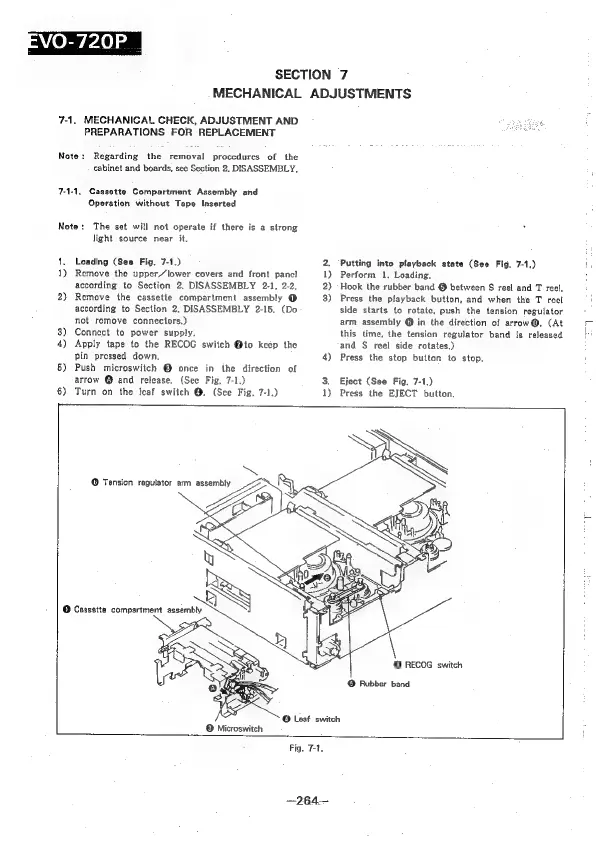
©
Tension
regulator
arm
assembly
@
RECOG
switch
@
Rubber
band
—264—

Table of Contents

Related product manuals