EasyManua.ls Logo

Sony EVO-720P - Checking after Adjustment

Sony EVO-720P
287 pages
Print Icon
To Next Page IconTo Next Page
To Previous Page IconTo Previous Page
Loading...
Seah
iieron
aillier
Gaananneean
4-5,
Checking
after
Adjustment
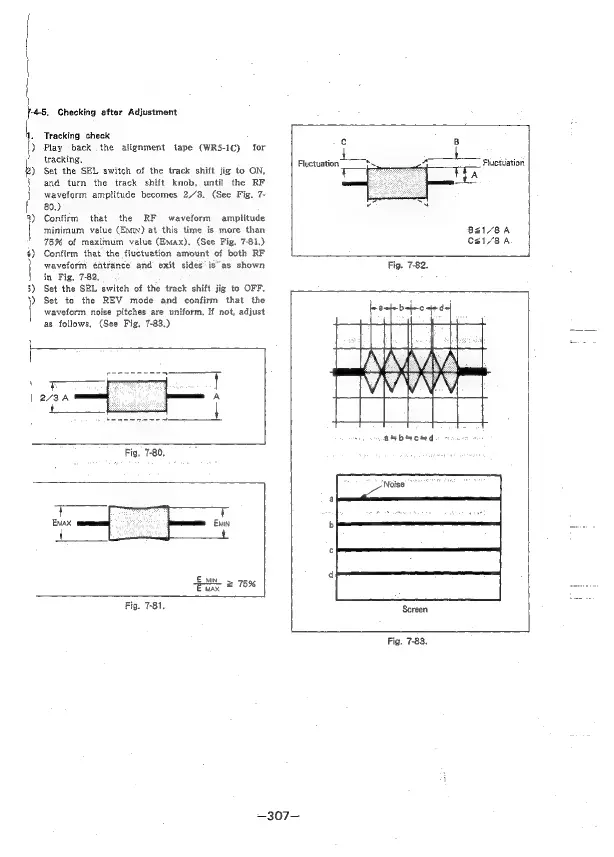
Tracking
check
Play
back
.the
alignment
tape
(WR5-1C)
for
tracking,
Set
the
SEL
switch
of
the
track
shift
jig
to
ON,
and
turn
the
track
shift
knob,
until
the
RF
waveform
amplitude
becomes
2,/3.
(See
Fig.
7-
80.)
Confirm
that
the
RF
waveform
amplitude
minimum
value
(EMIN)
at
this
time
is
more
than
759
of
maximum
value
(Emax).
(See
Fig.
7-81.)
Confirm
that
the
fluctuation
amount
of
both
RF
waveform
entrance
and
exit
sides’
is
as
shown
in
Fig,
7-82,
Set
the
SEL
switch
of
the
track
shift
jig
to
OFF.
Set
to
the
REV
mode
and
confirm
that
the
waveform
noise
pitches
are
uniform,
If
not,
adjust
as
follows,
(See
Fig.
7-83.)
Fig.
7-81.
—307—
c
Fluctuation
hs
A
Fluctuation
t
A
a
SN
BsI/8A
Csal/8A
Fig.
7-82.
Screen
Fig.
7-83.

Table of Contents

Related product manuals