EasyManua.ls Logo

Sony EVO-720P - L Slider Assembly

Sony EVO-720P
287 pages
Print Icon
To Next Page IconTo Next Page
To Previous Page IconTo Previous Page
Loading...
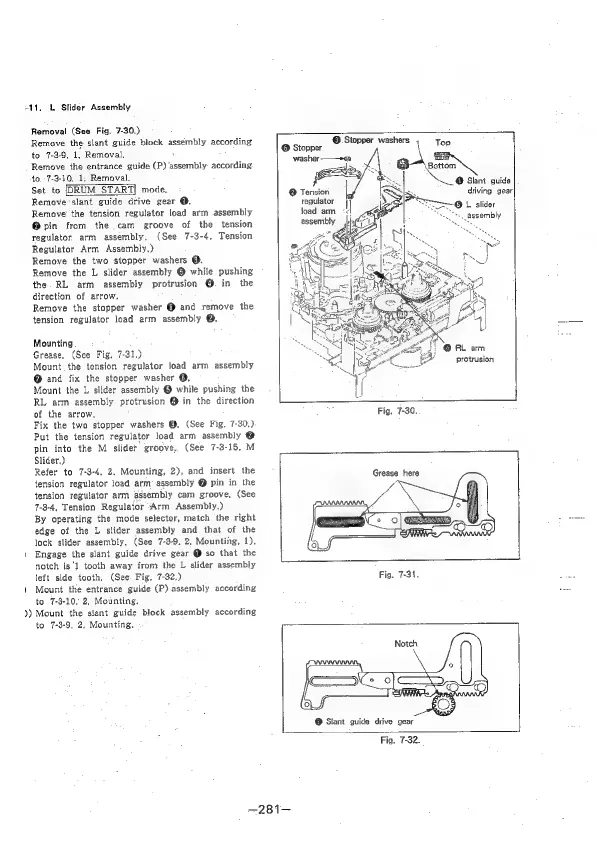
+11,
L
Slider
Assembly
Removal
(See
Fig.
7-30.)
Remove
the
slant.
guide
block
assembly
according
to
7-3-9,
1,
Removal,
Remove
the
entrance
guide
(P)
assembly
according
to.
-7-3-10,
1,
Removal.
Set
to
[DRUM
_START|
mode.
Remove'slant
guide
drive
gear
@.
Remove
the
tension
regulator
load
arm
assembly
@pin
from
the
cam
groove
of
the
tension
regulator.
arm
assembly.
(See
7-3-4,
Tension
Regulator
Arm
Assembly.)
Remove
the
two
stopper
washers
@.
Remove
the
L
slider
assembly
@
while
pushing
the.
RL
arm
assembly
protrusion
@
in
the
direction
of
arrow.
Remove
the
stopper
washer
@
and
remove
the
tension
regulator
load
arm
assembly
@.
Mounting
Grease.
(See
Fig.
7-31.)
Mount.
the
tension
regulator
load
arm
assembly
@
and
fix
the
stopper
washer
@.
Mount
the
L
stider
assembly
@
while
pushing
the
RL
arm
assembly
protrusion
@
in
the
direction
of
the
arrow,
Fix
the
two
stopper
washers
@.
(See
Fig.
7-30.)
Put
the
tension
regulator
load
arm
assembly
e
pin
into
the
M
slider
groove,.
(See
7-3-15.
M
Slider.)
Refer
to
7-3-4,
2,
Mounting,
2),
and
insert
the
tension
regulator
load
arm
assembly
@
pin
in
the
tension
regulator
arm
assembly
cam
groove,
(See
7-8-4,
Tension
Regulator
Arm
Assembly.)
By
operating
the
mode
selector,
match
the
right
edge
of
the
L
slider
assembly
and
that
of
the
lock
slider
assembly.
(See
7-3-9.
2,
Mounting,
1).
Engage
the
slant
guide
drive
gear
@
so
that
the
notch
is'l
tooth
away
from
the
L
slider
assembly
left
side
tooth,
(See
Fig.
7-32.)
)
Mount
the
entrance
guide
(P)
assembly
according
to
7-3-10,
2,
Mounting,
))
Mount
the
slant
guide
block
assembly
according
to
7-3-9,
2,
Mounting.
©
Stopper
washers
,
©
Stopper
@
Tension
regulator
load
arm
assembly
Hl
re
e+
eortan
\
Top
@
Slant
guide
driving
gear]
protrusion
tI
Fig.
7-30.
Grease
here
@
Slant
guide
drive
gear
—281-—
Fig.
7-32.

Table of Contents

Related product manuals