EasyManua.ls Logo

Sony EVO-720P - Page 206

Sony EVO-720P
287 pages
Print Icon
To Next Page IconTo Next Page
To Previous Page IconTo Previous Page
Loading...
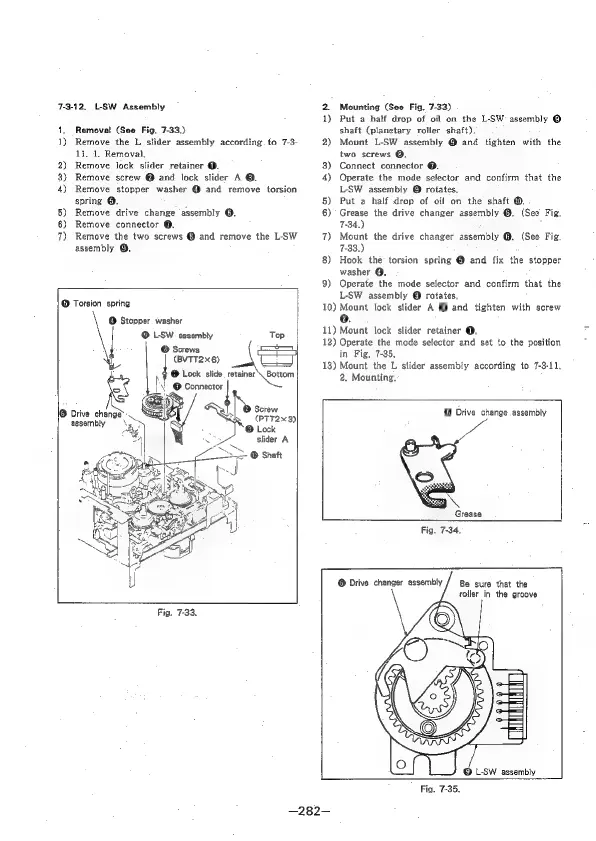
7-3-12,
L-SW
Assembly
1,
Removal
(See
Fig.
7-33.)
1)
Remove
the
L
slider
assembly
according.
to
7-3-
13,
1.
Removal,
2)
Remove
lock
slider
retainer
@.
8)
Remove
screw
@
and
lock
slider
A
@.
4)
Remove
stopper
washer
@
and
remove
torsion
spring
@.
5)
Remove
drive
change
assembly
@.
6)
Remove
connector
@.
7)
Remove
the
two
screws
@
and
remove
the
L-SW
assembly
@.
@
Torsion
spring
@
Stopper
washer
©
L-SW
assembly
Top
©
Screws
(BVTT2x6)
@
Lock
slide
retainer
\
Bottom
N
@
Connector
|
@
Screw
(PTT2x3)|
®
Lock
slider
A
Drive
change’:
assembly
Fig.
7-33.
Mounting
(See
Fig,
7-33)
1)
Put
a
half
drop
of
oil
on
the
L-SW
assembly
@
shaft
(planetary
roller
shaft).
2)
Mount
L-SW
assembly
@
and
tighten
with
the
two
screws
@.
3)
Connect
connector
@.
4)
Operate
the
mode
selector
and
confirm
that
the
L-SW
assembly
©
rotates,
5)
Put
a
half
drop
of
oil
on
the
shaft
@.
6)
Grease
the
drive
changer
assembly
@.
(See
Fig.
7-34.)
7)
Mount
the
drive
changer
assembly
@.
(See
Fig.
7-33.)
8)
Hook
the
torsion
spring
@
and
fix
the
stopper
washer
Q.
9)
Operate
the
mode
selector
and
confirm
that
the
L-SW
assembly
@
rotates,
10)
Mount
lock
slider
A
®
and
tighten
with
screw
e.
11)
Mount
lock
slider
retainer
@.
12)
Operate
the
mode
selector
and
set
to
the
position
in
Fig,
7-35,
13)
Mount
the
L
slider
assembly
according
to
7-3-11,
2,
Mounting.
©
Drive
change
assembly
Grease
Fig.
7-34,
©
Drive
changer
assembly
/
Be
sure
that
the
roller
in
the
groove
©
LSW
assembly
Fig.
7-35.
—282-—

Table of Contents

Related product manuals