EasyManua.ls Logo

Sony EVO-720P - Page 207

Sony EVO-720P
287 pages
Print Icon
To Next Page IconTo Next Page
To Previous Page IconTo Previous Page
Loading...
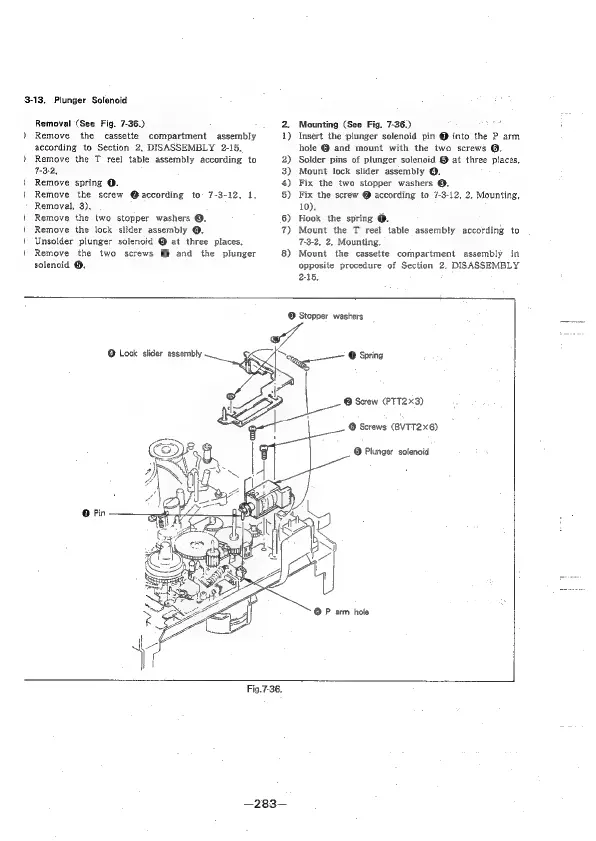
3-13.
Plunger
Solenoid
Removal
(See
Fig.
7-36.)
)
Remove
the
cassette
compartment
assembly
according
to
Section
2,
DISASSEMBLY
2-15.
Remove
the
T
reel
table
assembly
according
to
7-3-2,
)
Remove
spring
O.
Remove
the
screw
@according
to
7-3-12.
1.
Removal,
3).
Remove
the
two
stopper
washers
@.
Remove
the
lock
slider
assembly
@.
Unsolder
plunger
solenoid
@
at
three
places.
Remove
the
two
screws
@
and
the
plunger
solenoid
@.
2)
3)
4)
5)
6)
7)
8)
Mounting
(See
Fig.
7-36.)
Insert
the
plunger
solenoid
pin
@
into
the
P
arm
hole
@
and
mount
with
the
two
screws
@.
Solder
pins
of
plunger
solenoid
@
at
three
places,
Mount
lock
slider
assembly
@.
Fix
the
two
stopper
washers
@.
Fix
the
screw
@
according
to
7-3-12,
2,
Mounting,
10).
Hook
the
spring
@.
Mount
the
T
reel
table
assembly
according
to
7-3-2,
2,
Mounting.
Mount
the
cassette
compartment
assembly
in
opposite
procedure
of
Section
2.
DISASSEMBLY
2-15,
@
Lock
slider
assembly
@
Pin
©
Stopper
washers
_
>
Zi
el
©
Spring
@
Screw
(PTT2%3)
@
P
arm
hole
Fig.7-36.
—283—

Table of Contents

Related product manuals