EasyManua.ls Logo

Sony EVO-720P - Entrance Side Adjustment - +304

Sony EVO-720P
287 pages
Print Icon
To Next Page IconTo Next Page
To Previous Page IconTo Previous Page
Loading...
7-43,
Entrance
Side
Adjustment
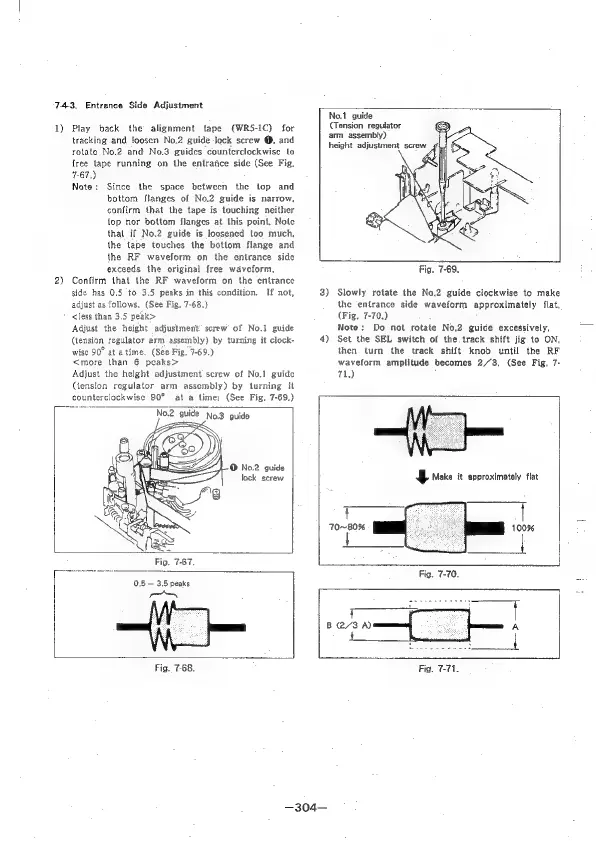
1)
2)
Play
back
the
alignment
tape
(WRS5-iC)
for
tracking.and
foosen
No.2
guide
Jock
screw
@,
and
rotate
No.2
and
No.3
guides
counterclockwise
lo
free
tape
running
on
the
entrance
side
(See
Fig,
7-67.)
Note:
Since
the
space
between
the
lop
and
bottom
flanges
of
No.2
guide
is
narrow,
confirm
that
the
tape
is
touching
neither
lop
nor
bottom
flanges
at
this
point,
Nole
that
if
No,2
guide
is
loosened
too
much,
the
lape
touches
the
bottom
flange
and
the
RF
waveform
on
the
entrance
side
exceeds
the
original
{ree
waveform,
Confirm
that
the
RF
waveform
on
the
entrance
side
has
0.5
to
3.5
peaks
in
this
condition,
If
not,
adjust
as
follows,
(See
Fig,
7-68.)
<Jess
than
3.5
peak>
Adjust
the
height
adjustment’
screw
of
No.1
guide
(tension
regulator
arm
assembly)
by
turning
it
clock-
wise
90°
at
atime.
(See
Fig.
7-69.)
<more
than
6
peaks>
Adjust
the
height
adjustment
screw
of
No.1
guide
(tension
regulator
arm
assembly)
by
turning
it
counterclockwise
90°
at
a
time:
(See
Fig.
7-69.)
No2
quide
No.3
guide
No.1
guide
(Tension
regulator
arm
assembly)
height
adjustment
screw
Fig.
7-69.
3)
Slowly
rotate
the
No.2
guide
clockwise
to
make
the
‘entrance
side
waveform
approximately
flat,
(Fig.
7-70.)
Note:
Do
not
rotate
No.2
guide
excessively,
4)
Set
the
SEL
switch
of
the
track
shift
jig
to
ON,
then
turn
the
track
shift
knob
until
the
RF
waveform
amplitude
becomes
2/3,
(See
Fig,
7-
71.)
4g
Make
it
approximately
flat
70-~B0%
Fig.
7-67.
feces
=
Fig,
7-70.
0.6
3.5
peaks
PN
et
|
|
eS
Po
Ss
me
B/3
A)
A
Fig.
7-68.
Fig.
7-71

Table of Contents

Related product manuals