EasyManua.ls Logo

Sony EVO-720P - Page 225

Sony EVO-720P
287 pages
Print Icon
To Next Page IconTo Next Page
To Previous Page IconTo Previous Page
Loading...
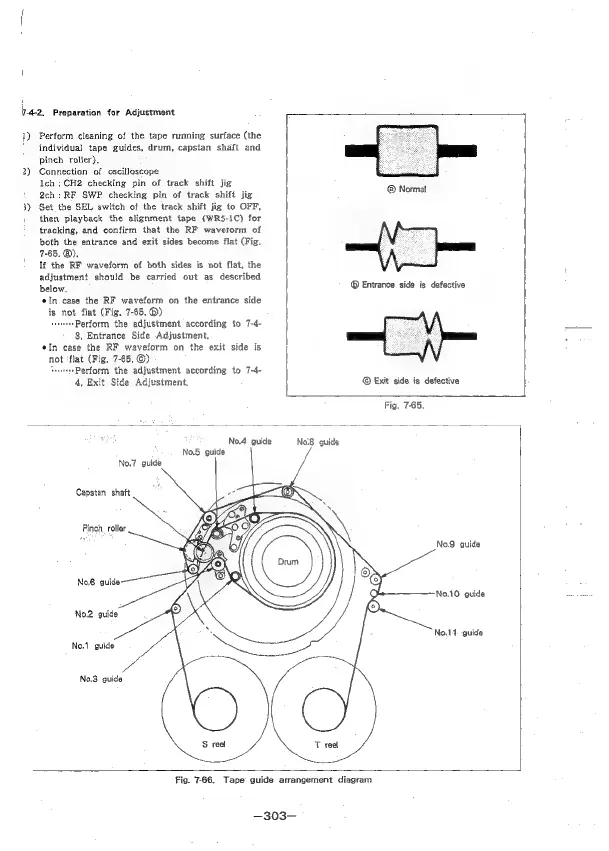
7-4-2,
Preparation
for
Adjustment
Perform
cleaning
of
the
tape
running
surface
(the
individual
tape
guides,
drum,
capstan
shaft
and
pineb
roller},
Connection
of
oscilloscope
lch
;
CH2
checking
pin
of
track
shift
jig
2ch:RF
SWP
checking
pin
of
track
shift
jig
Set
the
SEL
switch
of
the
track
shift
jig
to
OFF,
then
playback
the
alignment
tape
(WRS-1C)
for
tracking,
and
confirm
that
the
RF
wavetorm
of
both
the
entrance
and
exit
sides
become
flat
(Fig.
7-65.
@).
If
the
RF
waveform
of
both
sides
is
not
flat,
the
adjustment
should
be
carried
out
as
described
below,
eIn
case
the
RF
waveform
on
the
entrance
side
is
not
flat
(Fig.
7-65.
®)
vee
Perform
the
adjustment
according
to
7-4-
8,
Entrance
Side
Adjustment,
¢In
case
the
RF
waveform
on
the
exit
side
is
not
‘flat
(Fig.
7-65,
©)
‘sen
Perform
the
adjustment
according
to
7-4-
4,
Exit Side
Adjustment.
L
Normal
©
Entrance
side
is
defective
©
Exit
side
is
defective
Fig.
7-65.
No.5
guide
No.7
guide
Capstan
shaft
Pinch,
roller
No.2
guide
No.1
guide.
No.3
guide
No.4
guide
No.8
guide
No.9
guide
No.10
guide
No.14-
guide
Fig.
7-66.
Tape
guide
arrangement
diagram
—303—

Table of Contents

Related product manuals