EasyManua.ls Logo

Sony EVO-720P - Still Adjustment (SE-7 P Board); SP Slow Adjustment (SE-7 P Board)

Sony EVO-720P
287 pages
Print Icon
To Next Page IconTo Next Page
To Previous Page IconTo Previous Page
Loading...
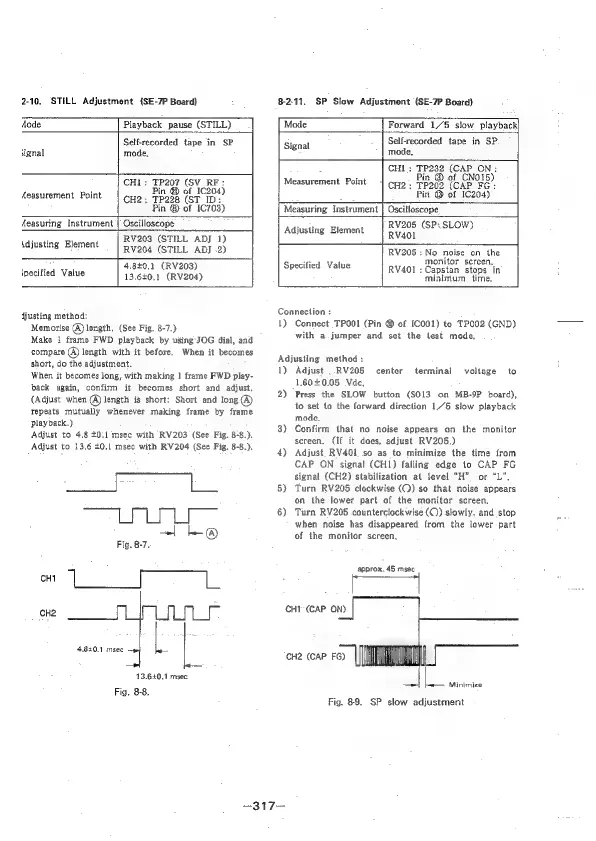
2-10.
STILL
Adjustment
(SE-7P
Board)
82-11.
SP
Slow
Adjustment
(SE-7P
Board)
Aode
Playback
pause
(STILL)
Mode
Forward
1/5
slow
playback]
Self-recorded
tape
in
SP
Signal
Self-recorded
tape
in
SP.
signal
mode,
mode,
:
TP232
(CAP
ON:
CHI:
TP207
(SV_RF:
Measurement
Point
|
cpH9;
Fin
@
ore
m1)
Aeasurement
Point
Fin
@
of
1C204)
Pin
@
of
1C204)
CH2
TP228
(ST
ID:
-
Pin
©
of
1C703)
|
Measuring
Instrument
|
Oscilloscope
al
;
;
.
Aeasuring
Instrument
|
Oscilloscope
Adjusting
Element
|
BV205
(SP,
SLOW)
Adjusting
Element
RV203
(STILL
ADJ
1)
:
RV204
(STILL
ADJ
2)
RV205
:
No
noise
on
the
4,840.1
(RV203)
‘pecified
Value
13.6201
(RV204)
Specified
Value
monitor
screen,
Capstan
stops
‘in
minimum
time,
RV401:
djusting
method:
Memorise
(@)
length.
(See
Fig.
8-7.)
Make
|
frame
FWD
playback
by
using
JOG
dial,
and
compare
(A)
length
with
it
before.
When
it
becomes
short,
do
the
adjustment.
When
it
becomes
long,
with
making
|
frame
FWD
play-
back
again,
confirm
it
becomes
short
and
adjust.
(Adjust
when
(A)
length
is
short:
Short
and
long
(A)
repeats
mutually
whenever
making
frame
by
frame
playback.)
Adjust
to
4.8
40.1
msec
with
RV203
(See
Fig.
8-8.).
Adjust
to
13,6
£0.1
msec
with
RV204
(See
Fig,
8-8.).
sce
Te,
+
L®@
Fig.
8-7.
CH1
CH2
4840.1
msec
L
13.620.1
msec
Fig.
8-8.
Connection
:
1)
Connect
TPOO1
(Pin
@
of
1C001)
to
TPOO2
(GND)
with
a.
jumper
and
set
the
lest
mode,
Adjusting
method
:
1)
2)
3)
4)
5)
6)
CHI
(CAP
ON)
CH2
(CAP
FG)
—317—
Adjust
|.
RV205
1,60+0.05
Vdc.
Press
the
SLOW
button
(S013
on
MB-9P
board),
to
set
to
the
forward
direction
1/5
slow
playback
mode.
Confirm
that
no
noise
appears
on
the
monitor
screen.
(If
it
does,
adjust
RV205,)
Adjust
RV401
so
as
to
minimize
the
time
from
CAP
ON
signal
(CH1)
falling
edge
1o
CAP
FG
signal
(CH2)
stabilization
at
level
“H”
or
“L”,
Turn
RV205
clockwise
(CQ)
so
that
noise
appears
on
the
lower
part
of
the
monitor
screen,
Turn
RV206
counterclockwise
(Q)
slowly,
and
stop
when
noise
has
disappeared
from
the
lower
part
of
the
monitor
screen,
center
terminal
voltage
to
approx.
45
msec
ie
=
_
Minimize
Fig.
8-9.
SP
slow
adjustment

Table of Contents

Related product manuals