EasyManua.ls Logo

Sony EVO-720P - Page 228

Sony EVO-720P
287 pages
Print Icon
To Next Page IconTo Next Page
To Previous Page IconTo Previous Page
Loading...
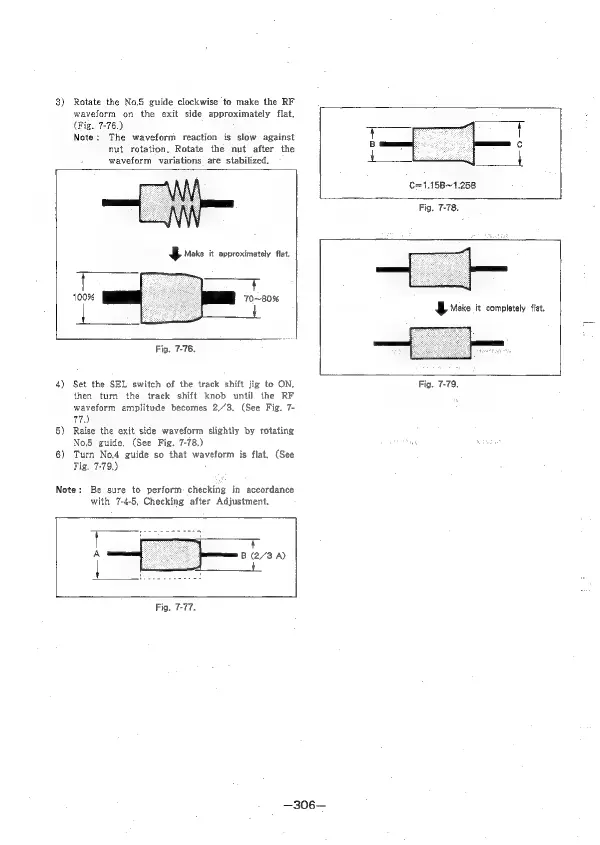
3)
Rotate
the
No.S
guide
clockwise
to
make
the
RF
waveform
on
the
exit
side
approximately
flat.
(Fig.
7-76.)
Note:
The
waveform
reaction
is
slow
against
nut
rotation,
Rotate
the
nut
after
the
waveform
variations
are
stabilized.
C=1.15B~1.25B
Fig.
7-78.
¥
Make
it
approximately
flat.
100%
70~80%
aes
Fig.
7-76.
4)
Set
the
SEL
switch
of
the
track
shift
jig
to
ON,
then
turn
the
track
shift
knob
until
the
RF
waveform
amplitude
becomes
2/“3.
(See
Fig.
7-
77)
5)
Raise
the
exit
side
waveform
slightly
by
rotating
No.5
guide.
(See
Fig.
7-78.)
6)
Turn
No.4
guide
so
that
waveform
is
flat,
(See
Fig.
7-79.)
Note:
Be
sure
to
perform:
checking
in
accordance
with
7-4-5,
Checking
after
Adjustment,
I
7
B
(2/3
A)
2
—306—
J
Mako
it
completely
fiat.
Fig.
7-79.

Table of Contents

Related product manuals