EasyManua.ls Logo

Sony EVO-720P - Page 256

Sony EVO-720P
287 pages
Print Icon
To Next Page IconTo Next Page
To Previous Page IconTo Previous Page
Loading...
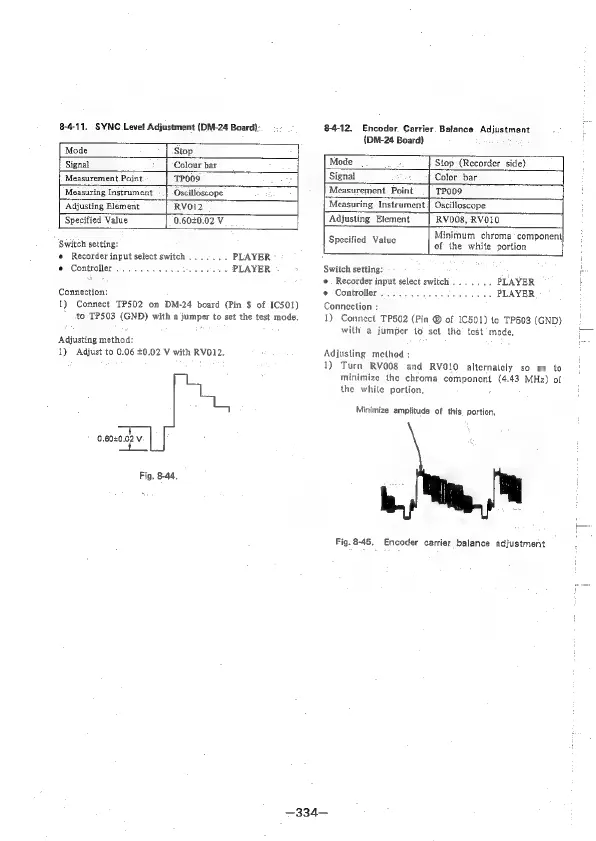
8-4-11.
SYNC
Level
Adjustment
(DM-24
Board).
84-12.
Encoder.
Carrier.
Balance
Adjustment
{DM-24
Board)
Mode
Stop
Signal
Colour
bar
Mode
Stop
(Recorder
side)
Measurement
Point
TPOOS
Signal
Color_bar
Measuring
Instrument
«|
Oscilloscope
Measurement
Point__|
TP009
‘Adjusting
Element
RVO12
Measuring
Instrument
|
Oscilloscope
Specified
Value
0.60£0.02
V
Adjusting
Element
RV008,
RVOIO
se
Minimum
chroma’
component}
Switch
setting:
Specified:
Value
of
the
white
portion
«
Recorder
input
select
switch
.......
PLAYER
e
Controller...
.
0.0...
ee
eee
PLAYER
Switch
setting:
P
aed
e.
Recorder
input
select
switch
.......
PLAYER
3
Connection:
of
Controller
055.43
ees
sae
ye
PLAYER
1)
Connect
TP502
on
DM-24
board
(Pin
$
of
IC501)
Connection
;
1)
Connect
TP502
(Pin
@
of
IC501)
to
TP503
(GND)
to
TP503
(GND)
with
a
jumper
to
set
the
test
mode.
with
a
jumper
to
set
the’
test
mode,
Adjusting
method:
1)
Adjust
to
0.06
£0.02
V
with
RVO12.
Adjusting
method
;
1)
Turn
RV008
and
RVO1O
alternalely
so
as
to
|
minimize
the
chroma
component
(4.43
MHz)
of
the
while
portion,
:
Minimize
amplitude
of
this.
portion,
0.6040.02
v
a
Fig.
8-44.
Fig.
8-45,
Encoder
carrier
balance
adjustment
—334—

Table of Contents

Related product manuals