- 16 -
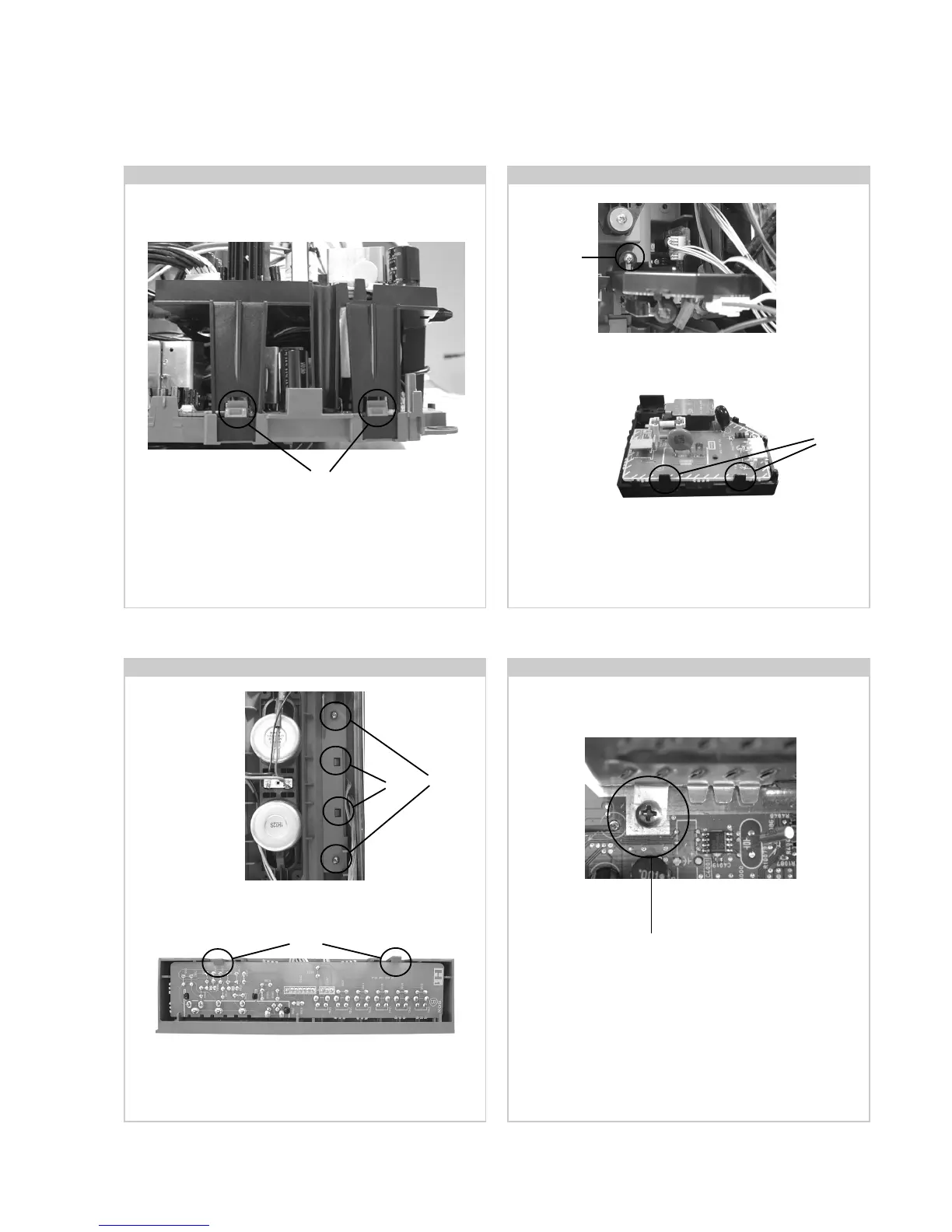
2-8. G1 Bracket Removal
Remove the F1 bracket by removing the screw indicated and
sliding the bracket away from the beznet.
Remove the H1 bracket by removing the screws indicated.
Release the two clips circled and ease the bracket out of its slot
in the beznet.
To remove the N Board shield, release the two fixing screws
and lift the shield vertically until it is clear of the chassis.
2-9. F1 Board Removal
To remove the G1 Bracket release the four clips (two on each
side of the bracket) and carefully lift away from the chassis.
2-10. H1 Board Removal 2-11. Removal of N Board Shield
To remove the F1 board release the two clips circled and ease
the board gently away from the support bracket.
Clips
Screw
Clips
Clips
Screws
To remove the H1 board release the two clips circled and ease
the board gently away from the support bracket.
Note : Removal of the H3 Board follows the same procedure.
Screw
Clips





 To Next Page