20
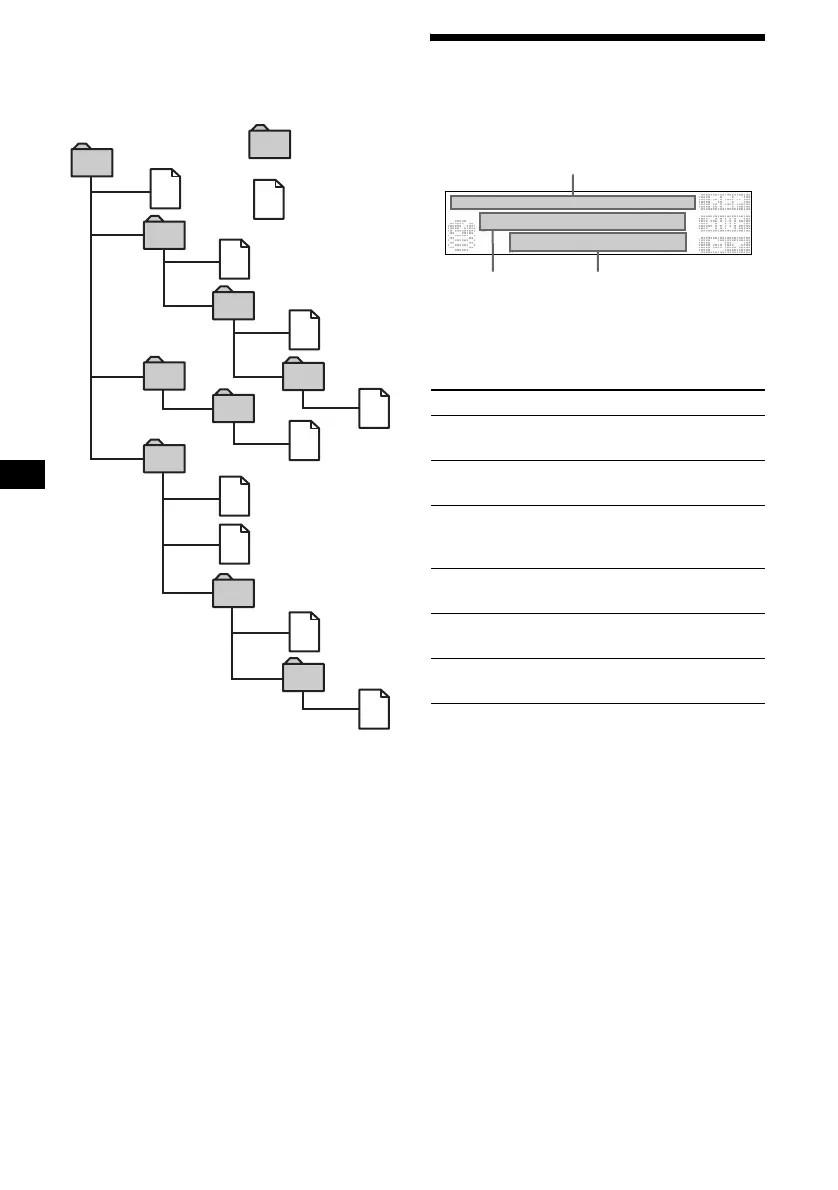
The playback order of MP3 files
The playback order of the folders and files is as
follows.
Example:
Notes
• A folder that does not include an MP3 file is skipped.
• Maximum folder number: 255 (including the root
folder and empty folders)
• The maximum number of MP3 files and folders that
can be contained in a disc: 512
If a file/folder name contains many characters, this
number may become less than 512.
• The maximum number of trees which can be played
is 8.
• If ATRAC3 files and MP3 files are in the “MG
Memory Stick,” only ATRAC3 files are played back
(MP3 files are not played back or displayed).
• Do not store MP3 files in the HIFI folder or
CONTROL folder of the “MG Memory Stick” as they
cannot be played or recognised.
Tip
To specify a desired playback order, before the folder
or file name, input the order by number (e.g., “01,”
“02”), then record contents onto a disc. (The order
differs depending on the writing software.)
Display items
When the folder/album (disc)/track changes, any
prerecorded title of the new folder/album (disc)/
track is automatically displayed.
Each time you press (DSPL), items change as
follows.
When playing back a track on the HDD
Notes
• The names of music files on an “MG Memory Stick”
are displayed in the format compliant with ISO 9660
(page 67).
• When a folder, album or disc has no name, those
number (such as Track 001) is displayed.
• Some characters cannot be displayed.
• For some CD TEXT discs with very many
characters, information may not scroll.
• A track name is displayed when you play back MP3
files, a track on the HDD, “MG Memory Stick,” or
when you play back a CD TEXT disc.
1
2
6
3
5
7
1
2
6
7
4
8
3
5
8
4
9
Folder (album)
MP3 file (track)
Tree 1
(root)
Tree 2
Tree 4
Tree 5
Tree 3
Items
1 AClock/S.A. BTrack name/Artist name
CTrack number/Elapsed playing time
2 AClock/S.A. BAlbum name/Artist name
CTrack name/Artist name
3
AAlbum name/Artist name BTrack name/
Artist name
CTrack number/Elapsed playing
time
4
AFolder name BAlbum name/Artist name
CTrack name/Artist name
5
AFolder name BTrack name/Artist name
CTrack number/ Elapsed playing time
6 AClock/S.A. BFolder name
CTrack name/Artist name
A
B C



 To Next Page