47
Using Network Walkman
Connecting a Network
Walkman
You can transfer audio files recorded on the HDD
to your Network Walkman.
You are always with your favourite music by
carrying the Network Walkman.
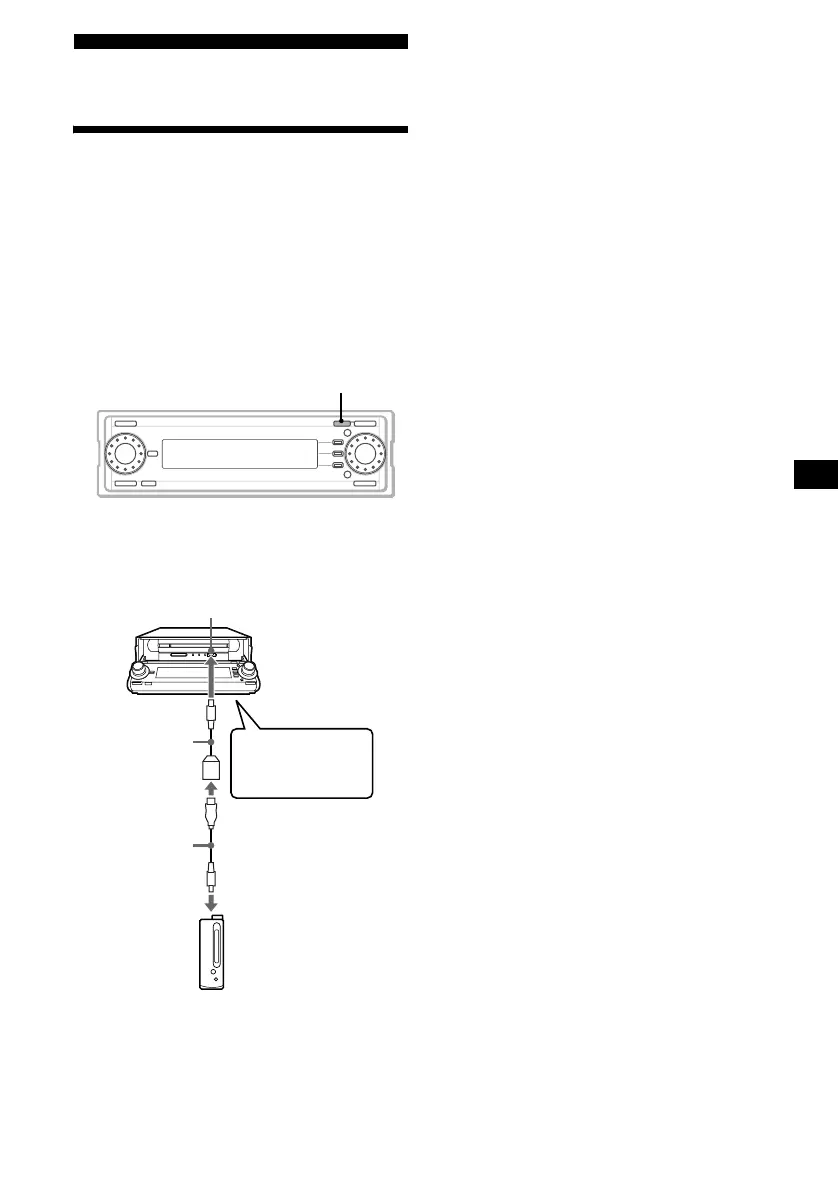
Use the digital I/O cable to connect the Network
Walkman. For details, see the instruction manual
of the Network Walkman.
1 Press (OPEN) to open the front panel.
2 Connect the digital I/O cable to the
digital I/O terminal.
Notes
• Connect the unit and a Network Walkman securely.
• If you press Z when a Network Walkman is
connected, there is a beep sound, and the disc tray
does not open.
• Operations cannot be guaranteed when devices are
connected using a USB extension cable.
• The Network Walkman is not controllable with this unit.
• The models of the Network Walkman can be used
connected with this unit are as follows (as of April
2002): NW-E3/E5, NW-E8P, NW-E7, NW-E10, MC-
S50
• Do not disconnect the digital I/O cable while Check-
Out/Check-In is in progress. The data being
transferred may be damaged.
OPEN
Digital I/O cable
(supplied)
Digital I/O terminal
Network Walkman
USB cable
(supplied with
your Network
Walkman or
optional)
Insert the cable
until it clicks.



 To Next Page