55
Adjusting the subwoofer
volume
— SUB
1 Press (SOURCE) to select a source.
2 Press the L dial.
The sound list display appears.
3 Rotate the L dial to select “SUB,” then
press the L dial.
4 Rotate the L dial to adjust the volume.
The level is adjustable from – ∞ , –10 to +10
steps.
5 Press the L dial.
The normal display appears.
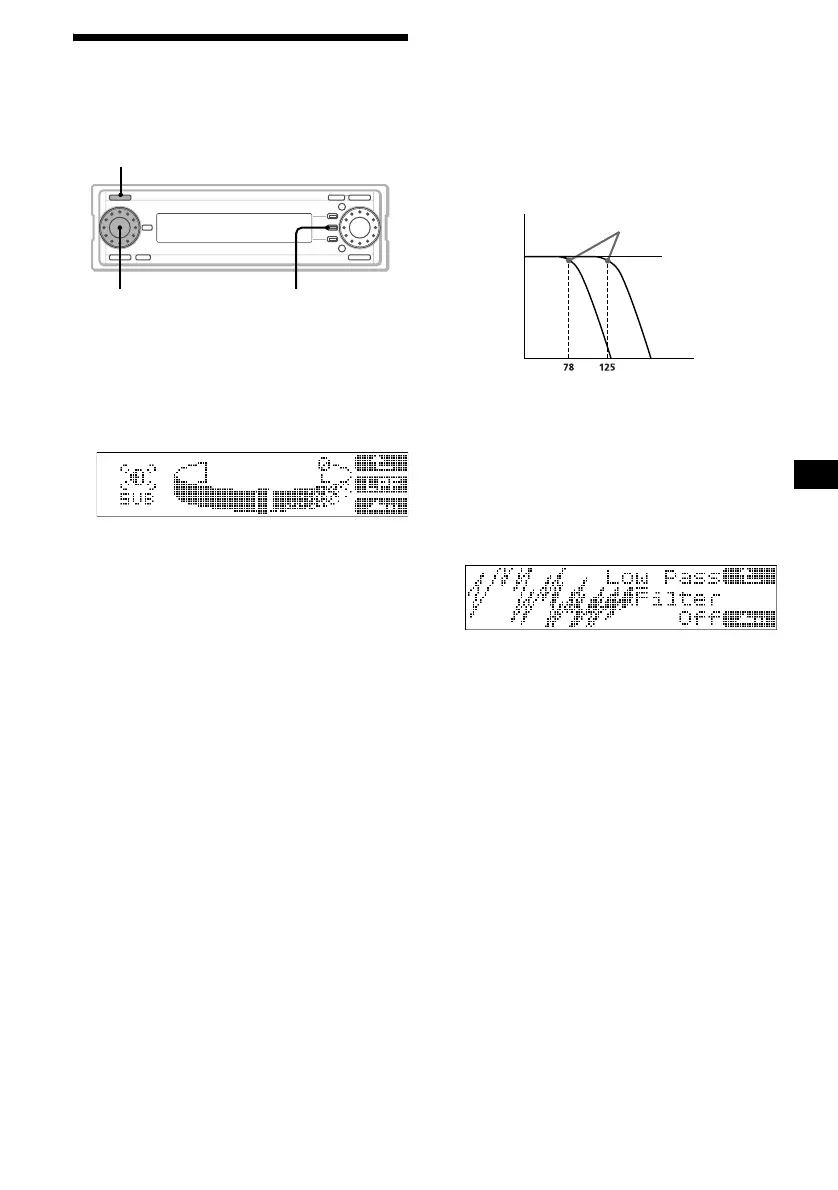
Adjusting the cut-off frequency for the
subwoofer(s)
To match the characteristics of the connected
subwoofer(s), you can cut out the unwanted high
and middle frequency signals entering the
subwoofer(s). By setting the cut-off frequency
(see the diagram below), the subwoofer(s) will
output only low frequency signals for clearer
sound.
1 Press (SOURCE) to select a source.
2 Press the L dial.
The sound list display appears.
3 Rotate the L dial to select “SUB,” then
press the L dial.
4 Press (F2) (LPF).
5 Rotate the L dial to select the cut-off
frequency.
As you rotate the L dial, the frequency
changes as follows:
off (default setting) y 125Hz y 78Hz
6 Press the L dial.
The normal display appears.
SOURCE
F2
L dial
Cut-off frequency
Frequency (Hz)
Level
off



 To Next Page