33
Setting the clock
automatically
— CT
The CT (Clock Time) data from the RDS
transmission sets the clock automatically.
1 During FM band reception, press
(MENU).
2 Rotate the R dial to select “RDS,” then
press the R dial.
3 Rotate the R dial to select “CT,” then
press the R dial.
4 Rotate the R dial to select “On.”
5 Press (F3) ().
The normal reception display appears.
To cancel the CT function, select “Off” in step 4.
Notes
• The CT function may not work even though an RDS
station is being received.
• There might be a difference between the time set by
the CT function and the actual time.
Recording and Editing
HDD
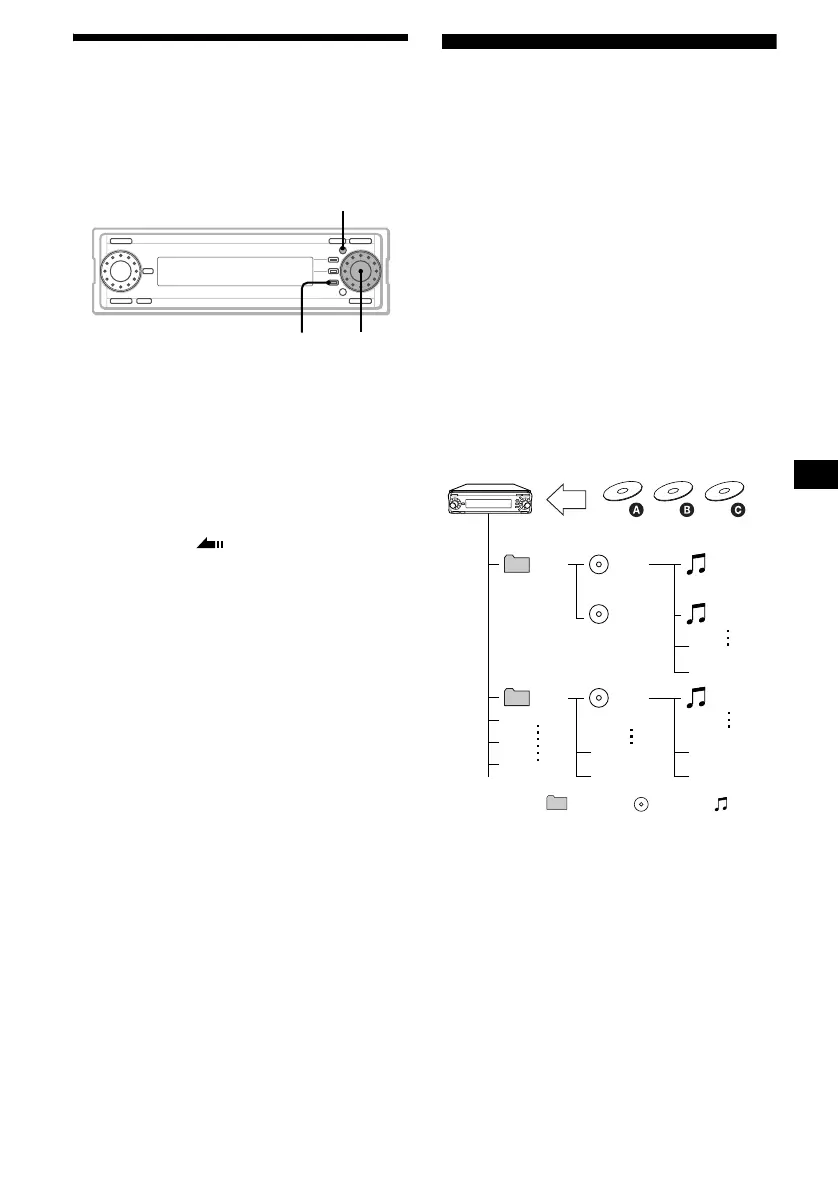
Overview of the HDD system
Recorded tracks on the HDD are sorted out by
folders as follows:
– When no folder is selected before recording, a
new empty album is created inside the
“Folder 001” folder and recorded tracks are
stored there automatically.
(See “CDA” and “CDB” in the diagram.)
– When a certain folder is selected before
recording, a new empty album is created inside
the selected folder and recorded tracks are
stored there automatically.
(See “CDC” in the diagram.)
Example:
“CDA” and “CDB”: No folder is selected.
“CDC”: “Folder 002” is selected.
Folder Album Track
Notes
• The recorded music is limited to private use only.
Use of the music beyond this limit requires
permission of the copyright holders.
• Sony is not responsible for music files that are not
saved on this unit due to unsuccessful recording
from CD or music downloading.
• Sony is not responsible for any files that are
damaged or erased from the hard disc.
MENU
F3
R dial
001
002
001
(CDA)
002
(CDB)
001
002
001
001
(CDC)
REC



 To Next Page