38
RCD-W10
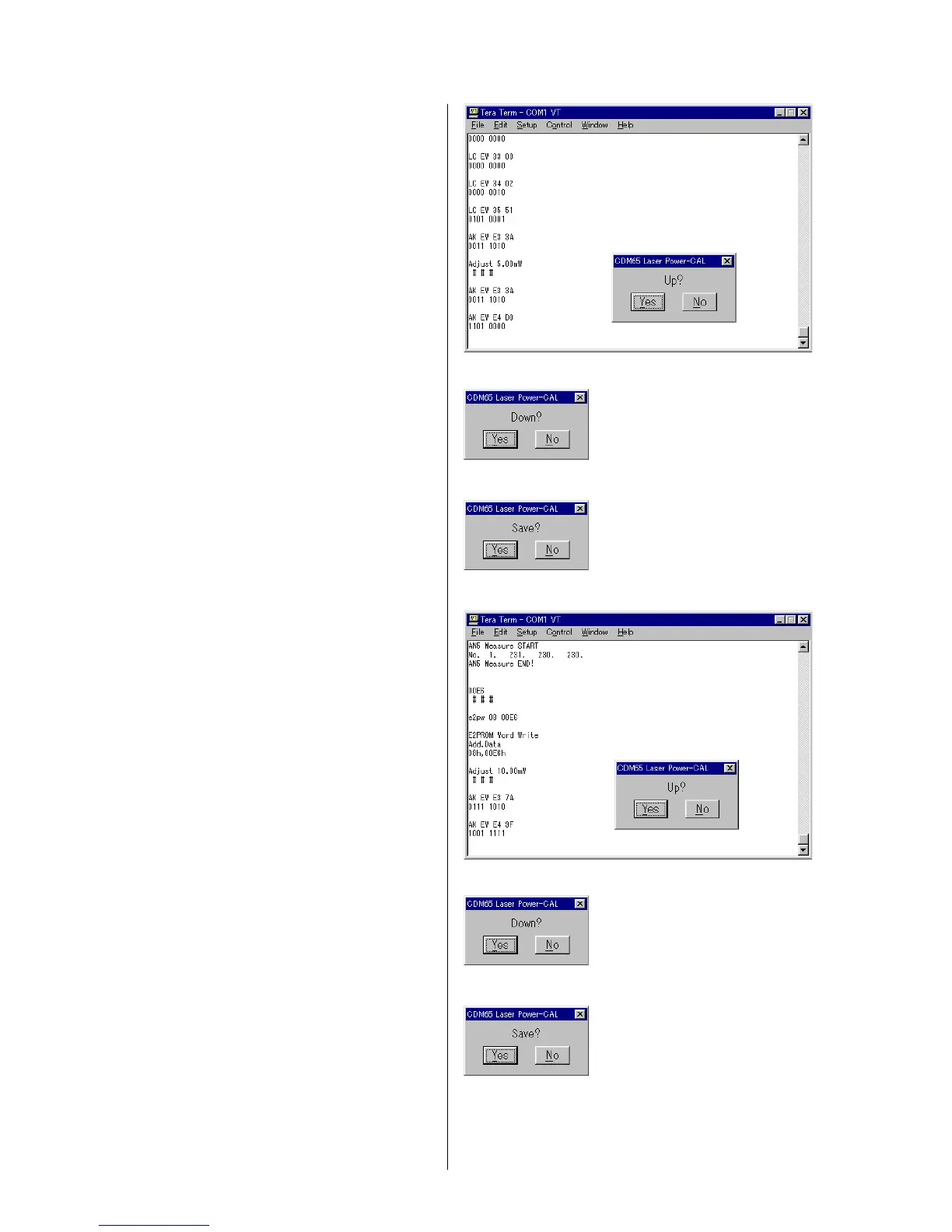
10) Adjust the laser output power as follows.
The laser output power (i.e., laser power meter reading) should
satisfy the specification shown below.
LEADER LPM-8001 : 4.6 +/- 0.1 mW (4.5 to 4.7 mW)
*To increase the laser output power
Press [Yes] of the “Up?” dialog box.
*To decrease the laser output power
Press [No] of the “Up?” dialog box
and then press [Yes] of the “Down?” dialog box.
Repeat until the laser output power satisfies the specification.
(Fig. 4-12, 4-13)
*When the setting value is determined
Press [No] of the “Up?” dialog box
and then press [No] of the “Down?” dialog box
and press [Yes] of the “Save?” dialog box. (Fig. 4-14)
11) Adjust the laser output power as follows.
The laser output power (i.e., laser power meter reading) should
satisfy the specification shown below.
LEADER LPM-8001 : 9.4 +/- 0.2 mW (9.2 to 9.6 mW)
*To increase the laser output power
Press [Yes] of the “Up?” dialog box.
*To decrease the laser output power
Press [No] of the “Up?” dialog box
and then press [Yes] of the “Down?” dialog box.
Repeat until the laser output power satisfies the specification.
(Fig. 4-15, 4-16)
*When the setting value is determined
Press [No] of the “Up?” dialog box
and then press [No] of the “Down?” dialog box
and press [Yes] of the “Save?” dialog box. (Fig. 4-17)
4 Fig. 4-12
4 Fig. 4-13
4 Fig. 4-14
4 Fig. 4-15
4 Fig. 4-16
4 Fig. 4-17


 To Next Page
 Loading...