39
RCD-W10
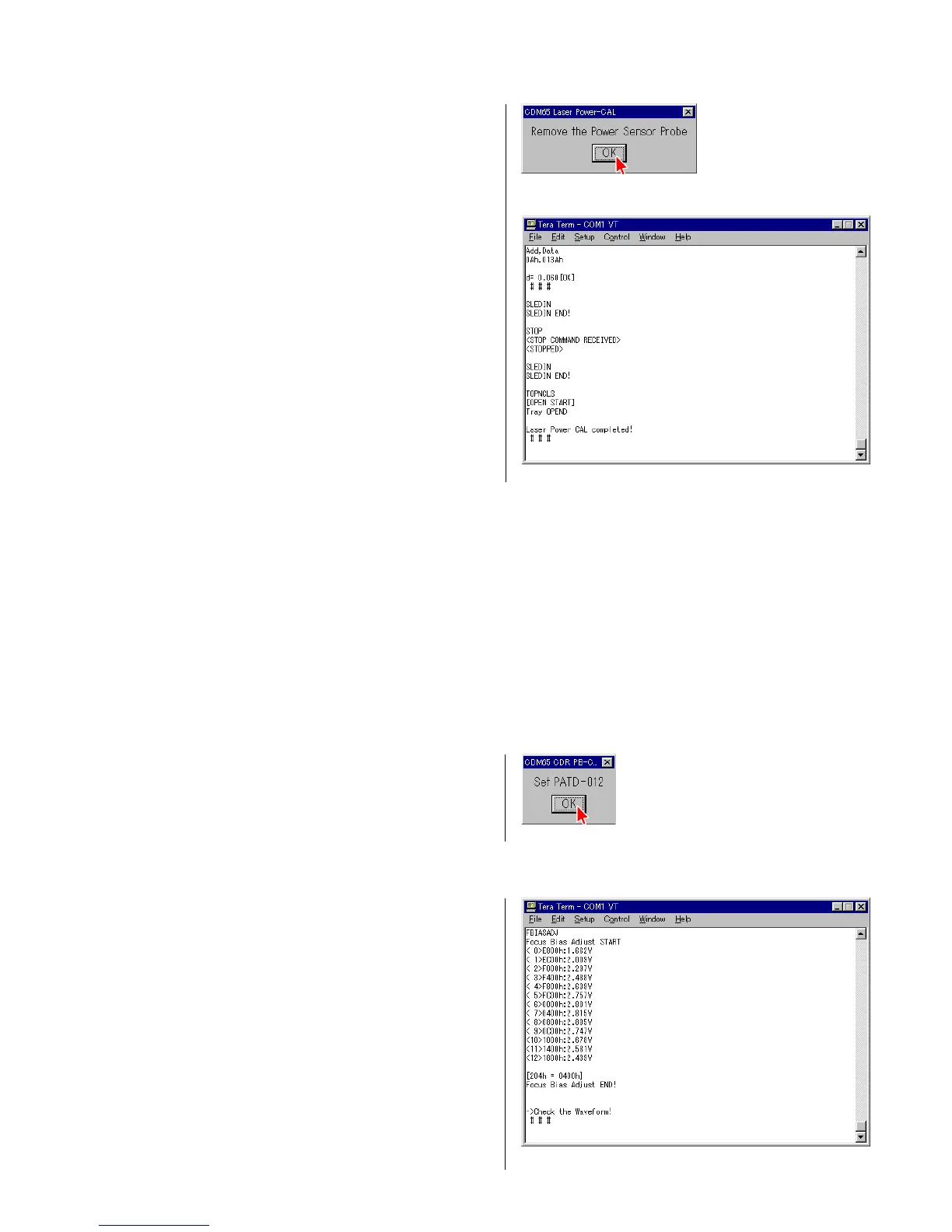
12) When the display shown in Fig. 4-18 appears, remove probe of
the laser power meter and press OK.
13) Check that the message “Laser Power CAL completed!”
appears. (Fig. 4-19)
NG Judgment Result Indication
4 Fig. 4-18
4 Fig. 4-19
4-1-1. Sled Speed NG!
Contents : This message appears when the movement performance of sled is outside the specification.
Measure : Check if there is any abnormality in the sled drive circuit (IC171 peripheral) and the sled drive mechanism.
4-1-2. Power CAL NG!
Contents : This message appears when the laser emission intensity is outside the specification.
Measure : Check peripheral of CN101.
Replace KRM-220CAA.
4-2. CD/CD-R Playback Adjustment
1) Select the menu as follows. Control → Macro, and select 02cdr_S.ttl.
Press “Open”.
2) Place the test CD disc PATD-012 on the tray as prompted by
the display and press “OK”. (Fig. 4-20)
4 Fig. 4-20
3) Press the “RESET” button (SW101) of the jig as prompted by the display.
4 Fig. 4-21
4) As prompted by the message shown in Fig. 4-21, check that
the waveform as shown in Fig. 4-22 appears on an oscilloscope.


 To Next Page
 Loading...