1-20
84
Virtual surround setting
Notes
•Surround effects cannot be obtained for DTS or linear PCM.
•When the playing signal does not contain a signal for the rear speakers, the surround effects
will be difficult to hear.
•When you activate the surround effect, turn off the surround setting of the connected TV or
amplifier (receiver).
•Make sure that your listening position is between and at an equal distance from your
speakers, and that the speakers are located in similar surroundings.
• If you use the DIGITAL AUDIO OUT (OPTICAL or COAXIAL) jack and set “Dolby
Digital” to “Dolby Digital” or “DTS” to “Oui” in “OPTIONS AUDIO” menu, sound will
come from your speakers but it will not have the surround effect.
•Certain audio features of this product manufactured under a license from Desper Products,
Inc. Spatializer
®
, VBX™ and the circle-in-square device are trademarks owned by Desper
Products, Inc.
85
Playing an MP3 audio track
DVD Additional Operations
Playing an MP3 audio track
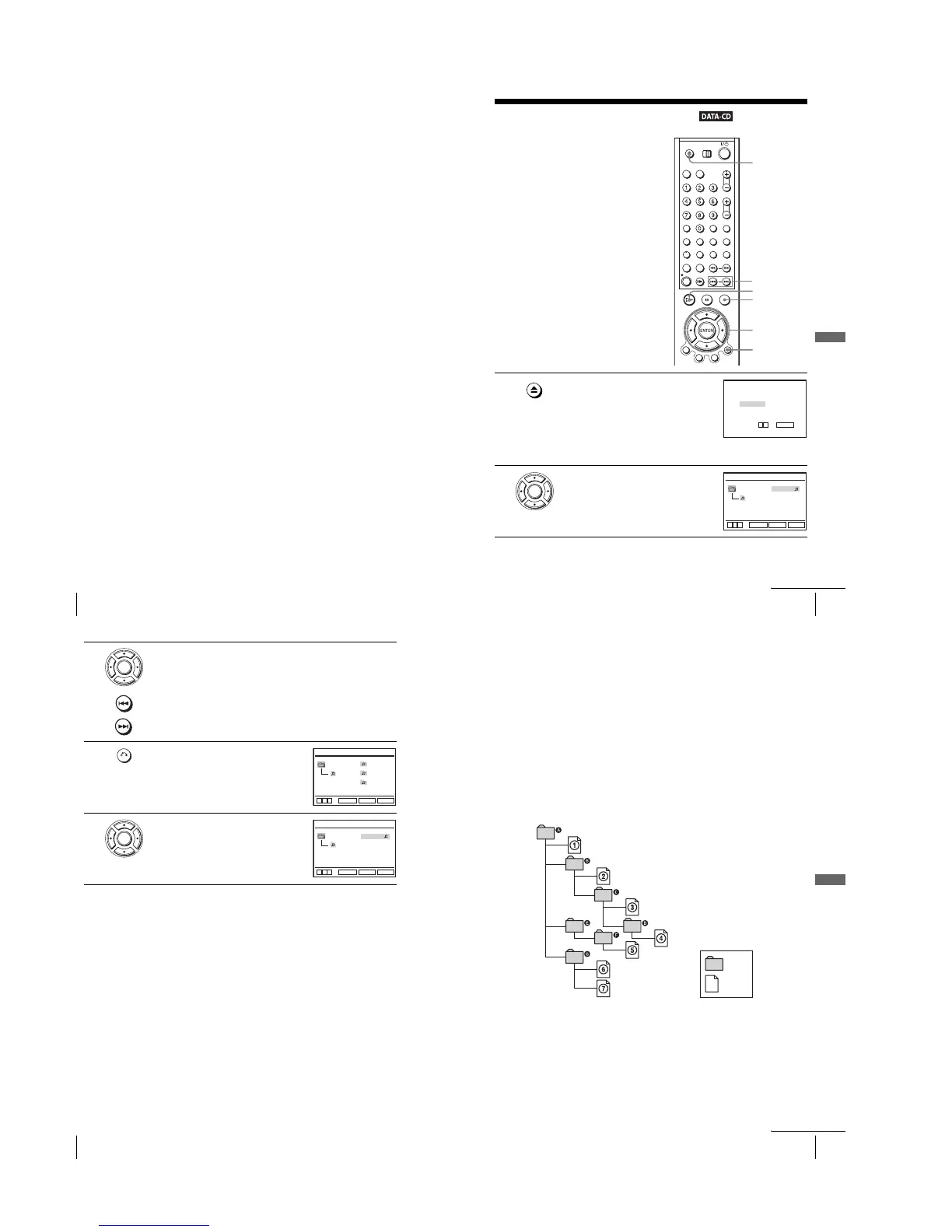
Yo u can play back DATA CDs (CD-ROMs/
CD-Rs/CD-RWs) recorded in MP3 (MPEG1
Audio Layer 3) format.
1
Press Z and place a DATA CD on the disc tray,
then press Z to close the tray.
When you load a DATA CD which contains
MP3 audio tracks and JPEG image files,
“Sélectionnez le type de media” menu appears.
If you load a DATA CD which contains only
MP3 audio files, the MP3 display appears.
Then you can skip step 2.
2
Press V/v to select “MP3”, then press
ENTER.
V/v/B/b
ENTER
H
O RETURN
Z
./>
x
Sélectionnez le type de media
2 JPEG
1 MP3
ENTER
v
V
ENTER
b
MP3 Total: 12
2 plage2
3 plage3
4 plage4
5 plage5
plage1
1 plage1
RETURN
SET UP
ENTER
v
V
continued
86
Playing an MP3 audio track
To go to the next or previous page
Press b or B.
To return to the previous display
Press O RETURN.
To turn off the display
Press x, then press O RETURN repeatedly.
Notes
•Only the letters in the alphabet and numbers can be used for album or track names. Anything
else is displayed as an asterisk.
•Up to 8 alphanumeric characters can be displayed for album or track names.
•ID3 tags cannot be displayed.
About MP3 audio tracks
Yo u can play MP3 audio tracks on CD-ROMs, CD-Rs, or CD-RWs. However, the
discs must be recorded according to ISO9660 level 1, level 2, or Joliet format for the
player to recognize the tracks.
Yo u can also play discs recorded in Multi Session.
See the instructions of the CD-R/RW device or recording software (not supplied) for
details on the recording format.
3
Press V/v then press ENTER, or press ./> to select the desired
track.
The selected track starts playing.
When a track or album is being played, its title is shaded. The playing track
number appears on the display window.
4
To change the album, press O RETURN.
5
Press V/v to select an album, then press
ENTER.
The list of tracks contained in the album
appears.
To select a track, repeat step 2.
ENTER
RETURN
MP3
album2
album3
plage1
album1
SET UP
ENTER
v
V
b
RETURN
ENTER
b
MP3 Total: 12
2 plage2
3 plage3
4 plage4
5 plage5
plage1
1 plage1
RETURN
SET UP
ENTER
v
V
87
Playing an MP3 audio track
DVD Additional Operations
To play a Multi Session CD
This player can play Multi Session CDs when an MP3 audio track is located in the
first session. Any subsequent MP3 audio tracks, recorded in the later sessions, can
also be played back. When audio tracks and images in music CD format or video CD
format are recorded in the first session, only the first session will be played back.
Notes
•If you put the extension “.MP3” to data not in MP3 format, the player cannot recognize the
data properly and will generate a loud noise which could damage your speaker system.
•The player cannot play audio tracks in MP3PRO format.
•This player supports MP3 audio tracks recorded with a bit rate of 128 kbps and a sampling
frequency of 44.1 kHz. Attempting to play MP3 audio tracks recorded with different
specifications may result in loud noise, sound skipping or speaker damage.
•Depending on the disc, playback may take some time to start.
The Playback order of MP3 audio tracks
The playback order of albums and tracks recorded on a DATA CD is as follows.
•Structure of disc contents
When you insert a DATA CD and press H, the numbered tracks are played
sequentially, from
1
through
7
. Any sub-albums/tracks contained within a currently
selected album take priority over the next album in the same tree. (Example: C
contains D so
4
is played before
5
.)
When you press O RETURN and the list of MP3 albums appears (page 86), the
albums are arranged in the following order: A t B t C t D t F t G.
Albums that do not contain tracks (such as album E) do not appear in the list.
ROOT
Tree 1Tree 2 Tree 3 Tree 4 Tree 5
album
plage
continued














 To Next Page