1-25
104
Adjusting the picture (tracking)
2
Press V/v to select “Réglages Utilisateur”,
then press ENTER.
3
Press V/v to select “Smart Trilogic”, then
press b.
4
Press V/v to set “SMART TRILOGIC” to
“OUI” or “NON”.
• OUI: Picture sharpness is automatically
adjusted.
• NON: Adjust the picture sharpness
manually.
To so ft en the picture, press B.
To sharpen the picture, press b.
5
Press O RETURN to return to the original screen.
ENTER
NICAM
Syst. Couleur
Etendre ShowView
Smart Trilogic
[ Non ]
RETURN
REGLAGES UTILISATEUR
SET UP
v
V
b
B
[ Oui ]
[ Oui ]
[ Auto ]
ENTER
NICAM
Syst. Couleur
Etendre ShowView
Smart Trilogic
[ Non ]
RETURN
REGLAGES UTILISATEUR
SET UP
v
V
b
B
[ Oui ]
[ Oui ]
[ Auto ]
ENTER
CONTRASTEE
DOUCE
––––––––––* –––––––––
RETURN
IMAGE
SMART TRILOGIC : OUI
V
v
OUI / NON :
RETURN
105
Changing menu options
VCR Additional Operations
Changing menu options
1
Press SET UP when the DVD player is in stop
mode, then press V/v to select
(OPTION) or (VIDEO) and press
ENTER.
2
Press V/v to select the option to change.
V/v/B/b
ENTER
SET UP
SET UP
ENTER
Langue
Installation
Veille Auto
Messages Ecran
Réglages Utilisateur
L’horloge
:Français
[ Non ]
[ Oui ]
RETURN
OPTION
SET UP
ENTER
v
V
Sélect. Cassette
Répétion Totale
RETURN
REGLAGE DE LA FONCTION VIDEO
SET UP
v
V
b
B
[ E180 ]
[ Non ]
ENTER
Sélect. Cassette
Répétion Totale
RETURN
REGLAGE DE LA FONCTION VIDEO
SET UP
v
V
b
B
[ E180 ]
[ Non ]
continued
106
Changing menu options
Menu choices
The default settings are indicated in bold print.
OPTION
VIDEO SETUP
3
Press B/b to change the setting.
4
Press SET UP to exit the menu.
Menu option Set this option to
Ve i l le Auto • “Non” to deactivate the Auto Power Off function.
•“1Heures”/“2Heures”/“3Heures” to turn the DVD-VCR off
automatically if no signal is received and you do not press any
of the buttons during this time.
Messages Ecran • “Oui”to display the menu on the TV screen.
•“Non” to disappear the menu from the TV screen.
Menu option Set this option to
Sélect. Cassette • “E180”to use an E-180 or shorter type tape.
•“E240” to use an E-240 type tape.
•“E260” to use an E-260 type tape.
•“E300” to use an E-300 type tape.
Répétion Totale • “Oui” to play back a tape repeatedly. The VCR rewinds a tape
to the beginning and restarts playback automatically.
•“Non” to turn off Auto repeat.
ENTER
SET UP
107
Editing
VCR Additional Operations
Editing
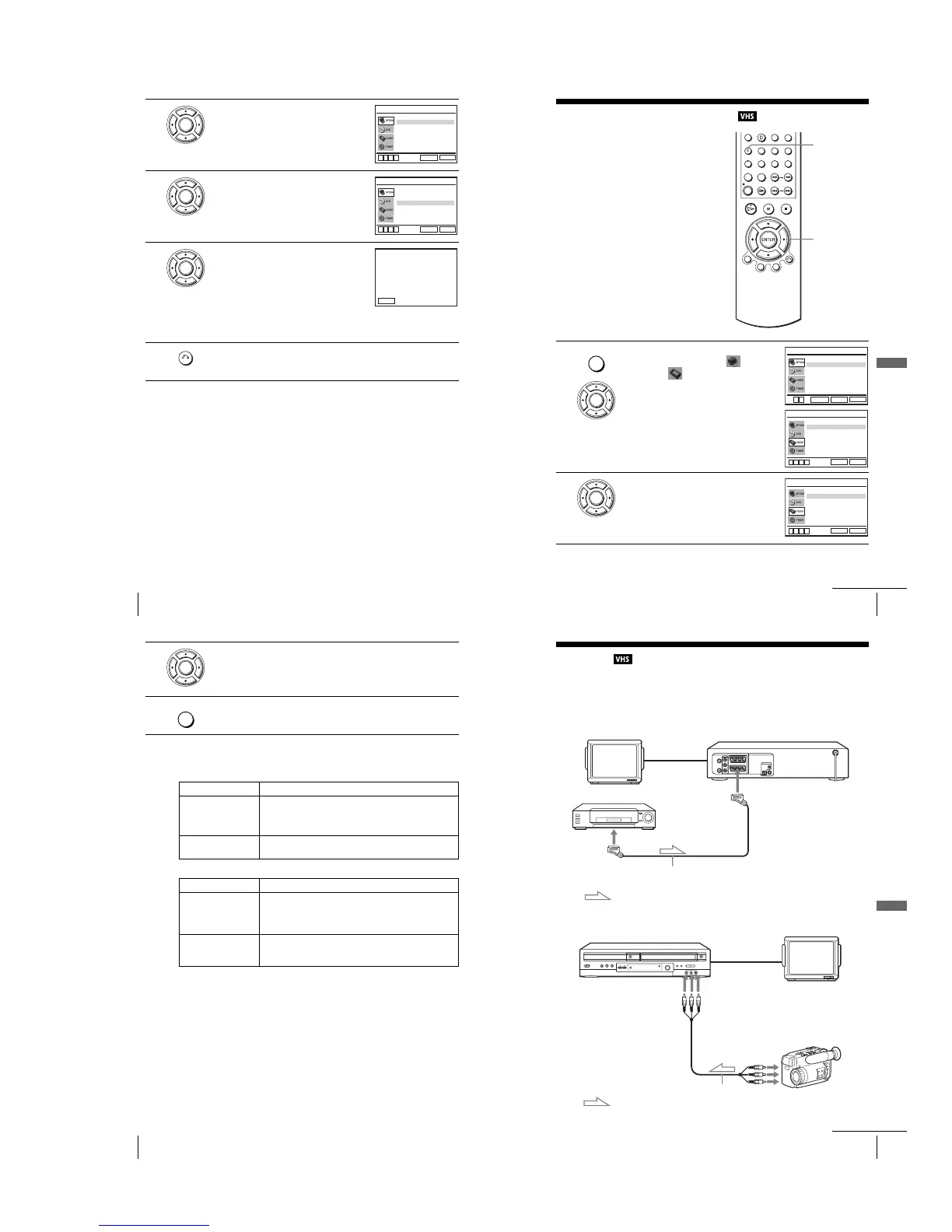
How to connect to record on this VCR
Connect the line outputs of the other VCR to the input connector of this VCR. Refer to the
examples A through C and choose the connection that best suits your VCR.
Example A
Example B
TV
LINE-1 (EURO AV)
PERITEL cable (not supplied)
PERITEL
: Signal flow
Your VCR (Recorder)
Other VCR (Player)
TV
audio/video cord
(not supplied)
SORTIE
LIGNE
Your VCR (Recorder)
Other VCR (Player)
: Signal flow
LINE-2 IN t/o L/R
continued














 To Next Page