2-8
1 SLIDER FL DRIVE
2 GEAR FL CAM
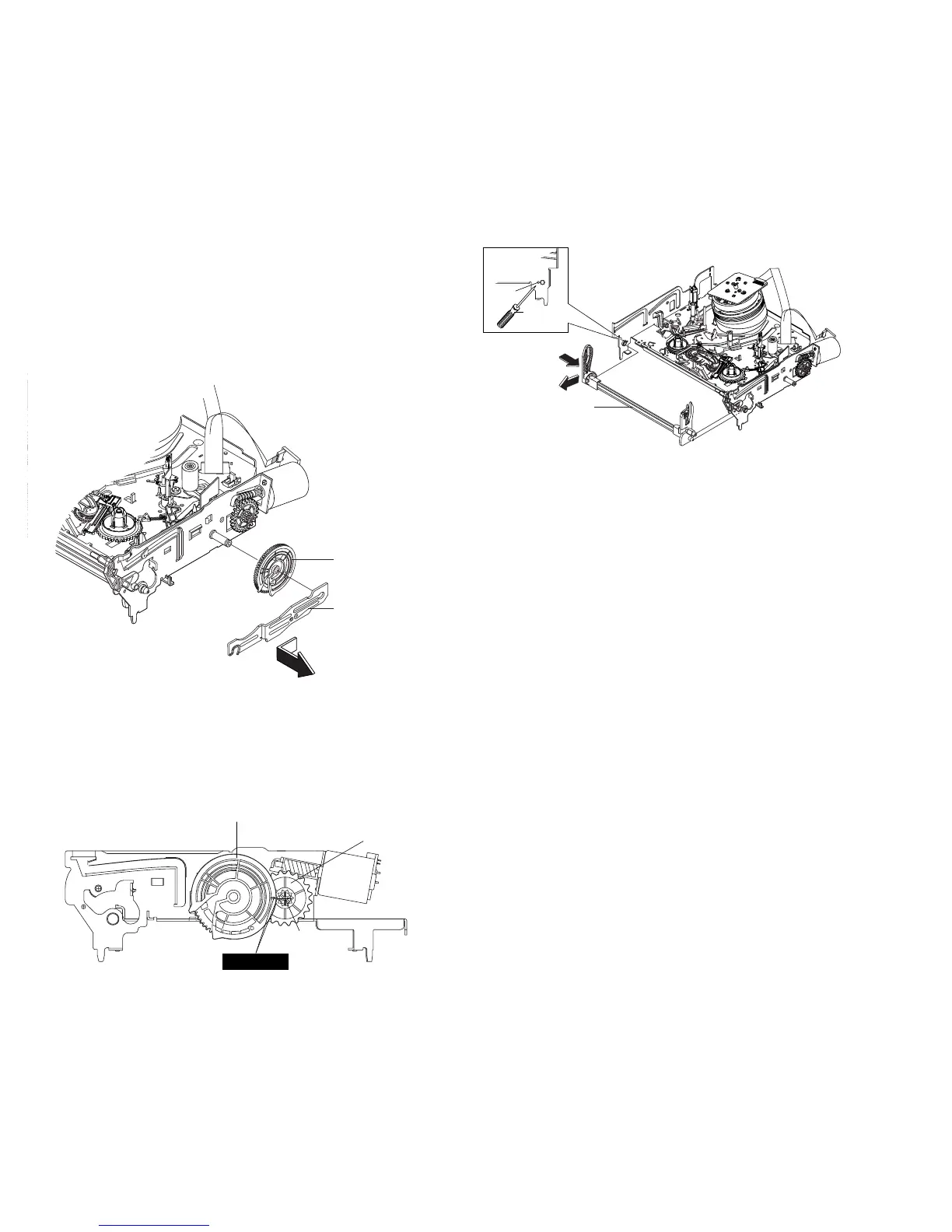
2-4-3 Slider FL Drive, Gear FL Cam Removal
1) Pull the Slider FL Drive 1 to the front direction.
2) Remove the Slider FL Drive 1 in the direction of arrow. (Refer to
Fig. 2-13)
3) Remove the Gear FL cam 2.
Note: When reinstalling be sure to reassemble Slider FL drive 1
after you insert the Boss of Lever FL ARM-R in Groove of Slider FL
drive 1.
Assembly: Align the Gear FL Cam 1 with the Gear worm wheel
Post as shown drawing.
(Refer to Timing point)
Fig. 2-13 Slider FL Drive Removal
Fig. 2-14 Gear FL Cam, Gear Worm
2-4-4 Lever FL Arm Ass’y Removal
1) Push the hole “A” in the direction of arrow “B” use the pin.(about
Dia. 2.5)
2) Pull out the Lever FL Arm Ass’y 1 from the Boss of Main Base.
3) Remove the Lever FL Arm Ass’y 1 in the direction of arrow “C”.
Fig. 2-15 Lever FL Arm Ass’y Removal
1 GEAR FL CAM
GEAR WORM WHEEL
POST
TIMING POINT
1 LEVER FL ARM ASS'Y
"C"
"B"
PIN
HOLE "A"














 To Next Page