101
GB
Other Operations
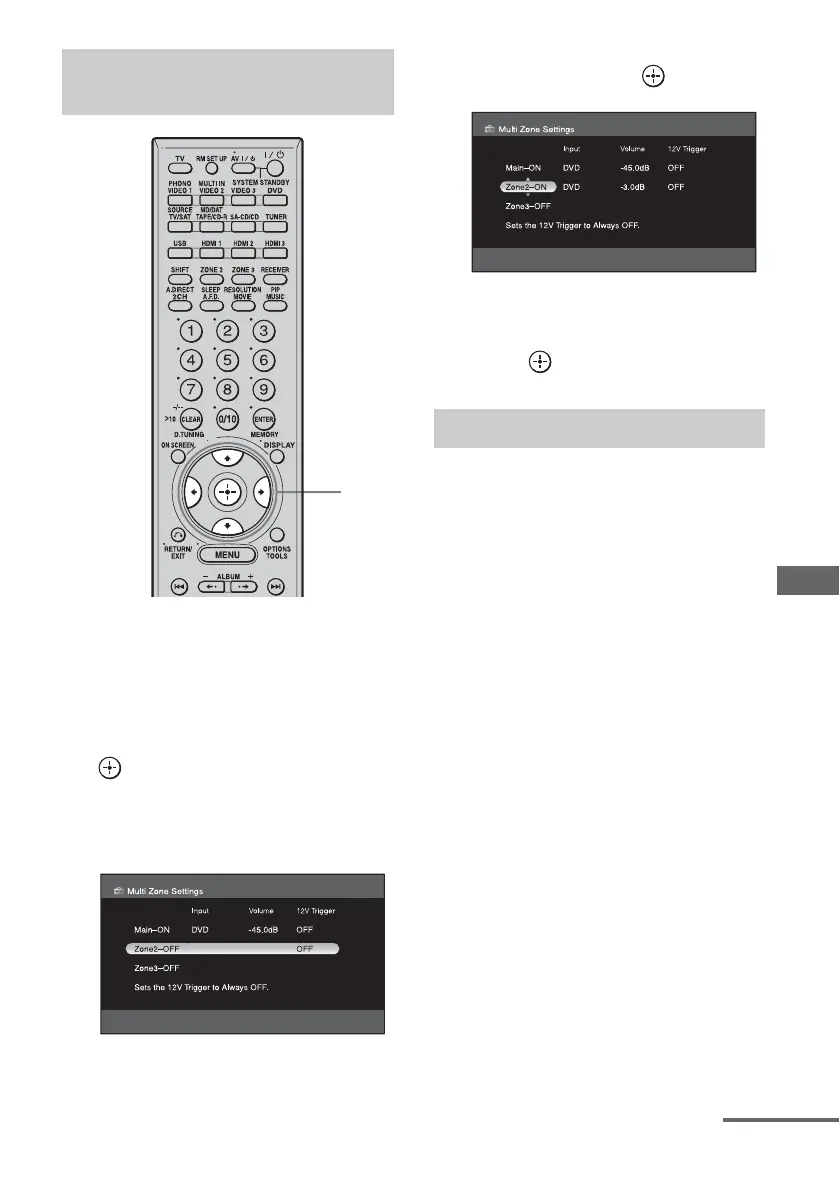
1 Choose “Multi Zone” in the
Settings menu (page 54).
2 Press V/v to select the zone to
which you want to output
audio/video signals, then press
.
Main (this receiver) is always selected. If
you do not change the setting, proceed to
step 4.
3 Press V/v to select, “ON” or
“OFF” then press .
4 Press V/v/B/b repeatedly to
select item and parameter, then
press .
x Power
(for ZONE 2/ZONE 3 only)
Lets you turn zone operation on.
•ON
•OFF
x Input
Lets you select the source that is output to the
zone. Audio and video signals are output to
zone 2, only audio signals are output to zone 3.
x Volume
Lets you adjust the volume in the zones.
x 12V Trigger
You can turn the receiver on/off in another
zone, or select various options for use of the
12V Trigger function, as explained below.
•OFF
Lets you turn off output of 12V triggers even
when the main receiver is turned on.
• ZONE
Lets you turn the output of 12V triggers on
or off based on whether the selected zone is
turned on or off.
•CTRL
Lets you turn the output of 12V triggers on
or off manually using the CIS command of
the IR remote.
Setting audio/video output
signals to the zone 2/zone 3
2-4
Multi Zone menu parameters
continued















 To Next Page