103
GB
Other Operations
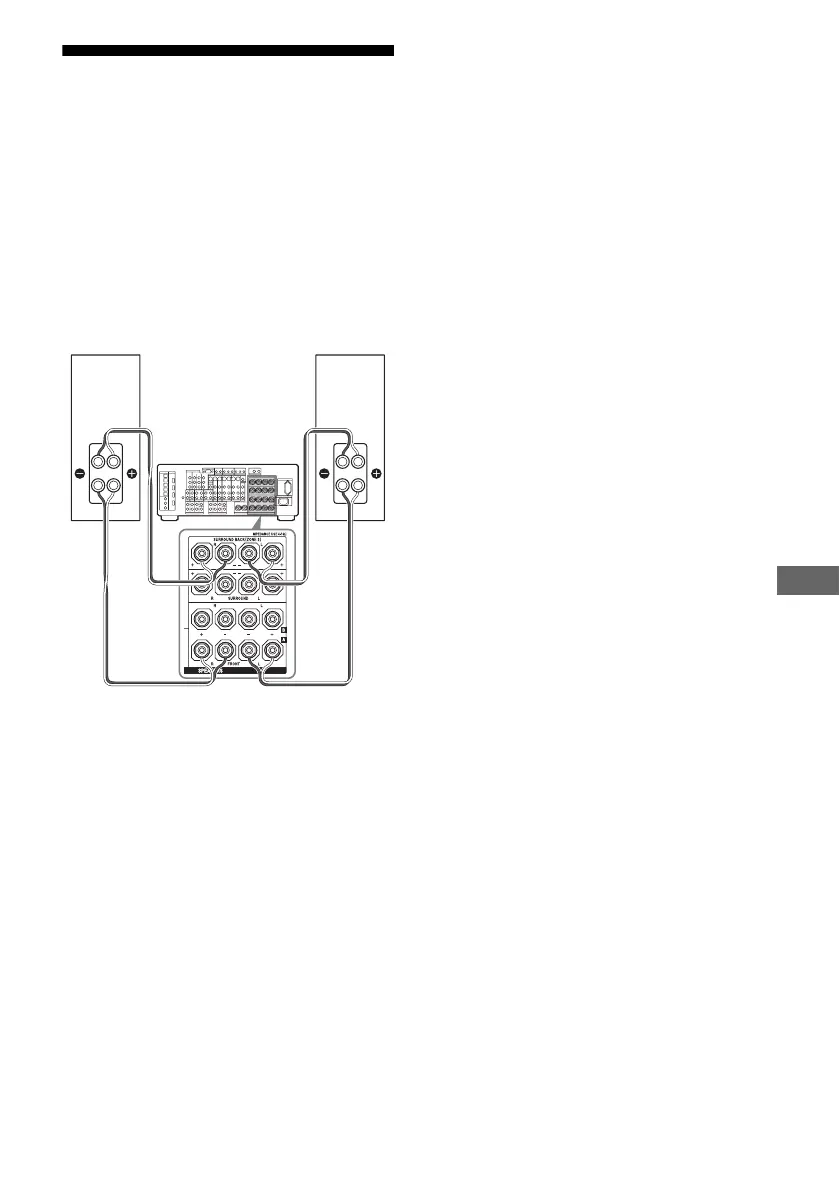
Using a bi-amplifier
connection
If you are not using surround back speakers,
you can use the SURROUND BACK
SPEAKERS terminals for the front speakers
for use with a bi-amplifier connection.
To connect speakers
Connect the jacks on the Lo (or Hi) side of the
front speakers to the FRONT SPEAKERS A
jacks, and connect the jacks on the Hi (or Lo)
side of the front speakers to the SURROUND
BACK SPEAKERS terminals. Make sure that
metal fittings of Hi/Lo attached to the speakers
have been removed from the speakers. Not
doing so may cause a malfunction of the
receiver.
To set up speakers
Set “Sur Back Assign” to “BI-AMP” in the
Auto Calibration settings menu (page 73). The
same signals output from the FRONT
SPEAKERS A jacks can be output from the
SURROUND BACK SPEAKERS terminals
by setting “Sur Back Assign” to “BI-AMP.”
Notes
• You cannot use the FRONT SPEAKERS B jacks
for a bi-amplifier connection.
• When you use the auto calibration function, make
the bi-amplifier settings before you perform auto
calibration.
• If you make the bi-amplifier settings, the speaker
level, balance, and equalizer settings of the
surround back speakers become invalid, and those
of the front speakers are used.
• Signals output from the PRE OUT jacks are used
with the same settings as those of the SPEAKERS
terminals.
• The audio signal of the center speaker of the
MULTI CHANNEL INPUT jack is not output
from the front left/right speakers when you set “Sur
Back Assign” to “BI-AMP” in the Auto
Calibration settings menu.
Front speaker
(R)
Front speaker
(L)
Hi
Lo
Hi
Lo















 To Next Page