58
GB
Enjoying a pre-
programmed sound field
1
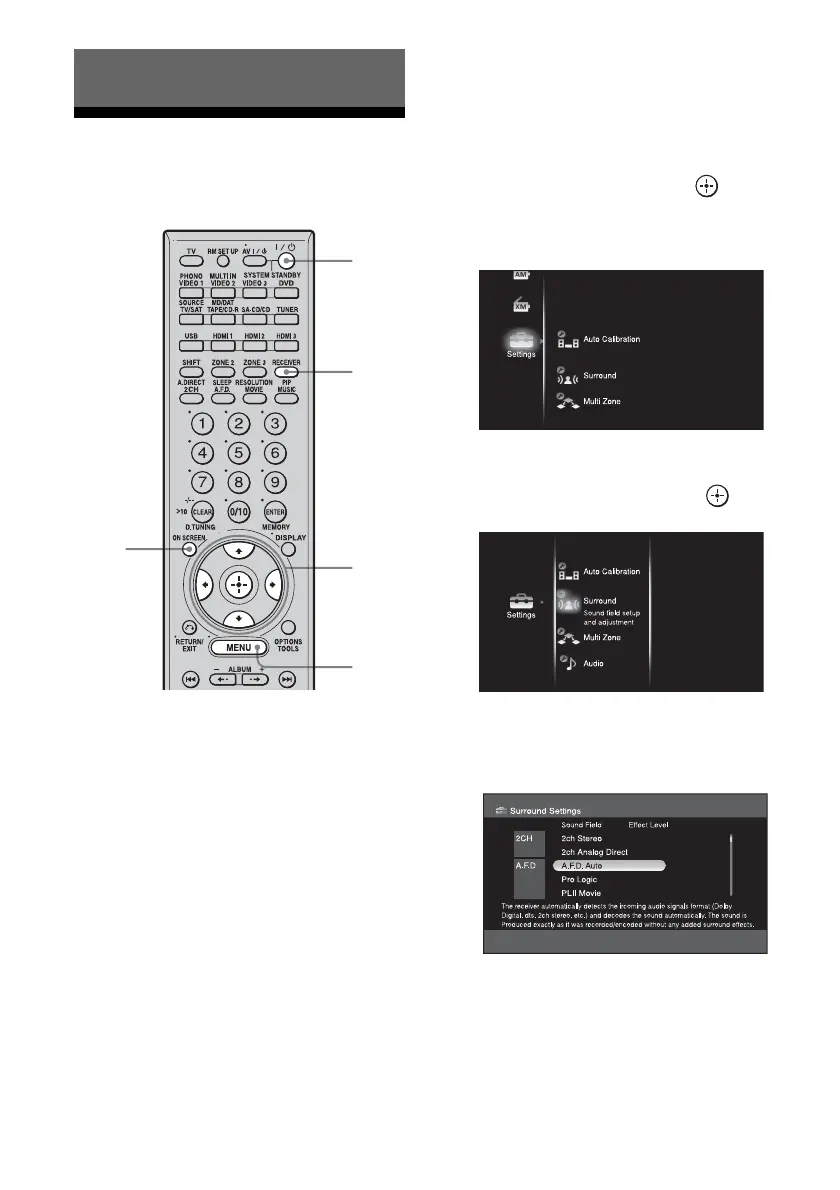
Start playing a source encoded
with multi-channel surround
effects (DVD, etc.).
2 Connect a TV monitor to this
receiver.
Refer to “3: Connecting the monitor for
displaying menus” (page 19).
3 Turn on the receiver and the TV.
4 Press RECEIVER to enable
receiver operation.
5 Press ON SCREEN.
The menu list of this receiver appears on
the TV screen. Press MENU if the menu
list does not appear on the TV screen.
6 Press V/v repeatedly to select
“Settings,” then press or b.
The Settings menu list appears on the TV
screen.
7 Press V/v repeatedly to select
“Surround,” then press .
8 Press V/v repeatedly to select
the surround sound you want.
Parameter that allows custom settings
provides a “Custom Settings” menu that
can be used to make advanced
adjustments. For details, see “Adjusting
the sound effect” (page 63).
Enjoying Surround Sound
6-8
4
MENU
3
5















 To Next Page