17
GB
Getting Started
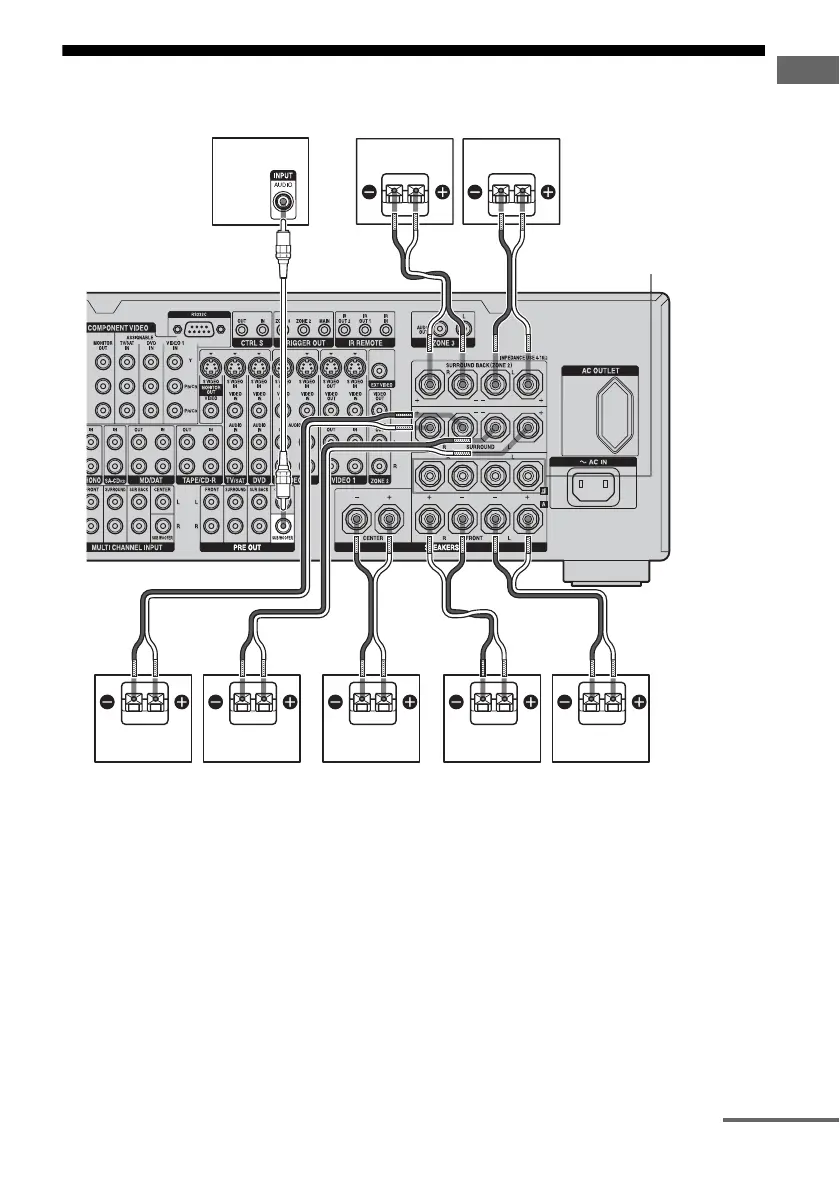
2: Connecting speakers
AFront speaker A (L)
BFront speaker A (R)
CCenter speaker
DSurround speaker (L)
ESurround speaker (R)
FSurround back speaker (L)
b)
GSurround back speaker (R)
b)
HSub woofer
c)
a)
If you have an additional front speaker
system, connect them to the FRONT
SPEAKERS B terminals. You can select
the front speaker system you want to use
with the SPEAKERS switch (OFF/A/B/
A+B) on the front panel (page 41).
b)
If you connect only one surround back
speaker, connect it to the SURROUND
BACK SPEAKERS L terminals.
HGF
BADEC
AB
FRONT SPEAKERS
B terminals
a)
A Monaural audio cord (not supplied)
B Speaker cords (not supplied)
continued















 To Next Page