22
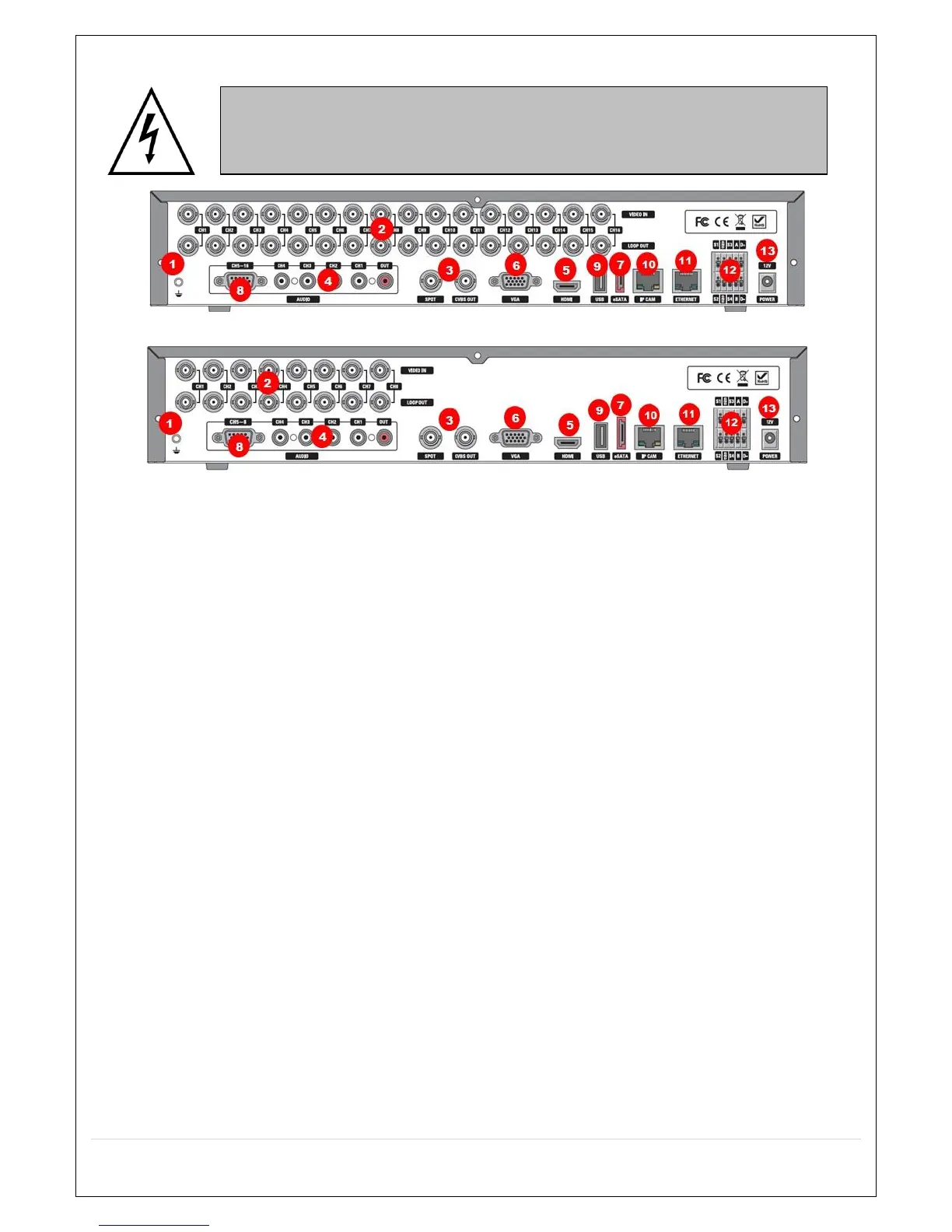
3-2. Rear Panel Connectors
D16HS
D8HS
Figure 3.2.1. Connectors
① Ground: Use for ground port.
② VIDEO IN: Video input port.(For Analog 960H cameras)
③ VIDEO OUT: MAIN – Composite Video Output / SPOT – Spot Monitor
④ AUDIO IN & OUT: Four connectors for audio input and one connector for audio output.
⑤ HDMI: HDMI output port. Connectors to the HDMI Monitor
⑥ VGA: VGA (Video Graphics Array) output port. Connects to the PC VGA monitor.
⑦ E-SATA: External SATA port for extension storage.
⑧ AUDIO IN: Audio inputs connections for channels 5-8 or 5-16 through external cable
⑨ USB: USB terminal for video export or firmware upgrade
⑩ IP CAM: Network Second Terminal. No Internet access.
⑪ ETHERNET: RJ-45 Connector for LAN Connection, used for Internet Connection
⑫ SENSOR IN, ALARM OUT, RS-485: External sensor terminal, External alarm out terminal & RS-485
for PTZ Camera control
⑬ POWER: DC12V input
Do not power this system on before all the connections are attached.
Make sure all the connections are properly secured. Faulty connection may result in
the system being damaged.



 To Next Page