46
Network access beyond a router
To access DVR beyond a router (firewall), you must open the proper TCP ports for live/playback streaming,
for commands, for remote backup, and for audio streaming. If these ports are not opened properly, you
can’t access the DVR beyond a router.
o For live/playback streaming, for commands, for remote backup: Open the port number
on NETWORK>NETWORK PORT menu. The default port number is 5445.
o For bi-directional audio: Open the port number on NETWORK AUDIO PORT. The default
port number is [NETWORK PORT number + 1].
o For web-viewer downloading and remote firmware upgrading: Open the port number on
NETWORK>WEB PORT menu. The default port number is 80.
4-6-4. Network Stream
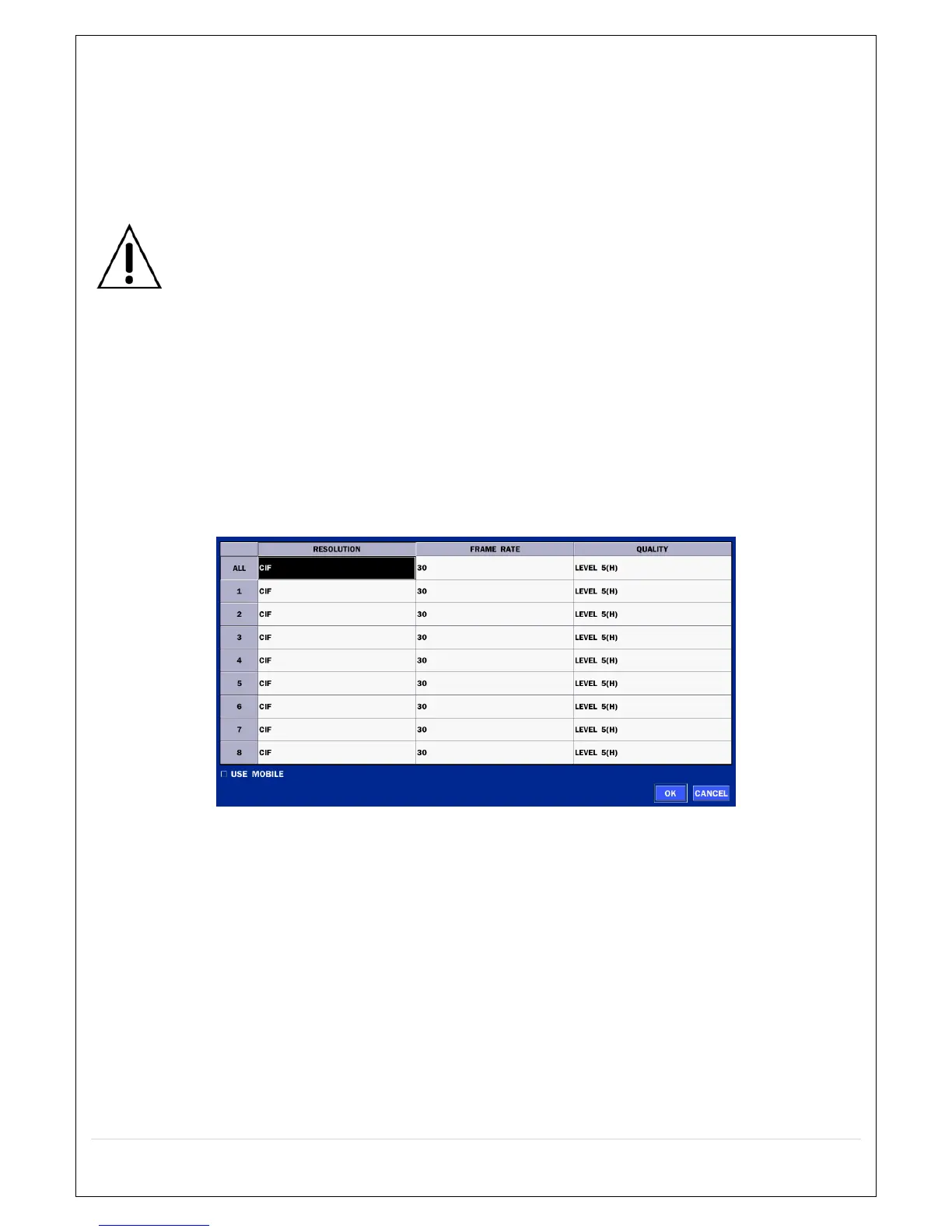
User can set the RESOLUTION, FRAME RATE, and the QUALITY for the network stream.
- D16HS: Up to 480 fps @CIF for 16 channels.
- D8HS: Up to 240 fps @CIF for 8 channels.
<Note> Individual Channels can be set with different RESOLUTION, FRAME RATE, and QUALITY.
Figure 4.6.4. NETWORK Setup Screen – Network Stream
<TIP> USE MOBILE: When this function is enabled, the frame rate is limited to 15fps@CIF and the video
quality is limited to LEVEL 2 for better remote viewing on the mobile phone.



 To Next Page