35
QUALITY Select the recording quality for the selected channel. Options are:
Level 1 (Low), Level 2, Level 3, Level 4, and Level 5 (High)
RECORDING
MODE
Assign the recording mode for the selected channel.
Options are: Continuous, Motion, Sensor, Schedule or Disable.
SENSOR
RECORDING
Select the sensor setting for the selected channel.
PRE RECORD Enable/disable pre-event recording. Pre-event recording is limited to 20 minutes.
POST EVENT
RECORD
Set the post event recording time duration for the specified channel.
(10~60 seconds)
AUDIO Enable/disable audio recording for the specified channel.
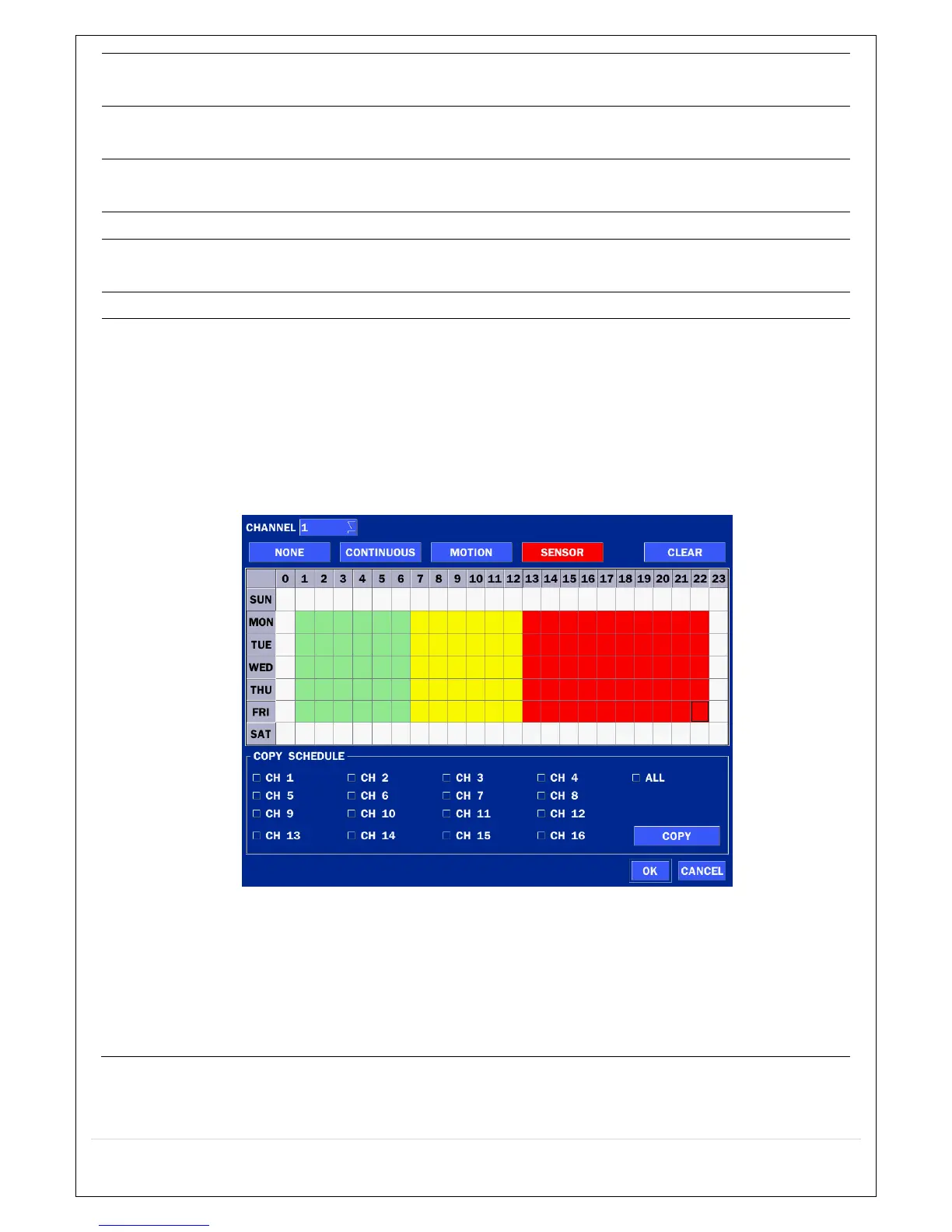
SCHEDULE To setup a recording schedule, select SCHEDULE in the RECORD menu. Navigate
through the menu items or change the settings using the mouse or the remote
control.
Select CHANNEL > select NONE, CONTINUOUS, MOTION or SENSOR > Highlight
area
To copy a schedule to a different channel, select the channel from the COPY
SCHEDULE menu.
Figure 4.3.2. Schedule Recording Setup Screen
NONE: Disable recording during selected timeframe (Highlighted in White)
CONTINUOUS: CONTINUOUS recording (Highlighted in Green)
MOTION: MOTION recording (Highlighted in Yellow)
SENSOR: SENSOR recording (Highlighted in Red)
CLEAR : Clears the schedule



 To Next Page