Left and Right Trim Panel Installation
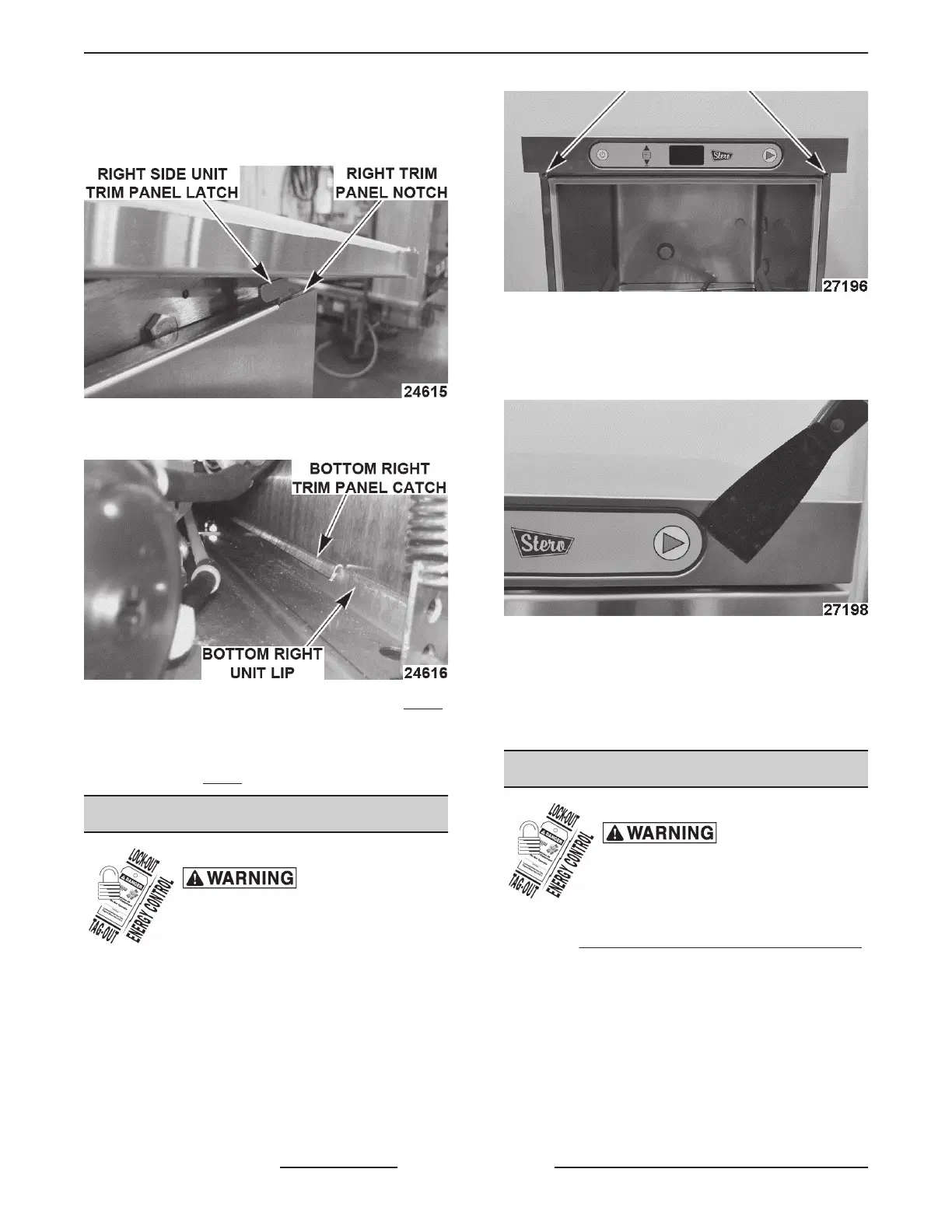
1. Insert right trim panel notch into right side unit
trim panel latch.
2. Verify bottom right trim panel catch is fastened to
the bottom right lip of the unit.
3. Insert and tighten right trim panel screw. (Fig. 5)
4. Repeat steps 1 - 3 for left trim panel installation.
5. Slide control cover back in place and tighten with
(2) screws. (
Fig. 4)
SWITCH MEMBRANE
Disconnect the
electrical power to the machine and
follow lockout / tagout procedures.
1. Open door and remove screws, using #3 Phillips
screwdriver.
Fig. 8
2. Pull out control cover and disconnect switch
membrane ribbon cable from connector.
3. Pry up switch membrane.
Fig. 9
4. Reverse procedure to install.
NOTE: Before installing replacement membrane, use
cleaner to remove old adhesive and allow to dry.
5. Check for proper operation.
CONTROL PANEL COVER
Disconnect the
electrical power to the machine and
follow lockout / tagout procedures.
1. Pull dishwasher out from underneath counter,
when
CONTROL PANEL SERVICE POSITION
is not possible or entire cover needs replaced.
2. Open door and remove two screws, using #3
Phillips screwdriver.
SG, SU-L, SU-H DISHWASHERS - REMOVAL AND REPLACEMENT OF PARTS
F45577 (1215) Page 8 of 59


 To Next Page