22
03.11
Strapex SMA 30
7 OPERATING INSTRUCTIONS
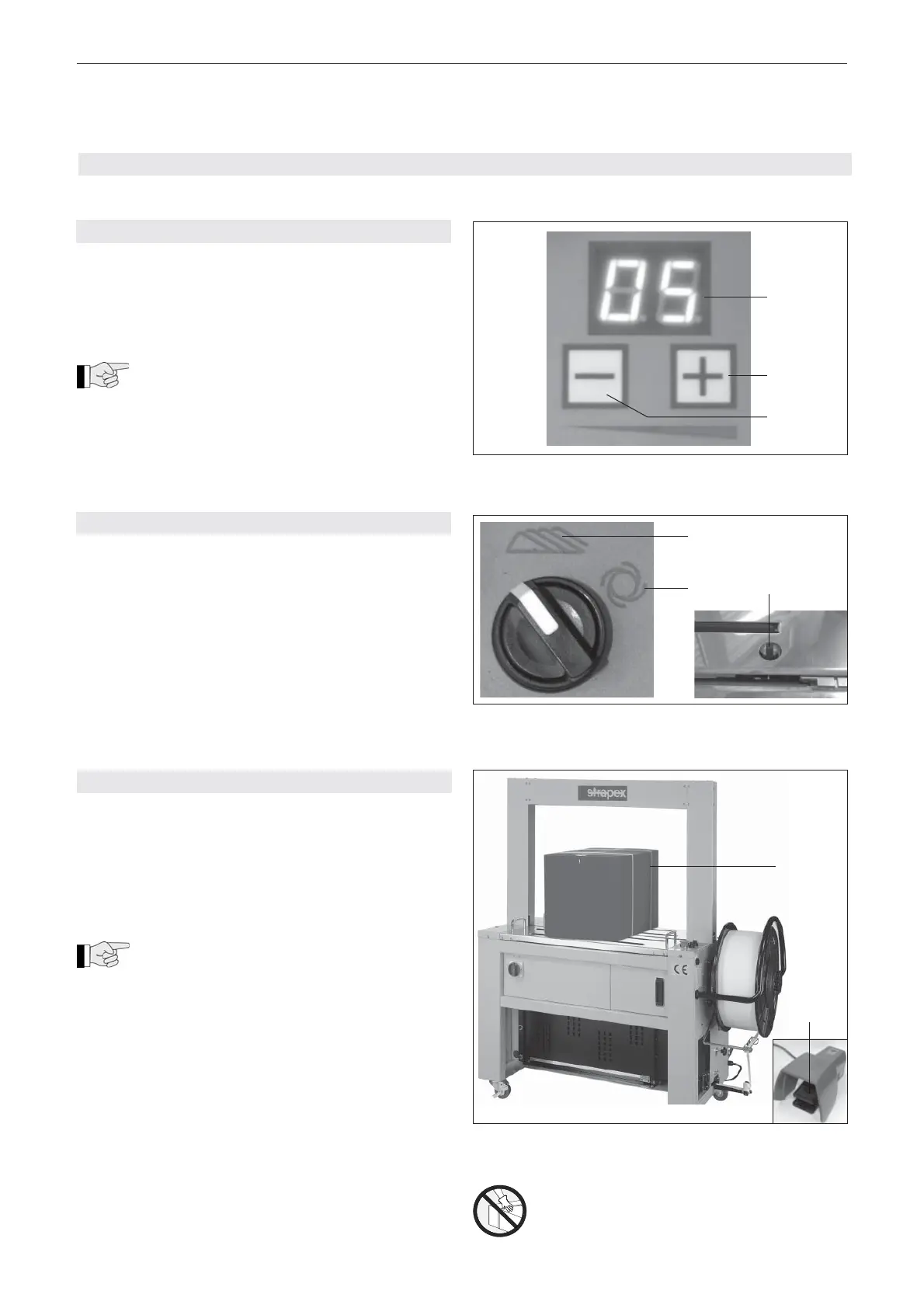
7.3 START STRAPPING
Prerequisites
– Machine is connected to the mains supply. Power
supply according to identifi cation plate.
– Both locking wheels locked.
– Strap coil has been installed and strap feed is
performed (see Chapter 6.2).
– Turn Main switch (3/1) to position “1“.
The warming-up time for the heating element
is about 20 seconds.
– Check strap tension, if necessary adjust it (see
Chapter 7.1)
– Select strapping operation manual or automatic (see
Chapter 7.2).
– Place the goods to be strapped (8/1) in the centre
of the machine on the table plate. Trigger strapping
with the foot pedal (8/2) (depending on mode of
operation). The strap will now be passed around the
package, tensioned, welded and cut off, then new
strap will be fed into the magazine.
– Remove the package.
– Check the seal (see chapter 7.4).
7.1 ADJUSTING STRAP TENSION
– Turn main switch (3/1) to position ”1“.
– Press ”Strap tension weaker“ (6/3) or ”Strap
tension stronger“ (6/2) buttons until required
value is shown on the ”Strap tension“ digital dis-
play (6/1).
The strap tension can be set in a range from
50–450 N.
Digital display Strap tension
0 approx. 50 N
5 approx. 150 N
10 approx. 250 N
20 approx. 450 N
7.2 SELECTOR SWITCH MANUAL / AUTOMATIC
Manual operation (7/1):
Strapping is started using the start button (3/4) or foot
pedal (3/11) in this position.
Automatic operation (7/2):
In this position, strapping is started using the table
switch (7/3). If the table switch is covered by a packa-
ge, another strapping will start automatically.
1
2
3
1
2
Fig. 6
Fig. 7
3
Caution:
Only strap packed goods!
Do not put hands or other parts of the body
between the strap and the package during
the strapping process.
Fig. 8
1
2


 To Next Page