20 BA_KA-ED_A22_190313_en.doc
4.5.1 Main switch S0 (Fig. 9)
The main switch S0 connects to the machine to the network voltage. If the carriage is
not in its basic position, the yellow light L2 in the switch box KA-22 lights up
(continuous light).
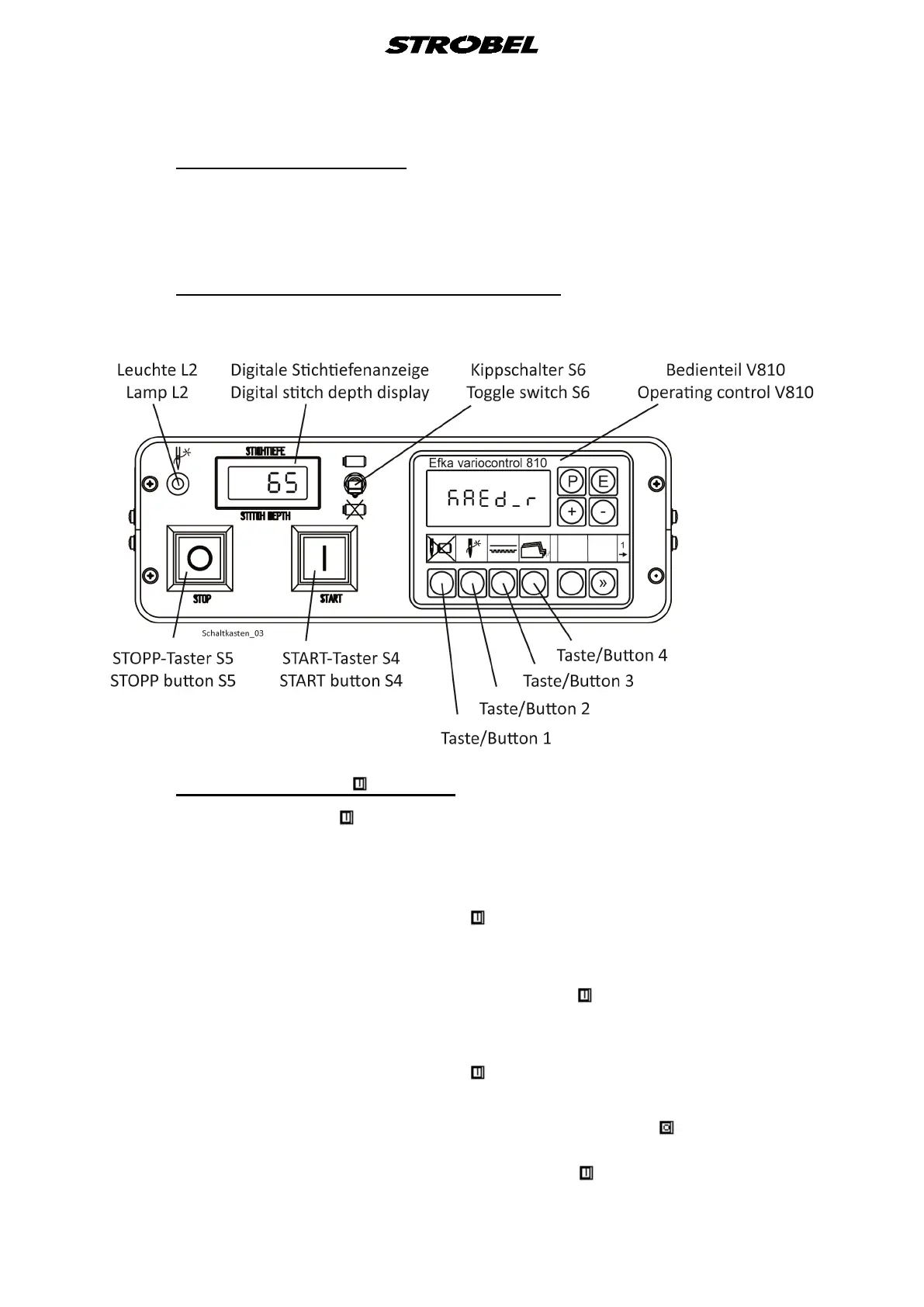
4.6 Operating elements in the switch box
Fig. 10
4.6.1 START button S4 (Fig. 10)
The START button S4 has several functions
1. Retraction of the carriage into basic position.
If the carriage is not in its basic position when the main switch S0 is switched on,
i.e. the yellow light L2 is lit, then the carriage can be driven to its basic position
by pressing the START button S4 .
2. Closing the clamping device
When the carriage is in basic position and a lapel is inserted, the clamping device
can be closed by pressing the START button S4 .
3. Starting the automatic sewing process
when the clamping device is closed, the automatic sewing mode can be started
by pressing the START button S4 .
4. Retraction of the carriage into basic position after stop
It the machine is stopped by pressing the STOP button S5 , the automatic
sewing mode is interrupted. Afterwards the carriage can be retracted to the
basic position by pressing the START button S4 .



 To Next Page