21 BA_KA-ED_A22_190313_en.doc
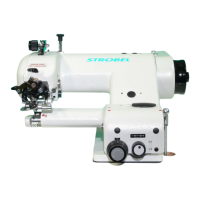
4.6.2 STOP button S5 (Fig. 10)
The STOP button S5 has two functions.
1. Open clamping device
If the clamping device was closed by pressing the START button S4 , it can be
opened again by pressing the STOP button S5 .
2. Switching off the automatic sewing process
By pressing the STOP button S5 the machine stops immediately in the current
position and the automatic sewing mode is interrupted. If the START button
S4 is pressed afterwards, the carriage retracts to its basic position and the
clamping device opens.
Each time the STOP button S5 button is pressed the START button S4 is generally
blocked for the time “t1”.
4.6.3 Toggle switch S6 (Fig. 10)
The coupling K1 can be switched off by toggle switch S6. This allows the carriage to be
moved freely when the main switch S0 is switched on. This is necessary for testing the
light barriers.
Toggle switch S6 is switched to “ ” position (“0” position) in basic position:
- Coupling K1 is switched off.
Toggle switch S6 is switched to “ ” position (“0” position) in automatic sewing
mode:
- The automatic sewing mode is interrupted, the machine stops in the current
position and coupling K1 is switched off.
As long as the toggle switch S6 remains in the “ ” position (“0” position),
“-Stop-” is displayed at the V810 operating control and all other operating elements of
the machine (excepting main switch S0) are blocked.
Once the toggle switch S6 is returned to position “ ” (position “1”), operating the
machine can be continued as usual.
4.6.4 Light L2 (yellow) (Fig. 10)
Various warning situations are indicated by light L2:
1. Continuous light - Carriage is not in basic position
2. Blinking - Thread has broken



 To Next Page