51 BA_KA-ED_A22_190313_en.doc
6 LASER (optional features) (Fig. 34)
6.1 General
The two lasers are active as helping lines for inserting the sewing material. Both lasers
are inactive during sewing. The laser "stitch start" indicates the start of the sewing
segment. The laser "first stitch" runs parallel/along the first sewing segment.
6.1.1 Setting of the lasers: "Stitch start" (1)
- Loosen screw (3) and move the laser in the groove of the aluminium profile (4)
to the desired position to the right or left. Tighten screw (3).
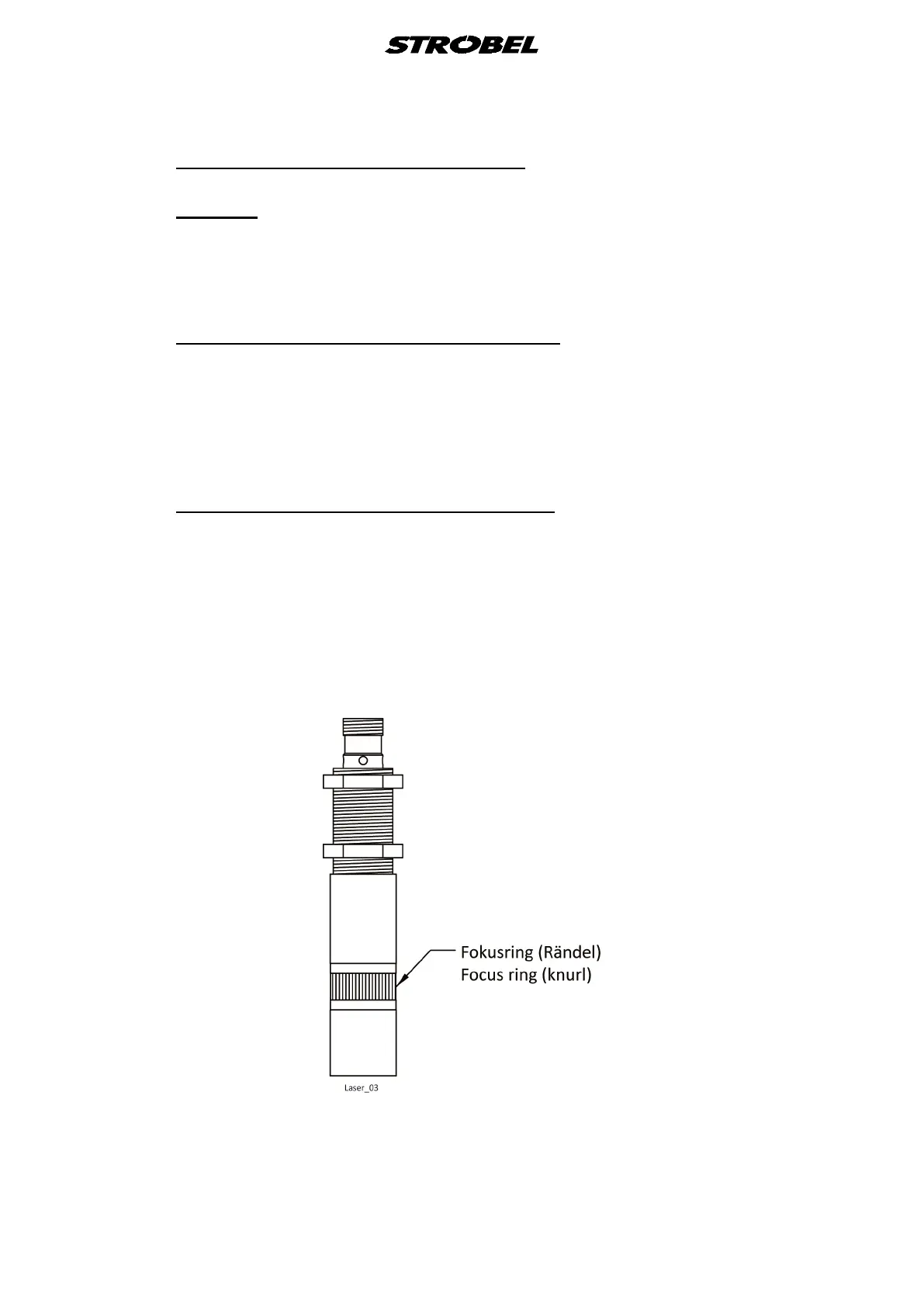
- Laser focusing: Adjust the silver focus ring (edge) of the desired focus. (Fig. 33)
- After setting the laser, check again that the laser beam is correct.
6.1.2 Setting of the lasers: "First stitch" (2)
- To move on the shaft, loosen 2x screw (5) and move to the desired position,
then tighten the screws (5) again. When tightening screws (5), pay attention that
the laser mounting (6) is level.
- Laser focusing: Adjust the silver focus ring (edge) of the desired focus. (Fig. 33)
- After setting the laser, check again that the laser beam is correct.
Fig. 33



 To Next Page