pg 7
DIG - dual digital delay
Live Edit Functions
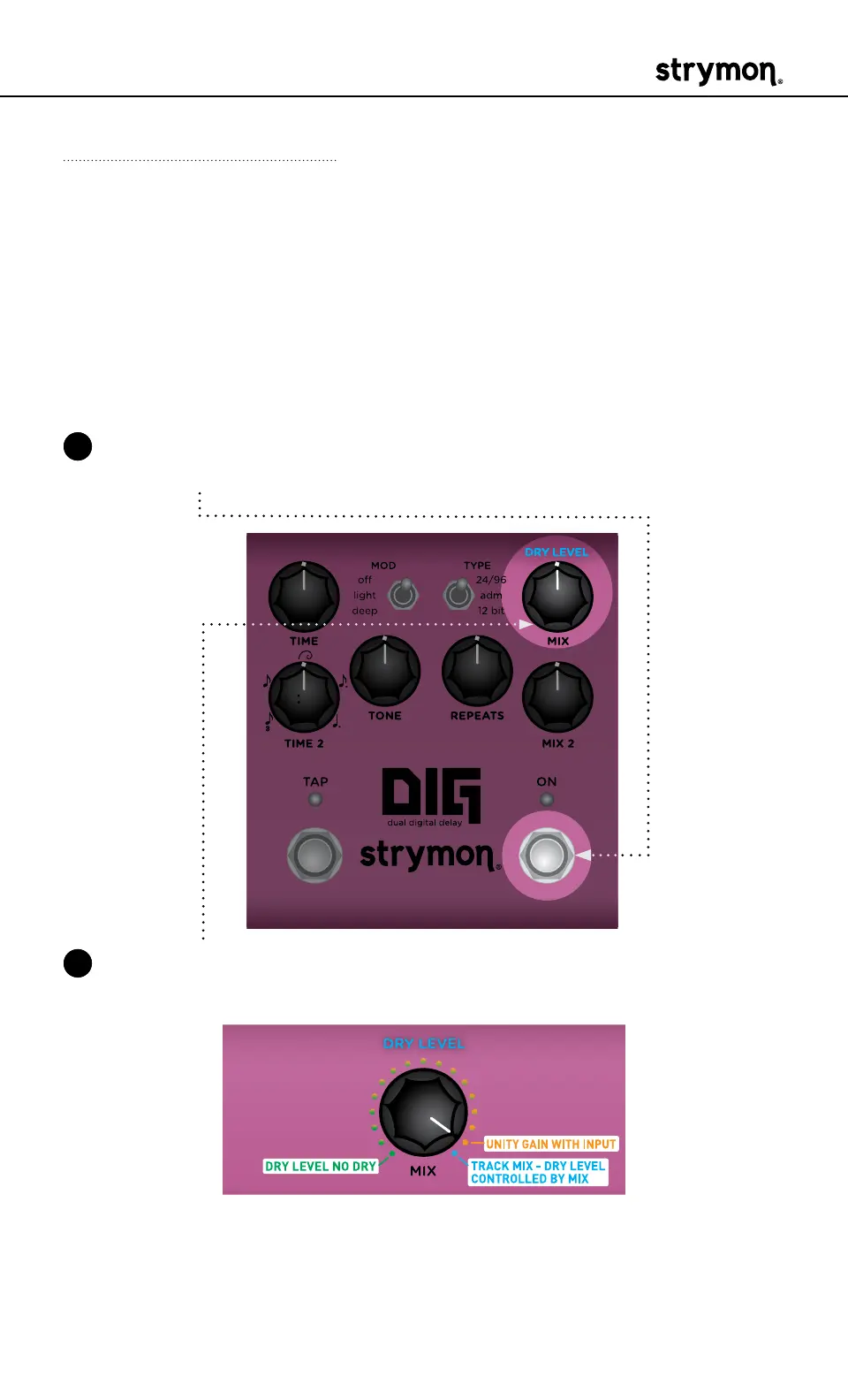
Use the following steps to enter Live Edit mode and access the second-
ary functions of the controls� Any of the following secondary functions
can be edited while in Live Edit mode�
Dry Level
By default, the Dry Level is set to “Track Mix,” where the Dry Level is
controlled via the MIX and MIX 2 knobs� Optionally, you can adjust the dry
signal level manually�
1 Press and hold the ON footswitch to enter Live Edit mode� Once both
LEDs flash, release the footswitch�
2 Turn the MIX (DRY LEVEL) knob to set the level of the dry signal� Both
the TAP and ON LEDs light to indicate your selection:
• Manually adjust the Dry Level smoothly from no dry signal at
minimum (GREEN, useful when DIG is connected in a parallel
effects loop) to maximum dry signal, where the dry matches the
dry input signal level (AMBER)�



 To Next Page