14
MIC EQ SUB-PAGE (Touch Tab to Open)
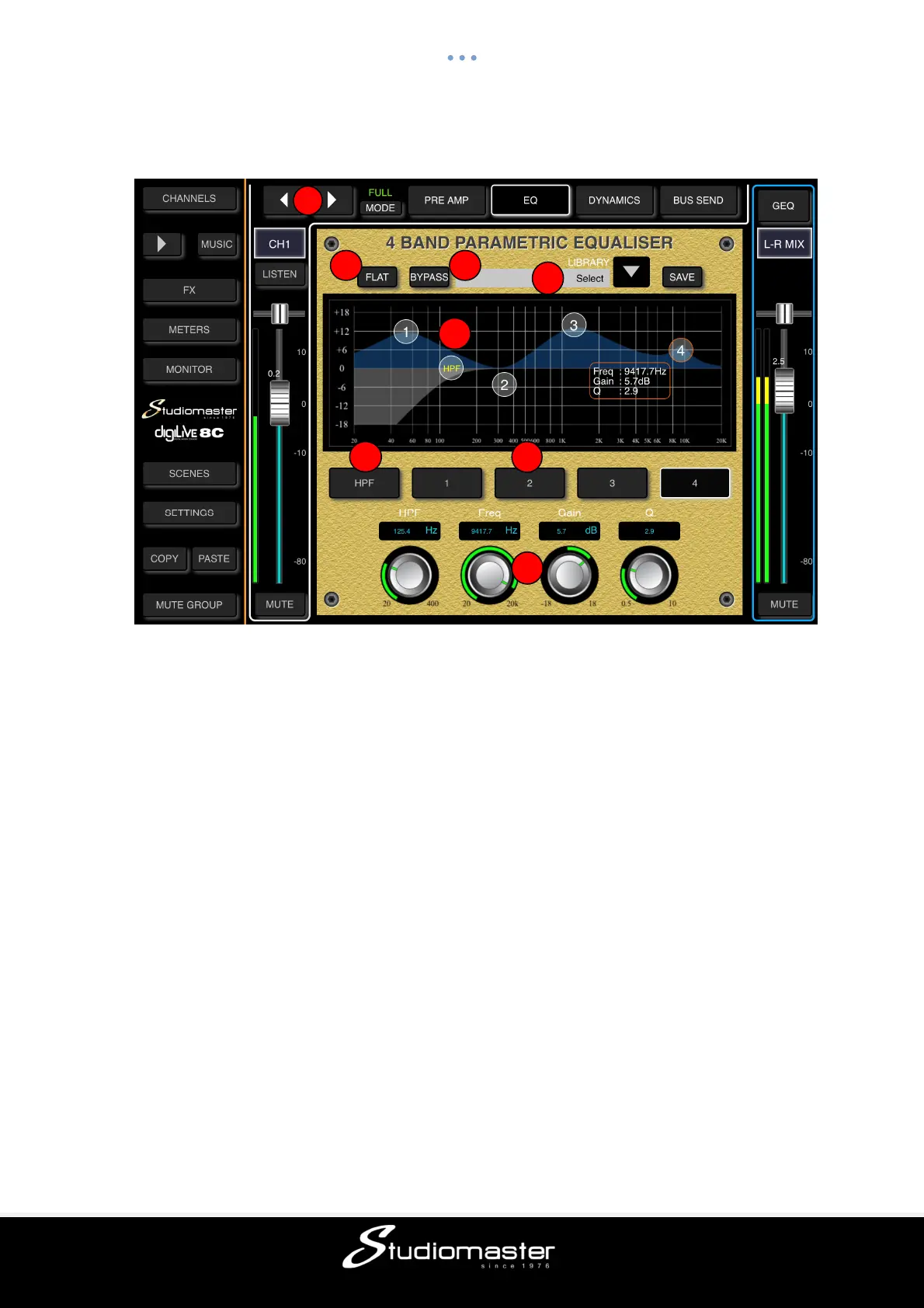
The EQ module is a 4-band fully-parametric EQ that can be set up on screen via touch.
① Change Input
Press the arrow-buttons to select the previous or next input.
② Flat
Single-touch to set all EQ bands flat. This cannot be undone. The HPF ⑤ is not affected.
③ Bypass
Single-touch to bypass the EQ (button illuminates). Press again to activate EQ (button goes
dark). Default is no bypass.
④ 4-band EQ Graph
The four numbered points on the EQ-curve indicate the position of the four EQ-bands. Each
band can be selected by touching the corresponding point or by using the select buttons ⑥.
⑤ HPF (High-Pass Filter)
Single-touch to enable the HPF. Press again to disable the HPF. Default is disabled.
You can adjust the HPF corner frequency on-screen from 20Hz to 400Hz either by dragging
the HPF point or by dragging the HPF soft encoder. Depth is fixed at -18dB.
⑥ 4-band EQ Frequency Select Buttons
Single-tap the “High”, High-Mid”, “Low-Mid” or “Low” button to select the corresponding band.
On the graph, the selected band’s number and its parameter settings will be outlined in red.
⑦ Parameter Adjustment
You can adjust the Frequency, Gain and Q of a selected EQ band either by dragging the
selected point on-screen, or by dragging its corresponding soft encoder to point towards the
desired value.
Frequency: each band can be set to a value between 20Hz and 20kHz. Default values are:
HF 4kHz, HMF 1kHz, LMF 200 Hz, LF 60Hz. The terms HF, HMF, LMF and LF only refer to
the initial setting of the bands; there is no restriction in setting the EQ bands so after setup
LF may actually be at the top of the frequency range.
1
2 3
4
5
6
7
8



 To Next Page