18
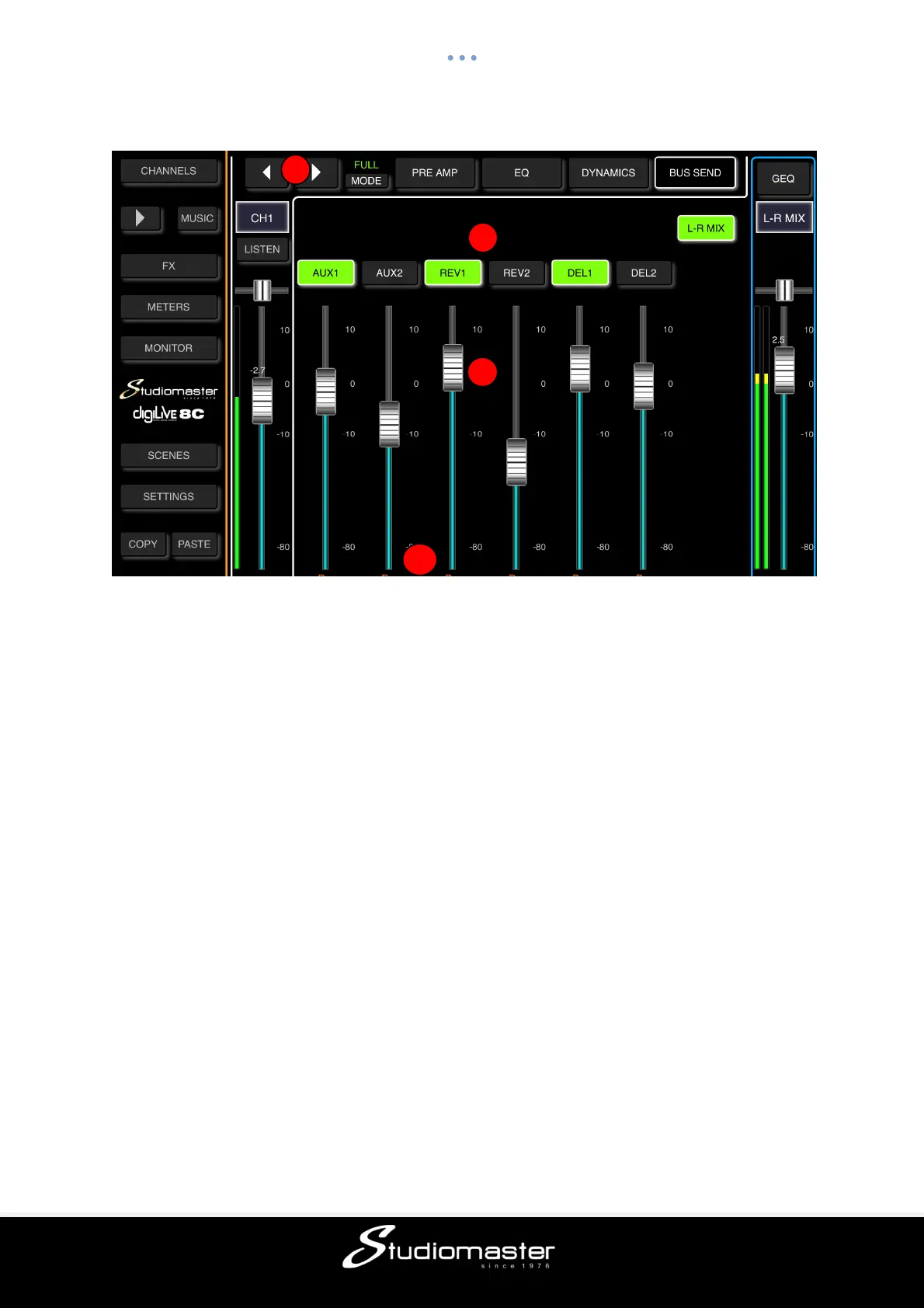
MIC BUS SEND SUB-PAGE (Touch Tab to Open)
Each input channel can send signals to 2 Mono busses (AUX 1 & AUX 2), 4 FX busses
(REVerb 1&2, DELay 1&2) and Main Mix L-R.
① Change Input
Press the arrow-buttons to select the previous or next input.
② Bus Send
Touch a “Bus Send” button to route the active channel to it (button illuminates), press again
to cancel the routing (button goes dark).
③ Pre-Fade/Post-Fade Switch
Touching the button switches the channel send to that bus from Pre-Fade and Post-Fade.
The button ID label changes when touched – from Pre to Post or from Post to Pre.
Sending a channel to a bus Pre-Fade bypasses the channel output fader, which means that
the level being sent to the bus does not change when the position of the channel fader is
adjusted. This is the normal setting for stage monitors. Default is Pre-Fade.
Sending Post-Fade means that the level being sent to the bus changes when the position of
channel fader is changed. Post-Fade sends are normally used as Effects Sends.
④ Send Level Faders
Controls the overall level of the signal being sent to the selected bus. This can be changed
by touching and dragging the on-screen fader up and down.
1
2
3
4



 To Next Page