35
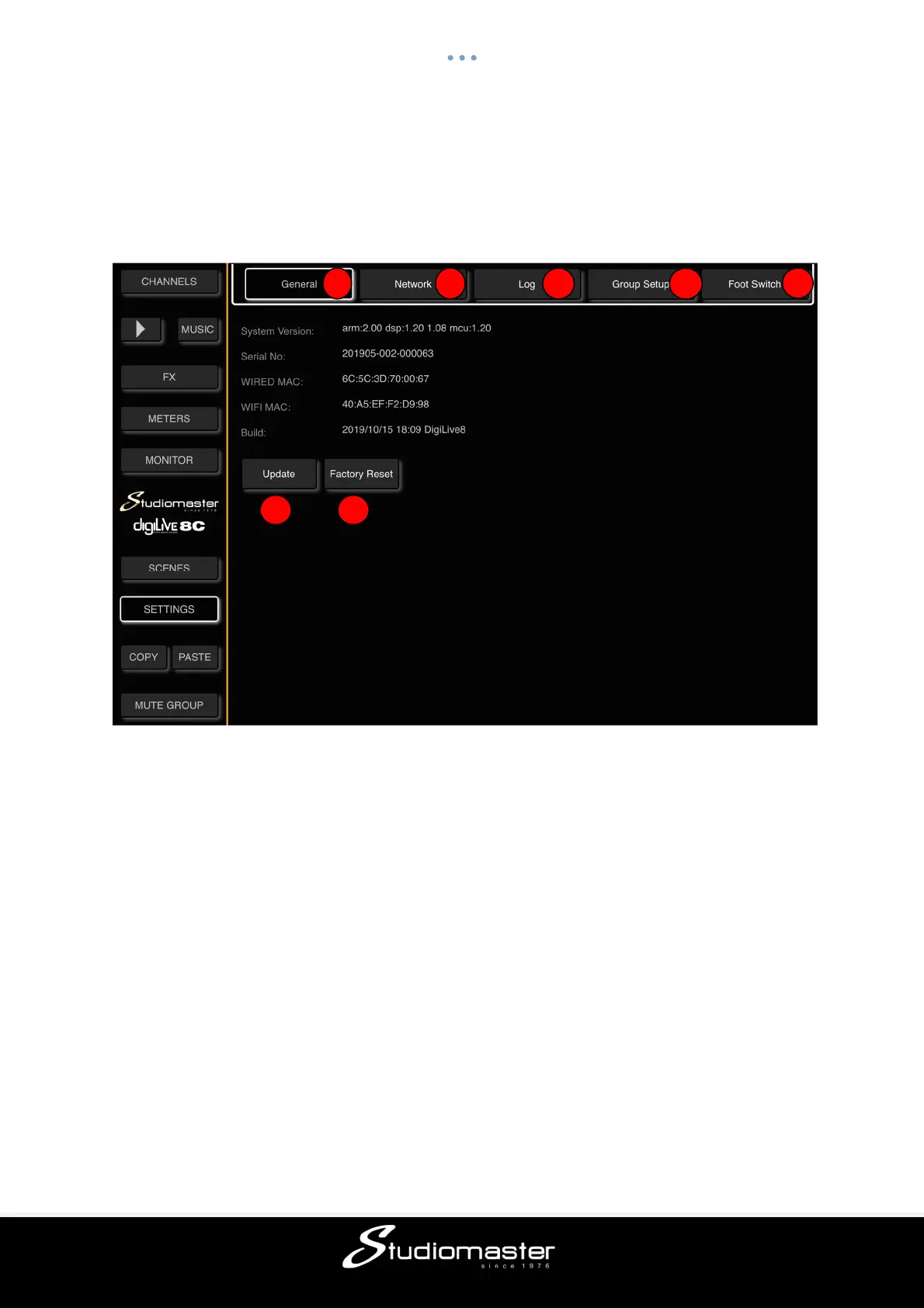
SETTINGS PAGE
This page allows you to access System Information, Wi-Fi/LAN Network configuration, the
Error Message Log, and Mute Group and Foot Switch configuration. To open this page, touch
the SETTINGS tab in the left-hand menu.
① General Sub-Page
This page displays System Version, Serial Number, LAN and Wi-Fi MAC addresses and
the time and date of the firmware build.
② Network Sub-Page
This page is where you configure the digiLiVE Wi-Fi Hotspot and LAN settings.
③ Log Sub-Page
This page contains the digiLiVE system log of error messages etc.
④ Mute Group Setup Sub-Page
This page allows you to assign inputs, FX and AUX and L-R outputs to the digiLiVE’s single
Mute Group
⑤ Update
This button starts an update the digiLiVE firmware from a USB drive with an update file in its
root directory. After update has completed the digiLiVe will restart automatically.
⑥ Factory Reset
This button will reset the digiLiVE console to its factory default settings. If you cannot access
this sub-page, you can reset the digiLiVE by using a paperclip or similar tool to press the
Reset switch located behind a small hole on the unit’s rear panel.
1 2
3 4
5
6 7



 To Next Page