26
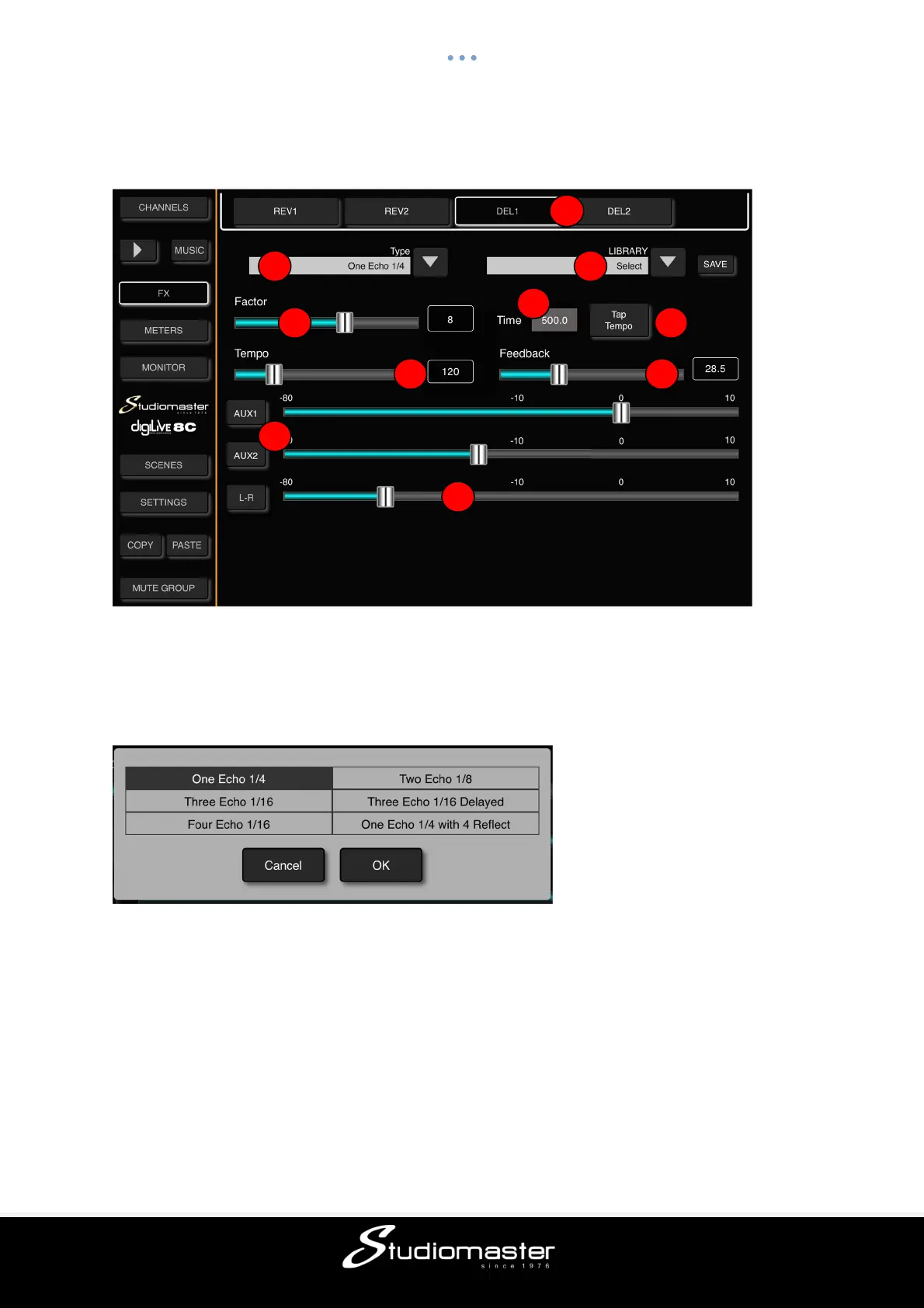
DELAY SUB-PAGE
Touch the “DEL1 or DEL2” button in the FX Sub-page to access the Delay Sub-Page.
① FX Tabs
Touching a tab opens the sub-page for the selected delay.
② Delay Type
Touching the down-arrow opens a sub-menu showing the available reverbs types.
Touch a Delay Type to select it and touch “OK” to load it.
③ Factor
Factor value ranges from 0 to 13, with a default @ 1. Adjust the Factor by dragging the slider.
This fader allows you to trim the available reverb time of the selected reverb type. The
numerical display next to the fader shows the current trim (0%-100%) of the full reverb time.
④ Tempo
The Delay Tempo has a range of 40 BPM to 240 BPM. The default tempo is 80 BPM. The
tempo can be adjusted either by dragging the slider or by repeatedly tapping the Tap Tempo
button. The minimum number of taps required to set a tempo is three.
⑤ Delay Time
Delay time ranges from 0 to 2000ms, with a default of 750ms. Adjust the time parameter by
dragging the slider.
1
2
3
4
5
6
4
9
7
8



 To Next Page