23
MUSIC PLAYER
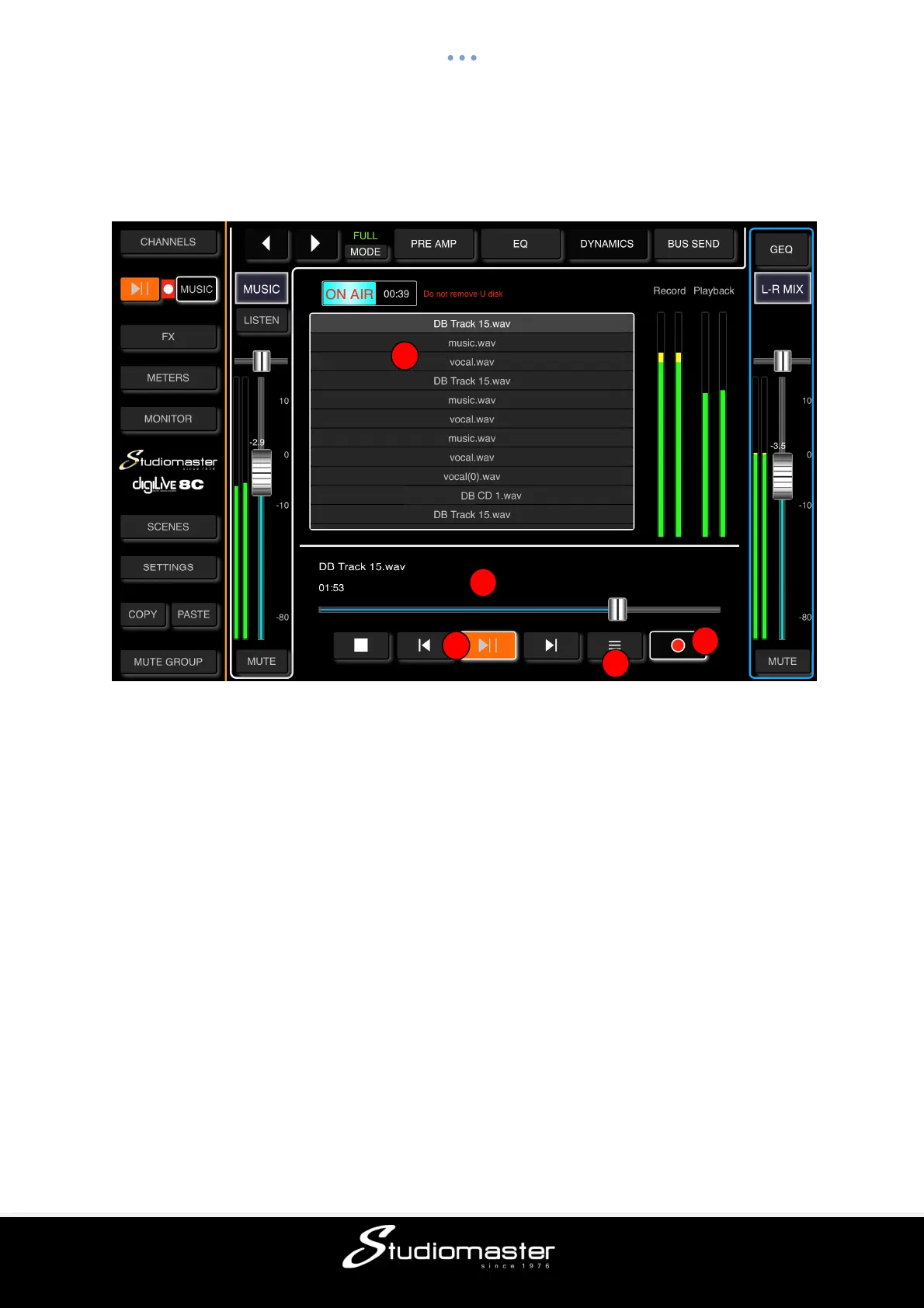
Touching the Music tab opens the Music Player and calls up the Music (USB 2.0) input.
① Track Listing
Shows the names and file types of all mp3 and WAV files in the root directory of a USB drive
inserted into the Music USB 2.0 channel connector.
You can swipe or scroll through this list to check its contents or to select an individual track.
② Elapsed Time Cursor
Shows the current time position in the loaded audio file. Can be used to move forwards or
backwards in time through a loaded file.
③ Transport Controls
Buttons for Stop, Return to Start, Play and Go to End. Double-tapping Play causes playback
to skip to the next track.
④ Play Order
As default, audio files play sequentially through the order shown in the on-screen list. This
control allows you to repeat the entire list, select shuffle play or to repeat the currently-
playing file.
⑤ Record Control
Touching this button starts the recording of the Main Mix outputs (button changes to a round
shape and “On Air” sign appears). Touching it again stops the recording (button changes
back to a square shape and “On Air” sign disappears).



 To Next Page