Audio and Visual 209
Audio Operations
Using the Radio
Using the Radio
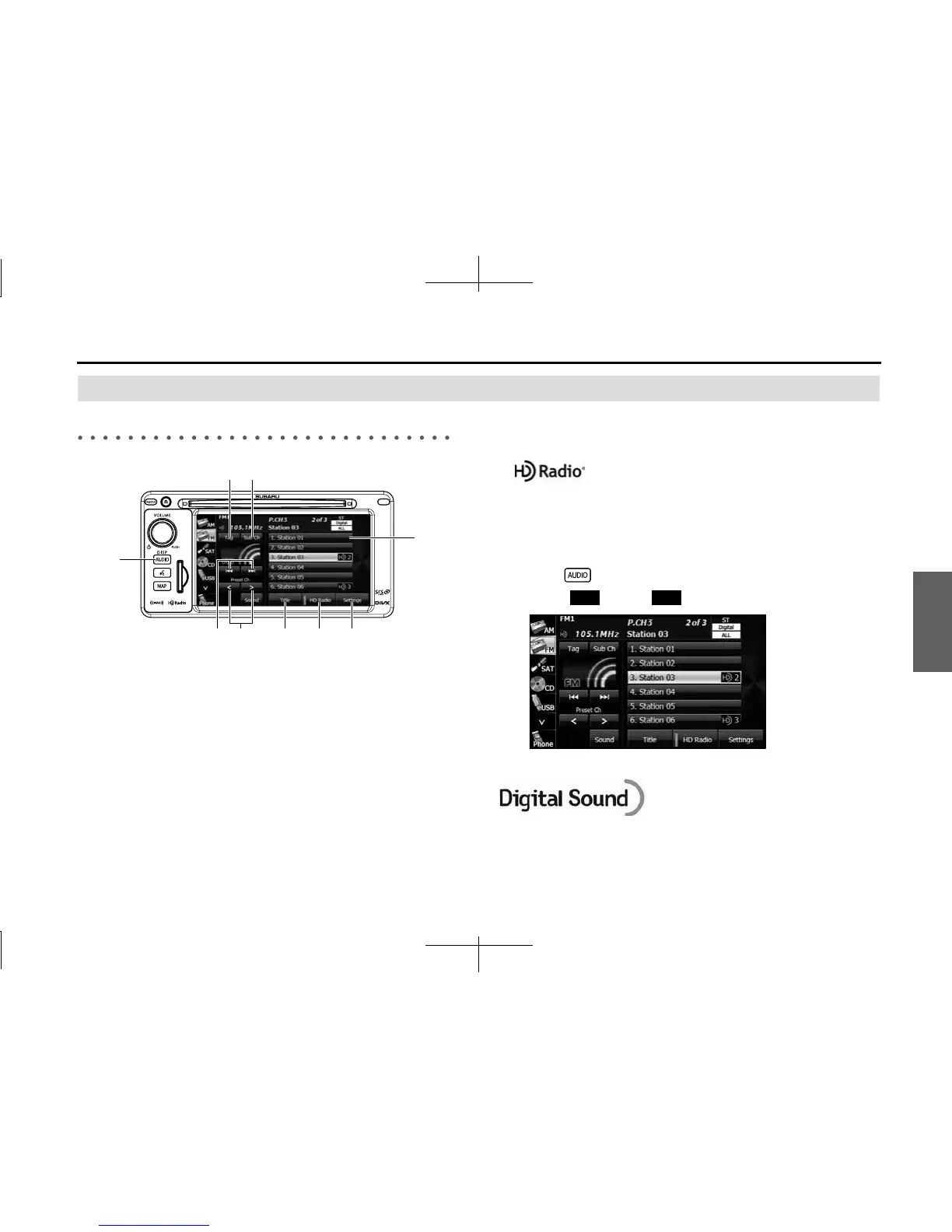
(1) Preset button
(2) Settings button
(3) HD Radio button
(4) Title button
(5) Preset CH up/down buttons
(6) Tune up/down buttons
(7) AUDIO button
(8) Tag button
(9) Sub Ch button
*
* Displayed only in FM radio mode.
NOTE
• When a digital HD Radio™ broadcast is received, “Digital” is displayed.
• About HD Radio™ Technology
HD Radio Technology manufactured under license from iBiquity Digital
Corporation. U.S. and Foreign Patents. HD Radio™ and the HD, HD Radio, and
“Arc” logos are proprietary trademarks of iBiquity Digital Corp.
■ Listening to the radio
1 Press .
2 Touch (AM) or (FM).
NOTE
Digital, CD-quality sound. HD Radio Technology enables local radio stations to
broadcast a clean digital signal. AM sounds like today’s FM and FM sounds like a
CD.
(1)
(2)(4) (3)(6) (5)
(7)
(9)(8)
AM FM














 To Next Page